Account Contact
Your Cart
Pay the courier with no extra fees.
Need help? DistriNode AI can handle any task on our site.

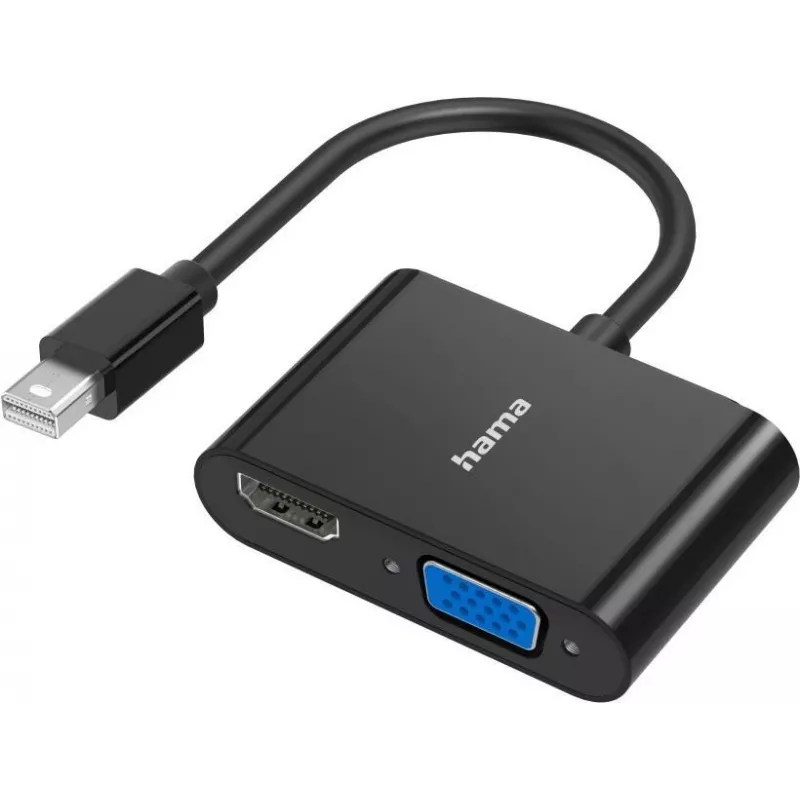
Video adapter HAMA Classic Line Mini DisplayPort to VGA/HDMI 2in1, Ultra HD 4K support

Video adapter HAMA Classic Line Mini DisplayPort to VGA/HDMI 2in1, Ultra HD 4K support
R1,158
The HAMA Classic Line Mini DisplayPort to VGA/HDMI 2in1 video adapter provides a compact solution for connecting devices with a Mini DisplayPort output to VGA-equipped monitors or HDMI displays. The adapter supports Ultra HD 4K resolution where both source and display allow, and its two-in-one conne... Read More
Stock 400 Code 2240868 Brand HAMA Model 00300086 Warranty 2 Years

Shipping & Returns

Estimated delivery Wednesday, October 7
You will be kept updated through our detailed tracking system
Payment options
EFTPayFastBank CardSnapScanZapperGoogle PayApple PayMobicredMoreTymePay on Arrival

The HAMA Classic Line Mini DisplayPort to VGA/HDMI 2in1 video adapter provides a compact solution for connecting devices with a Mini DisplayPort output to VGA-equipped monitors or HDMI displays. The adapter supports Ultra HD 4K resolution where both source and display allow, and its two-in-one connector design enables quick switching between analog VGA and digital HDMI outputs without additional cables. The adapter is intended for simple plug-and-play use with laptops, ultrabooks and other Mini DisplayPort-equipped devices.

Advantages

This adapter combines VGA and HDMI output options in a single compact adapter, reducing the need to carry multiple adapters. It supports high-resolution video up to Ultra HD 4K on compatible displays and preserves signal quality for digital HDMI connections while offering VGA compatibility for legacy monitors or projectors. The design is lightweight and portable, and installation requires no drivers on most modern operating systems.

Suitable for

Key specifications

How to use

Plug the adapter into the Mini DisplayPort output of your laptop or device. Connect either an HDMI cable to the adapter’s HDMI output or a VGA cable to the VGA socket, depending on the target display. Select the appropriate input on the external monitor or TV. Configure display settings (mirroring or extended desktop and resolution) in the operating system display control panel if necessary. When using 4K resolution, ensure both the source device and the connected HDMI display support the desired resolution and refresh rate.

Recommendations

For best results with digital HDMI connections, use high-quality HDMI cables and verify the display’s supported resolutions. When connecting to VGA displays, adjust the display resolution and scaling in the system settings to obtain the clearest image. Keep the adapter and cables free from sharp bends to prolong service life.

Key Highlights
  • Connecting a laptop with Mini DisplayPort to an HDMI TV or monitor
  • Connecting to VGA projectors and older monitors in meeting rooms or classrooms
  • Travel use where different types of display inputs may be encountered
  • Presentations, video playback and everyday screen extension or mirroring
  • Connector type: Mini DisplayPort (source) to selectable VGA or HDMI (display)
  • Maximum supported resolution: Ultra HD 4K (when source and display support 4K over HDMI)
  • VGA support: analog RGB signal compatible with standard VGA monitors and projectors
  • HDMI support: digital video compatible with HDMI displays and TVs
  • Plug-and-play: no driver installation required for most operating systems
  • Form factor: compact, single-piece 2in1 adapter for portability
Price history over the last 6 months
Video adapter HAMA Classic Line Mini DisplayPort to VGA/HDMI 2in1, Ultra HD 4K support
Current
R1,158
Lowest
R1,142
Highest
R1,158
Change 24H
+R13   +1%
Week
—   
Month
—   

Popular products in this category

WhatsApp
Hi, I’m DistriNode’s AI assistant. I can help you find products, compare options, create quote PDFs, or open support requests.