Account Contact
Your Cart
Pay the courier with no extra fees.
Need help? DistriNode AI can handle any task on our site.

USB cable ShiverPeaks BS14-50017

USB cable ShiverPeaks BS14-50017
R274
The ShiverPeaks BS14-50017 USB cable is a compact 0.3 m connection cable with a standard USB A plug on one end and a Micro-USB B plug on the other. Designed for USB 2.0, it supports data transfer rates up to 0.48 Gbit/s and provides a reliable wired connection between computers, chargers and compati... Read More
Stock 95 Code 2256104 Brand SHIVERPEAKS Model BS14-50017 Warranty 2 Years

Shipping & Returns

Estimated delivery Tuesday, October 6
You will be kept updated through our detailed tracking system
Payment options
EFTPayFastBank CardSnapScanZapperGoogle PayApple PayMobicredMoreTymePay on Arrival

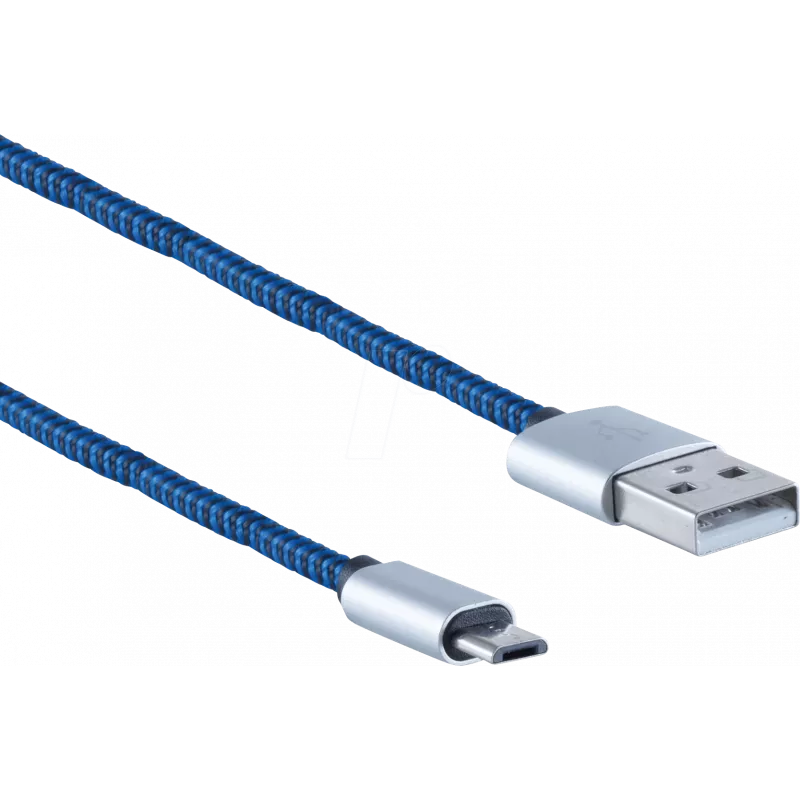
The ShiverPeaks BS14-50017 USB cable is a compact 0.3 m connection cable with a standard USB A plug on one end and a Micro-USB B plug on the other. Designed for USB 2.0, it supports data transfer rates up to 0.48 Gbit/s and provides a reliable wired connection between computers, chargers and compatible mobile devices. The cable is finished in blue and intended for short-distance data synchronization and power delivery where a short, tidy lead is required.

Advantages

This USB cable offers a short, space-saving length suitable for desk setups, vehicle use or portable chargers where minimal cable slack is desired. As a USB 2.0 cable it delivers backward-compatible connectivity for a wide range of peripherals and mobile devices that use Micro-USB B. The fixed connector types ensure straightforward plug-and-play use without additional adapters. The blue jacket makes the cable easy to identify among other leads.

Suitable for

  • Data synchronization between a PC or laptop and devices with Micro-USB B ports
  • Charging mobile devices from USB ports or wall chargers
  • Use with external accessories such as power banks, small peripherals and older smartphones
  • Short-distance connections on desks, in cars or in travel kits

Key specifications

  • Connectors: USB A to Micro-USB B
  • USB version: USB 2.0
  • Maximum data transfer rate: 0.48 Gbit/s
  • Cable length: 0.3 m
  • Colour: blue

How to use

Insert the USB A connector into a computer, charger or USB hub and plug the Micro-USB B connector into the target device. For data transfer, ensure the device is powered on and unlocked if required; then select the appropriate transfer mode on the device (file transfer/MTP or charging only) as applicable. For charging, confirm that the host port or charger provides the necessary current. Avoid excessive bending near the connectors to maintain connector integrity.

Recommendations

Use this short USB 2.0 cable where a compact, tidy connection is needed: on desks, in vehicles or in travel kits. For large file transfers or faster charging speeds, consider cables supporting higher USB standards. Keep the cable away from sharp edges and unplug by gripping the connector housing rather than pulling the cable.

Key Highlights
  • Data synchronization between a PC or laptop and devices with Micro-USB B ports
  • Charging mobile devices from USB ports or wall chargers
  • Use with external accessories such as power banks, small peripherals and older smartphones
  • Short-distance connections on desks, in cars or in travel kits
  • Connectors: USB A to Micro-USB B
  • USB version: USB 2.0
  • Maximum data transfer rate: 0.48 Gbit/s
  • Cable length: 0.3 m
  • Colour: blue
Specifications
Cable length
0.3 m
Connector 1
USB A
Connector 1 form factor
Straight
Connector 1 gender
Male
Connector 2
Micro-USB B
Connector 2 form factor
Straight
Connector 2 gender
Male
Maximum data transfer rate
0.48 Gbit/s
Product colour
Blue
Quantity per pack
1 pc(s)
USB version
USB 2.0
Price history over the last 6 months
USB cable ShiverPeaks BS14-50017
Current
R274
Lowest
R263
Highest
R274
Change 24H
+R9   +4%
Week
—   
Month
—   

Popular products in this category

WhatsApp
Hi, I’m DistriNode’s AI assistant. I can help you find products, compare options, create quote PDFs, or open support requests.