Account Contact
Your Cart
Pay the courier with no extra fees.
Need help? DistriNode AI can handle any task on our site.

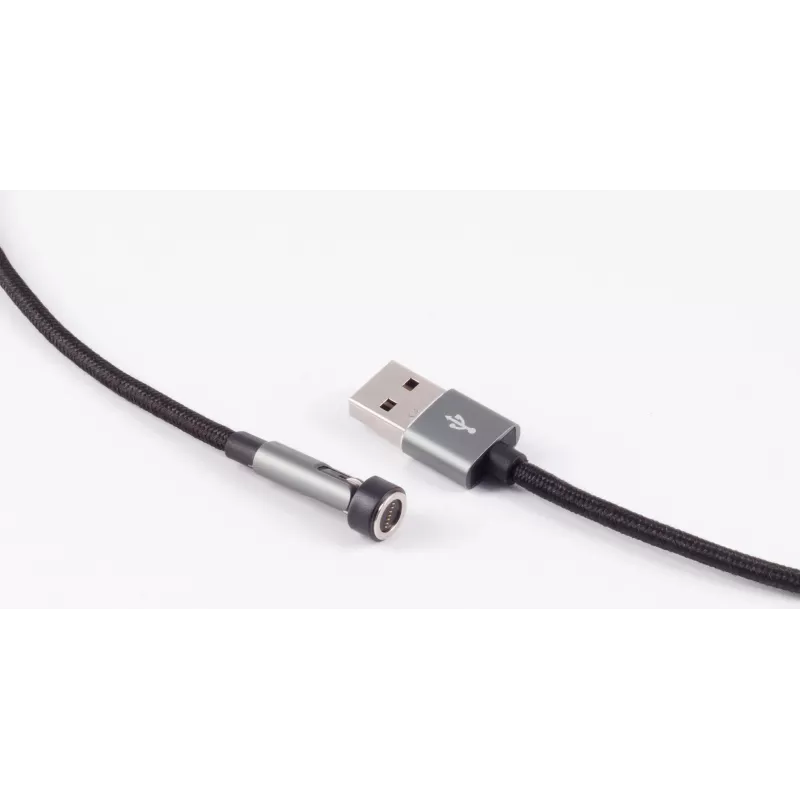
USB cable ShiverPeaks BS14-19011 2 m USB A Black

USB cable ShiverPeaks BS14-19011 2 m USB A Black
R507
The ShiverPeaks BS14-19011 2 m USB A cable in black is a standard USB-A to USB-A/USB-compatible lead designed for reliable data transfer and device charging. With a two-metre length it offers extended reach for desktop setups, charging from wall adapters or connecting peripherals across a room. The ... Read More
Stock 57 Code 2253466 Brand SHIVERPEAKS Model BS14-19011 Warranty 2 Years

Shipping & Returns

Estimated delivery Tuesday, October 6
You will be kept updated through our detailed tracking system
Payment options
EFTPayFastBank CardSnapScanZapperGoogle PayApple PayMobicredMoreTymePay on Arrival

The ShiverPeaks BS14-19011 2 m USB A cable in black is a standard USB-A to USB-A/USB-compatible lead designed for reliable data transfer and device charging. With a two-metre length it offers extended reach for desktop setups, charging from wall adapters or connecting peripherals across a room. The cable's construction addresses everyday use where flexibility and a stable connection are required.

Advantages

This 2 m USB A cable provides extended reach compared with short cords, reducing the need to place devices immediately next to power sources or hosts. The black finish is neutral and resists visible dirt, making it suitable for both home and office environments. The cable is built to support consistent data transmission and power delivery for compatible devices while remaining simple to use and plug in.

Suitable for

  • Connecting computers and USB-compatible peripherals such as printers, external drives, and hubs
  • Charging phones, tablets or other gadgets from USB-A power adapters or power banks (when compatible)
  • Use in offices, home workplaces, classrooms and meeting rooms where a longer cable run is needed

Key specifications

  • Cable length: 2 metres
  • Connector type: USB A (standard USB-A on one or both ends depending on device compatibility)
  • Colour: Black
  • Primary functions: Data transfer and device charging

How to use

Plug the USB A connector into the host device or power adapter and connect the other end to the peripheral or device you wish to charge or sync. Ensure connectors are fully inserted to secure the connection. Avoid bending the cable sharply near the connectors and route the cable to prevent tension or pinching. If data transfer is required, confirm the connected devices recognise each other and that any necessary drivers or permissions are enabled on the host system.

Recommendations

For reliable performance, keep the cable away from excessive heat sources and liquids. Do not expose the cable to repeated heavy mechanical stress; unplug by gripping the connector rather than pulling the cord. For charging, use an appropriate power adapter with the correct output rating for your device.

Key Highlights
  • Connecting computers and USB-compatible peripherals such as printers, external drives, and hubs
  • Charging phones, tablets or other gadgets from USB-A power adapters or power banks (when compatible)
  • Use in offices, home workplaces, classrooms and meeting rooms where a longer cable run is needed
  • Cable length: 2 metres
  • Connector type: USB A (standard USB-A on one or both ends depending on device compatibility)
  • Colour: Black
  • Primary functions: Data transfer and device charging
Specifications
Cable length
2 m
Cable type
Round cable
Connector 1
USB A
Connector 1 form factor
Straight
Connector 2 form factor
Angled
Magnetic connector
Yes
Plug and Play
Yes
Product colour
Black
Quantity per pack
1 pc(s)
Price history over the last 6 months
USB cable ShiverPeaks BS14-19011 2 m USB A Black
Current
R507
Lowest
R496
Highest
R507
Change 24H
+R10   +2%
Week
—   
Month
—   

Popular products in this category

WhatsApp
Hi, I’m DistriNode’s AI assistant. I can help you find products, compare options, create quote PDFs, or open support requests.