Account Contact
Your Cart
Pay the courier with no extra fees.
Need help? DistriNode AI can handle any task on our site.

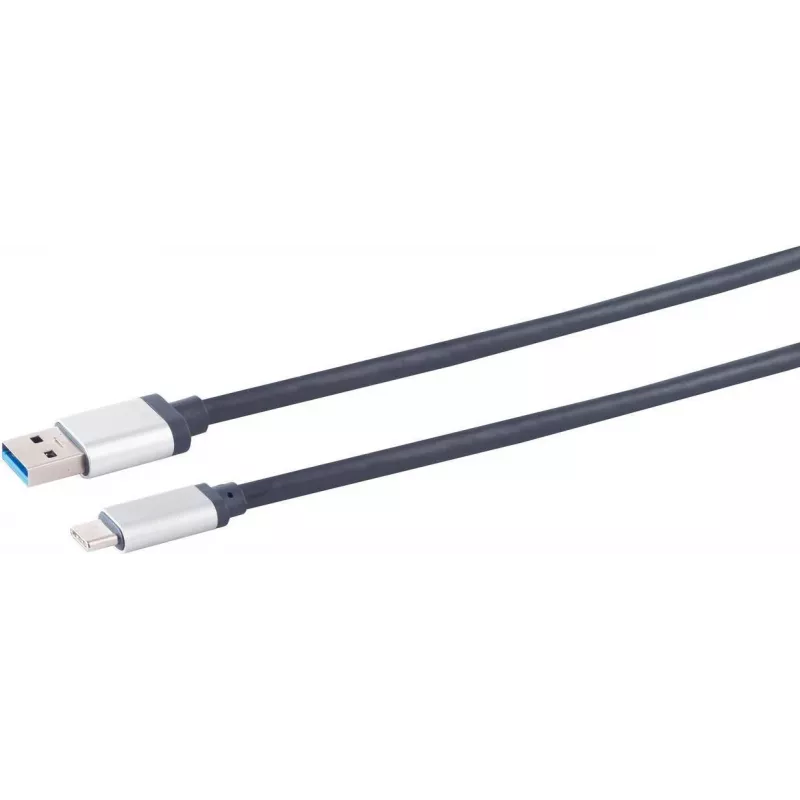
USB 3.0 cable ShiverPeaks S/CONN 1.5 m USB-A to USB-C

USB 3.0 cable ShiverPeaks S/CONN 1.5 m USB-A to USB-C
R392
ShiverPeaks USB 3.0 cable S/CONN, 1.5 m, with USB-A to USB-C connectors provides a straightforward wired connection for data transfer and device charging between hosts with USB-A ports and devices with USB-C ports. The cable supports the USB 3.0 protocol for faster data throughput than USB 2.0 and i... Read More
Stock 40 Code 2352400 Brand SHIVERPEAKS Model 03-75155 Warranty 2 Years

Shipping & Returns

Estimated delivery Tuesday, October 6
You will be kept updated through our detailed tracking system
Payment options
EFTPayFastBank CardSnapScanZapperGoogle PayApple PayMobicredMoreTymePay on Arrival

ShiverPeaks USB 3.0 cable S/CONN, 1.5 m, with USB-A to USB-C connectors provides a straightforward wired connection for data transfer and device charging between hosts with USB-A ports and devices with USB-C ports. The cable supports the USB 3.0 protocol for faster data throughput than USB 2.0 and is intended for everyday tasks such as file synchronization, media transfer and powering small devices. The 1.5 m length offers a balance between reach and desk tidiness for home and office use.

Advantages

The cable combines a USB-A plug with a USB-C plug to ensure compatibility between older hosts and newer peripherals. Support for USB 3.0 enables higher transfer speeds compared with USB 2.0 connections, reducing time for large file copies and backups. The 1.5 m length provides flexibility for typical workstation layouts while remaining compact enough for transport and storage.

Suitable for

  • Connecting laptops or desktops with USB-A ports to smartphones, tablets and accessories with USB-C
  • Transferring photos, videos and documents between devices
  • Charging small devices where USB 3.0 charging is supported
  • Using with external storage devices such as portable SSDs and HDDs that accept USB-C input

Key specifications

  • Cable type: USB-A (male) to USB-C (male)
  • Standard: USB 3.0 data protocol
  • Length: 1.5 metres
  • Primary functions: data transfer and device charging
  • Compatibility: hosts with USB-A ports and peripherals with USB-C ports

How to use

Connect the USB-A plug to the host device (computer, laptop or charging adapter) and insert the USB-C plug into the target device. Ensure both devices are powered on and that any required drivers or permissions for data transfer are enabled. For charging, confirm the host or adapter supports the appropriate output; for data transfer use the operating system’s file manager or synchronization software to copy or sync files.

Recommendations

For reliable performance, avoid sharply bending the cable near the connectors and disconnect by pulling the connector body rather than the cable. Use a USB 3.0-capable host and device to achieve higher transfer speeds; when connecting to USB 2.0 ports, transfer rates will be limited to the lower standard. Store the cable coiled loosely to prevent stress on the conductors.

Key Highlights
  • Connecting laptops or desktops with USB-A ports to smartphones, tablets and accessories with USB-C
  • Transferring photos, videos and documents between devices
  • Charging small devices where USB 3.0 charging is supported
  • Using with external storage devices such as portable SSDs and HDDs that accept USB-C input
  • Cable type: USB-A (male) to USB-C (male)
  • Standard: USB 3.0 data protocol
  • Length: 1.5 metres
  • Primary functions: data transfer and device charging
  • Compatibility: hosts with USB-A ports and peripherals with USB-C ports
Price history over the last 6 months
USB 3.0 cable ShiverPeaks S/CONN 1.5 m USB-A to USB-C
Current
R392
Lowest
R381
Highest
R392
Change 24H
+R10   +3%
Week
—   
Month
—   

Popular products in this category

WhatsApp
Hi, I’m DistriNode’s AI assistant. I can help you find products, compare options, create quote PDFs, or open support requests.