Account Contact
Your Cart
Pay the courier with no extra fees.
Need help? DistriNode AI can handle any task on our site.

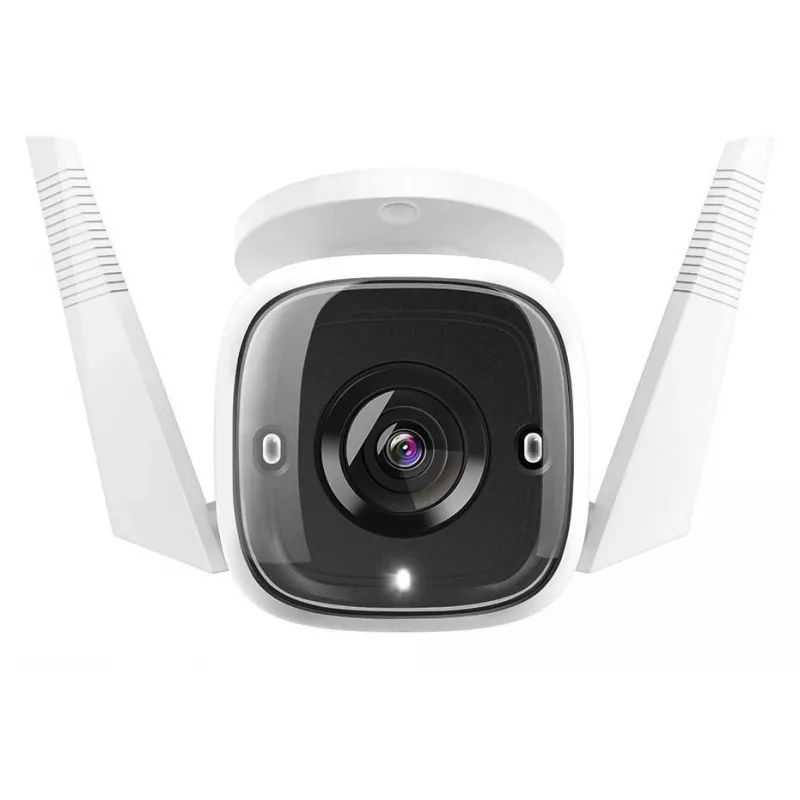
Outdoor security Wi‑Fi camera TP‑LINK Tapo C310 — outdoor camera, weather‑resistant, Wi‑Fi

Outdoor security Wi‑Fi camera TP‑LINK Tapo C310 — outdoor camera, weather‑resistant, Wi‑Fi
R1,329
TP‑LINK Tapo C310 is an outdoor security Wi‑Fi camera for perimeter monitoring and home security. The device connects to a local Wi‑Fi network and is built for weather‑resistant outdoor use, enabling remote viewing and motion detection alerts. The camera is intended to provide continuous surveillanc... Read More
Stock 22 Code 1717932 Brand TP-LINK Model TL-TAPO C310 Warranty 2 Years

Shipping & Returns

Estimated delivery Friday, October 9
You will be kept updated through our detailed tracking system
Payment options
EFTPayFastBank CardSnapScanZapperGoogle PayApple PayMobicredMoreTymePay on Arrival

TP‑LINK Tapo C310 is an outdoor security Wi‑Fi camera for perimeter monitoring and home security. The device connects to a local Wi‑Fi network and is built for weather‑resistant outdoor use, enabling remote viewing and motion detection alerts. The camera is intended to provide continuous surveillance of entrances, gardens and driveways and to integrate with the Tapo mobile app for setup and live access.

Advantages

The Tapo C310 offers weather‑resistant construction suitable for outdoor installation and wireless connectivity over Wi‑Fi for placement without additional cabling. It supports remote live viewing and motion detection alerts via the companion app, allowing users to monitor a property from a smartphone. The camera is designed for straightforward installation and practical day‑to‑day surveillance tasks while operating continuously for perimeter protection.

Suitable for

  • Monitoring home entrances and front doors
  • Surveillance of gardens, yards and driveways
  • Outdoor perimeter monitoring for small businesses
  • Remote viewing and alerting via a mobile app

Key specifications

  • Connection: Wi‑Fi wireless connectivity for remote access
  • Installation: Outdoor weather‑resistant housing for external mounting
  • Functionality: Motion detection and alert notifications
  • Use case: Designed for continuous surveillance of outdoor areas such as entrances, gardens and driveways

How to use

Install the Tapo C310 on a stable external surface in a location that provides the desired field of view, keeping the camera within range of the household Wi‑Fi network. Follow the manufacturer’s mounting instructions and connect the camera to power. Use the Tapo mobile app to complete Wi‑Fi setup, configure motion detection sensitivity and define notification preferences. After setup, view live video, review recorded events and receive alerts through the app as needed.

Recommendations

Place the camera at a height and angle that minimize obstructions and exposure to direct spray from sprinklers or intense sunlight. Ensure the camera is within reliable Wi‑Fi coverage and regularly verify app settings and firmware updates to maintain optimal performance and notification reliability.

Key Highlights
  • Monitoring home entrances and front doors
  • Surveillance of gardens, yards and driveways
  • Outdoor perimeter monitoring for small businesses
  • Remote viewing and alerting via a mobile app
  • Connection: Wi‑Fi wireless connectivity for remote access
  • Installation: Outdoor weather‑resistant housing for external mounting
  • Functionality: Motion detection and alert notifications
  • Use case: Designed for continuous surveillance of outdoor areas such as entrances, gardens and driveways
Price history over the last 6 months
Outdoor security Wi‑Fi camera TP‑LINK Tapo C310 — outdoor camera, weather‑resistant, Wi‑Fi
Current
R1,329
Lowest
R1,185
Highest
R2,030
Change 24H
+R128   +11%
Week
+R39   +3%
Month
+R33   +3%

Popular products in this category

WhatsApp
Hi, I’m DistriNode’s AI assistant. I can help you find products, compare options, create quote PDFs, or open support requests.