Account Contact
Your Cart
Pay the courier with no extra fees.
Need help? DistriNode AI can handle any task on our site.

Internal PCIe Adapter DeLOCK 41914

Internal PCIe Adapter DeLOCK 41914
R784
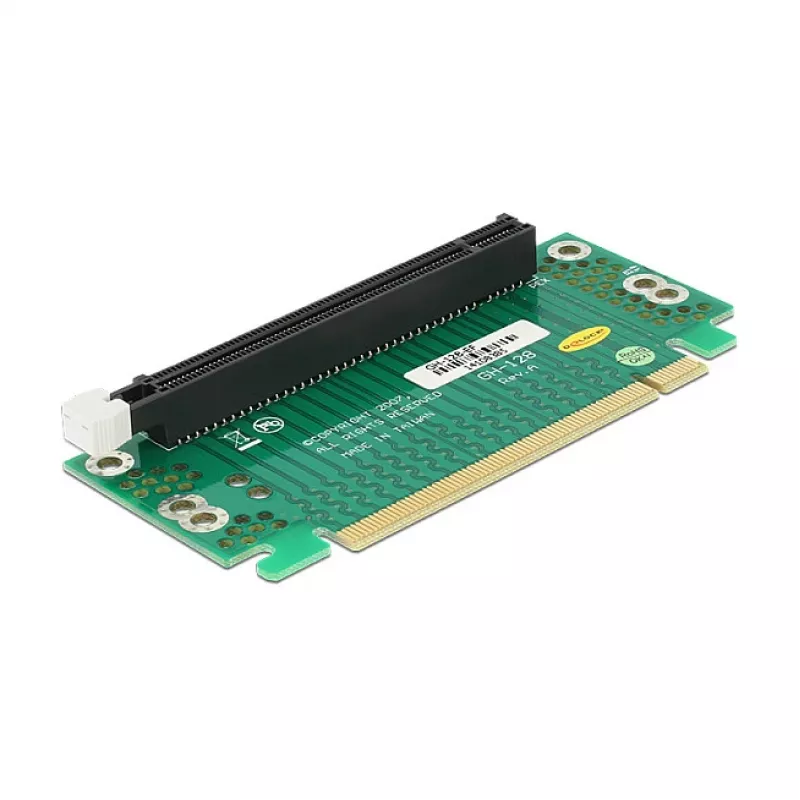
The DeLOCK 41914 is an internal PCIe adapter that enables mounting a PCI Express x16 card at a 90° angle to the motherboard PCI Express slot. It provides a PCIe host interface and a PCIe output interface to maintain high-speed data transfer while allowing flexible component placement inside compact ... Read More
Stock 100 Code 1721064 Brand DELOCK Model 41914 Warranty 2 Years

Shipping & Returns

Estimated delivery Thursday, October 1
You will be kept updated through our detailed tracking system
Payment options
EFTPayFastBank CardSnapScanZapperGoogle PayApple PayMobicredMoreTymePay on Arrival

The DeLOCK 41914 is an internal PCIe adapter that enables mounting a PCI Express x16 card at a 90° angle to the motherboard PCI Express slot. It provides a PCIe host interface and a PCIe output interface to maintain high-speed data transfer while allowing flexible component placement inside compact or custom PC builds.

Advantages

This adapter supports PCIe x16 cards using a right-angle design that saves space and improves airflow options. Its internal construction ensures direct connection to the motherboard PCIe slot without external cables, and the compact form factor simplifies installation in confined chassis or specialized layouts.

Suitable for

  • Installing a PCIe x16 graphics card in small form factor or non-standard cases
  • Systems requiring alternative card orientation for cooling or clearance
  • Hardware testing, development rigs, or custom mounting solutions

Key specifications

  • Brand: DELOCK
  • Model / MPN: 41914
  • EAN: 4014619775774
  • Host interface: PCIe
  • Output interface: PCIe x16
  • Internal: Yes

How to use

Power off the PC and disconnect it from the mains. Open the chassis and locate the target PCIe slot on the motherboard. Insert the adapter’s host connector firmly into the motherboard PCIe slot, secure the adapter if your case provides mounting points, then insert the PCIe x16 card into the adapter’s output interface. Reassemble the case, reconnect power, and start the system. Install or update drivers for the installed PCIe card as required.

Recommendations

Ensure the case and adjacent components provide sufficient clearance for the mounted PCIe card and maintain proper airflow. Verify card compatibility (electrical and mechanical) with PCIe x16 standard before installation and handle components using ESD-safe procedures.
Key Highlights
  • Installing a PCIe x16 graphics card in small form factor or non-standard cases
  • Systems requiring alternative card orientation for cooling or clearance
  • Hardware testing, development rigs, or custom mounting solutions
  • Brand: DELOCK
  • Model / MPN: 41914
  • EAN: 4014619775774
  • Host interface: PCIe
  • Output interface: PCIe x16
  • Internal: Yes
Specifications
Harmonized System (HS) code
84733020
Host interface
PCIe
Internal
Yes
Output interface
PCIe
Price history over the last 6 months
Internal PCIe Adapter DeLOCK 41914
Current
R784
Lowest
R746
Highest
R792
Change 24H
+R30   +4%
Week
+R38   +5%
Month
+R35   +5%

Popular products in this category

WhatsApp
Hi, I’m DistriNode’s AI assistant. I can help you find products, compare options, create quote PDFs, or open support requests.