Account Contact
Your Cart
Pay the courier with no extra fees.
Need help? DistriNode AI can handle any task on our site.

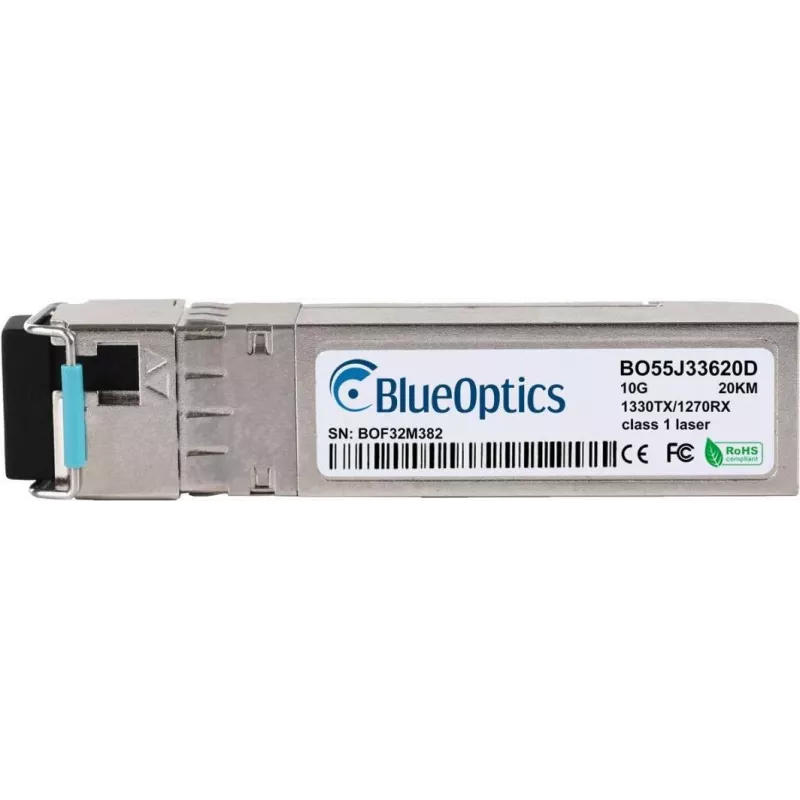
SFP+ transceiver module BlueOptics AT-SP10BD20-13-BO 10000 Mbit/s

SFP+ transceiver module BlueOptics AT-SP10BD20-13-BO 10000 Mbit/s
R1,876
The BlueOptics AT-SP10BD20-13-BO is an SFP+ transceiver module engineered for high-speed fiber optic links. It provides a compact, hot-pluggable solution for 10 Gbit/s connectivity and is suitable for upgrading or expanding network equipment that accepts SFP+ interfaces. The module's silver housing ... Read More
Stock 90 Code 1470650 Brand BLUEOPTICS Model AT-SP10BD20-13-BO Warranty 2 Years

Shipping & Returns

Estimated delivery Tuesday, October 6
You will be kept updated through our detailed tracking system
Payment options
EFTPayFastBank CardSnapScanZapperGoogle PayApple PayMobicredMoreTymePay on Arrival

The BlueOptics AT-SP10BD20-13-BO is an SFP+ transceiver module engineered for high-speed fiber optic links. It provides a compact, hot-pluggable solution for 10 Gbit/s connectivity and is suitable for upgrading or expanding network equipment that accepts SFP+ interfaces. The module's silver housing and light 20 g weight make it easy to handle and install into compatible switch, router, or server ports.

Advantages

This SFP+ transceiver supports up to 10000 Mbit/s data transfer rate and offers a reliable physical interface for 10 Gbit/s network segments. Its compact SFP+ form factor supports hot-swap installation, minimizing downtime during upgrades or replacements. The module's low weight and standardized interface ensure compatibility with a wide range of network devices that use SFP+ ports.

Suitable for

Key specifications

How to use

Install the BlueOptics SFP+ transceiver by inserting it into a compatible SFP+ port on network equipment until it latches. Connect the appropriate fiber optic cable to the module's optical interface, observing correct connector type and polarity for your link. The module is hot-pluggable, so it can be inserted or removed while the host device is powered on, but follow your equipment manufacturer's guidelines to avoid port or link issues. Verify link status and configuration in the host device management interface after installation.

Recommendations

Ensure compatibility of fiber type, connector type and wavelength with connected equipment before deployment. Handle the transceiver by its housing, avoid touching optical interfaces, and use protective caps when the module is not connected. For optimal performance, maintain clean fiber connectors and follow the switch or router vendor's instructions for supported SFP+ modules and firmware versions.

Key Highlights
  • 10 Gbit/s fiber optic uplinks between switches or routers
  • High-bandwidth server connections in data centers
  • Aggregation links in campus and enterprise networks
  • Upgrading existing equipment to SFP+ fiber connectivity
  • Interface type: SFP+
  • Maximum data transfer rate: 10000 Mbit/s (10 Gbit/s)
  • Form factor: compact SFP+ transceiver module
  • Weight: 0.02 kg (20 g)
  • Colour: silver metal housing
Specifications
Digital Diagnostics Monitoring (DDM)
Yes
Fiber ethernet cabling technology
10GBASE
Fiber optic connector
LC
Interface type
SFP+
Manual
Yes
Maximum data transfer rate
10000 Mbit/s
Maximum operating temperature
70 °C
Maximum transfer distance
20000 m
Minimum operating temperature
0 °C
Operating temperature (T-T)
0 - 70
Package weight
30 g
Product colour
Silver
Quantity per pack
1 pc(s)
Rx wavelength (max)
1270 nm
SFP transceiver standard
BX-D
SFP transceiver type
Fiber optic
Single-mode fiber (SMF) supported
Yes
Tx wavelength (max)
1330 nm
Warranty period
5 year(s)
Weight
0.02 kg
Price history over the last 6 months
SFP+ transceiver module BlueOptics AT-SP10BD20-13-BO 10000 Mbit/s
Current
R1,876
Lowest
R1,838
Highest
R1,937
Change 24H
+R16   +1%
Week
+R34   +2%
Month
+R30   +2%

Popular products in this category

WhatsApp
Hi, I’m DistriNode’s AI assistant. I can help you find products, compare options, create quote PDFs, or open support requests.