Account Contact
Your Cart
Pay the courier with no extra fees.
Need help? DistriNode AI can handle any task on our site.

RJ45 Port Blocker ShiverPeaks BS08-01035 — 1 Key, 10 Orange Locks

RJ45 Port Blocker ShiverPeaks BS08-01035 — 1 Key, 10 Orange Locks
R337
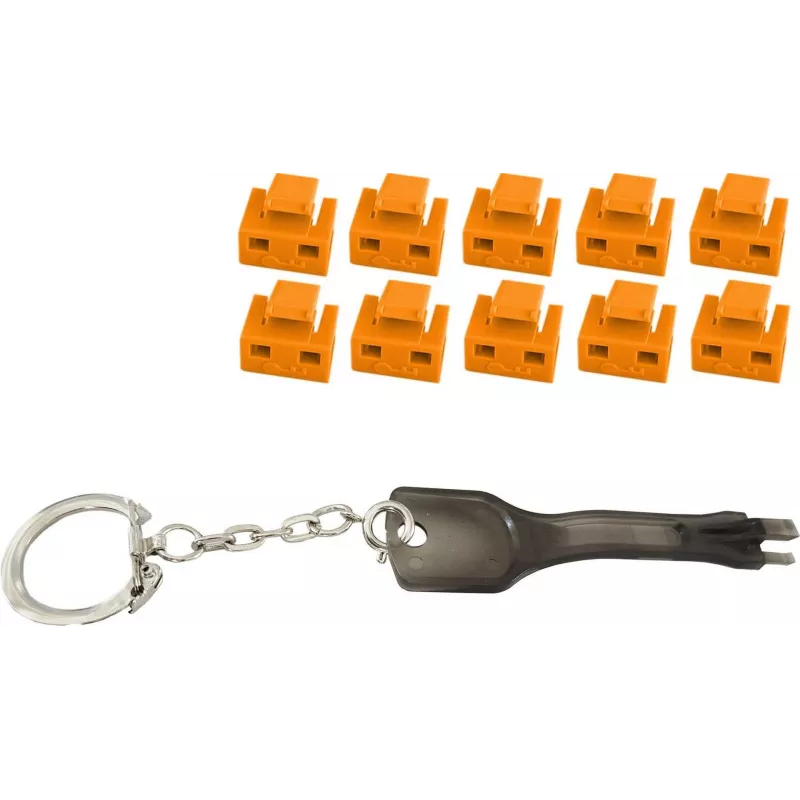
ShiverPeaks RJ45 port blocker BS08-01035 kit includes ten orange RJ45 locks and one matching key designed to restrict physical access to Ethernet ports. The compact plastic locks insert into standard RJ45 sockets to block insertion of network plugs, offering a simple, tangible control measure for ne... Read More
Stock 112 Code 2247451 Brand SHIVERPEAKS Model BS08-01035 Warranty 2 Years

Shipping & Returns

Estimated delivery Wednesday, October 7
You will be kept updated through our detailed tracking system
Payment options
EFTPayFastBank CardSnapScanZapperGoogle PayApple PayMobicredMoreTymePay on Arrival

ShiverPeaks RJ45 port blocker BS08-01035 kit includes ten orange RJ45 locks and one matching key designed to restrict physical access to Ethernet ports. The compact plastic locks insert into standard RJ45 sockets to block insertion of network plugs, offering a simple, tangible control measure for network access in offices, classrooms, public areas, and shared workspaces.

Advantages

The RJ45 port blocker provides a physical layer of access control without altering network configuration or requiring software. Its bright orange color makes blocked ports easily visible during inspections, and the included single key allows authorized personnel to remove multiple locks quickly. The locks are engineered to fit standard RJ45 jacks and to withstand routine insertion attempts while remaining removable with the supplied key.

Suitable for

  • Preventing unauthorized Ethernet connections in offices and meeting rooms
  • Securing network ports in schools and libraries
  • Controlling access to ports in public spaces and kiosks
  • Temporary lockdown of unused ports in data cabinets and wall outlets

Key specifications

  • Contents: 10 RJ45 port locks (orange) and 1 removable key
  • Compatibility: fits standard 8P8C (RJ45) Ethernet ports
  • Material: durable plastic body designed for repeated use
  • Colour: high-visibility orange for quick identification
  • Operation: manual insertion and key-operated removal
  • Use environment: suitable for indoor network outlets and patch panels

How to use

Insert the RJ45 port blocker into the Ethernet jack until it seats securely and the locking tab engages. To remove, insert the supplied key into the corresponding slot on the blocker and turn or pull as designed to release the lock. Use one key to remove multiple locks; keep the key in a controlled location and limit access to authorized personnel. The blocker does not require tools or changes to network settings.

Recommendations

Store the key separately from the locks and document which ports are blocked. Periodically inspect blocked ports for damage and replace any worn locks. For environments requiring higher security, combine physical port blocking with network-level access control and monitoring.

Key Highlights
  • Preventing unauthorized Ethernet connections in offices and meeting rooms
  • Securing network ports in schools and libraries
  • Controlling access to ports in public spaces and kiosks
  • Temporary lockdown of unused ports in data cabinets and wall outlets
  • Contents: 10 RJ45 port locks (orange) and 1 removable key
  • Compatibility: fits standard 8P8C (RJ45) Ethernet ports
  • Material: durable plastic body designed for repeated use
  • Colour: high-visibility orange for quick identification
  • Operation: manual insertion and key-operated removal
  • Use environment: suitable for indoor network outlets and patch panels
Price history over the last 6 months
RJ45 Port Blocker ShiverPeaks BS08-01035 — 1 Key, 10 Orange Locks
Current
R337
Lowest
R327
Highest
R337
Change 24H
+R10   +3%
Week
—   
Month
—   

Popular products in this category

WhatsApp
Hi, I’m DistriNode’s AI assistant. I can help you find products, compare options, create quote PDFs, or open support requests.