Account Contact
Your Cart
Pay on delivery – no extra fees
Need help? Ask our AI

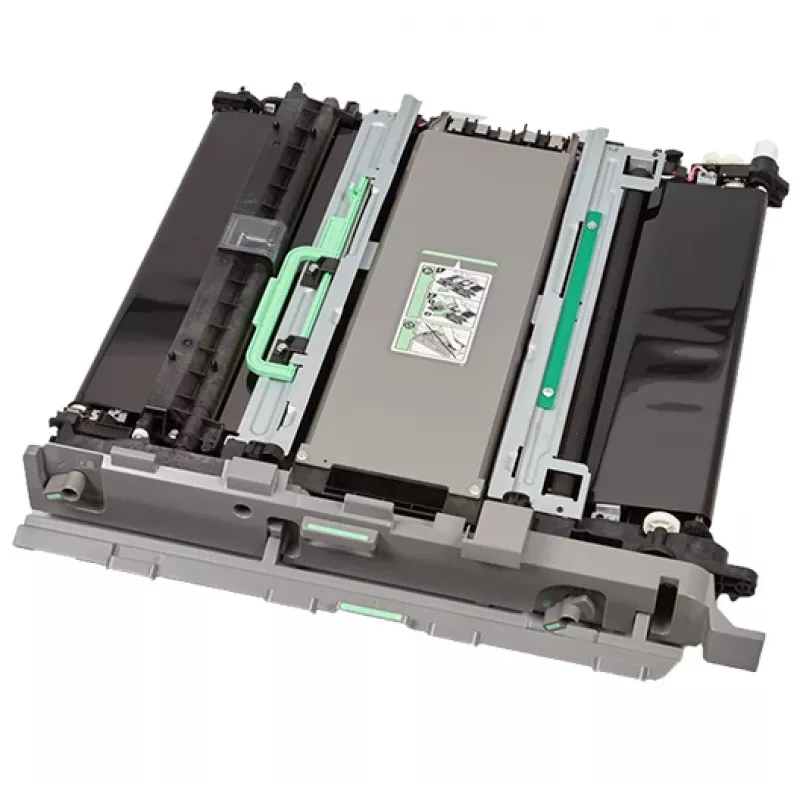
Ricoh SP C840 Transfer guide 1 pc(s)

Ricoh SP C840 Transfer guide 1 pc(s)
R10,908
PDF
PDF

Shipping & Returns

Estimated delivery Monday, November 23
You will be kept updated through our detailed tracking system
Payment options
EFTPayFastBank CardSnapScanZapperGoogle PayApple PayMobicredMoreTymePay on Arrival

Description

The Ricoh SP C840 Transfer Guide is a replacement component engineered for Ricoh SP C840DN and SP C842DN laser/LED printers. It directs the toner from the imaging drum to the paper surface to maintain consistent print transfer and stable colour reproduction. The part comes in a black finish and is packaged as a single unit intended for direct installation during routine maintenance or when print defects indicate transfer issues.

Advantages

The transfer guide stabilizes toner flow and helps reduce streaks, smudges and uneven colour density, supporting consistent output across single and multi-page jobs. Its form factor and connector interfaces match the original equipment specifications, allowing straightforward replacement without complex adjustments. Using the correct transfer guide contributes to predictable print results and can decrease the need for repeated reprints.

Suitable for

  • Office environments using Ricoh SP C840DN and SP C842DN printers
  • Workshops performing regular printer maintenance and parts replacement
  • Print service tasks requiring consistent colour transfer for documents and marketing materials
  • Situations where troubleshooting print defects such as streaks or uneven toner distribution is needed

Key specifications

  • Compatibility: Ricoh SP C840DN, Ricoh SP C842DN
  • Function: toner transfer guidance between imaging unit and paper
  • Colour: black exterior
  • Quantity: single unit per package
  • Form factor: OEM-matching shape and connectors for direct fit

How to use

Turn off and unplug the printer before starting any replacement. Open the printer access panels according to the device service instructions, remove the old transfer guide by disengaging any clips or latches, and lift it out carefully to avoid contact with toner surfaces. Position the new Ricoh SP C840 Transfer Guide into the designated slot, ensuring alignment with guide rails and connector points, then secure it in place and close panels. Power the printer back on and run a test print or calibration cycle to verify correct installation and print quality.

Recommendations

Replace the transfer guide when you observe persistent streaks, ghosting, or inconsistent colour density that are not resolved by cleaning. Use gloves to avoid contaminating the part with oils from hands, keep the component in its protective packaging until installation, and follow the printer’s maintenance manual for safe handling and disposal of used parts.

Key Highlights
  • Office environments using Ricoh SP C840DN and SP C842DN printers
  • Workshops performing regular printer maintenance and parts replacement
  • Print service tasks requiring consistent colour transfer for documents and marketing materials
  • Situations where troubleshooting print defects such as streaks or uneven toner distribution is needed
  • Compatibility: Ricoh SP C840DN, Ricoh SP C842DN
  • Function: toner transfer guidance between imaging unit and paper
  • Colour: black exterior
  • Quantity: single unit per package
  • Form factor: OEM-matching shape and connectors for direct fit

Specifications

Specifications
Brand compatibility
Ricoh
Compatibility
SP C840DN SP C842DN
Device compatibility
Laser/LED printer
Product colour
Black
Quantity per pack
1 pc(s)
Type
Transfer guide

Leaflet

Open Leaflet
Price history over the last 6 months
Ricoh SP C840 Transfer guide 1 pc(s)
Current
R10,908
Lowest 7d
R10,908
Highest 7d
R10,949
Change 24H
-R35   0%
Change 7D
R0   0%
Change 30D
-R51   0%

Write a review

Rating *
Your name will be shown publicly – you can use a nickname. We invite buyers to write reviews; we check reviews before publishing and publish critical ones too.

More RICOH products in this category

12

Popular products in this category

7
WhatsApp
Messenger
Hi, I’m DistriNode’s AI assistant. I can help you find products, compare options, create quote PDFs, or open support requests.
All categories