Account Contact
Your Cart
Pay on delivery – no extra fees
Need help? Ask our AI

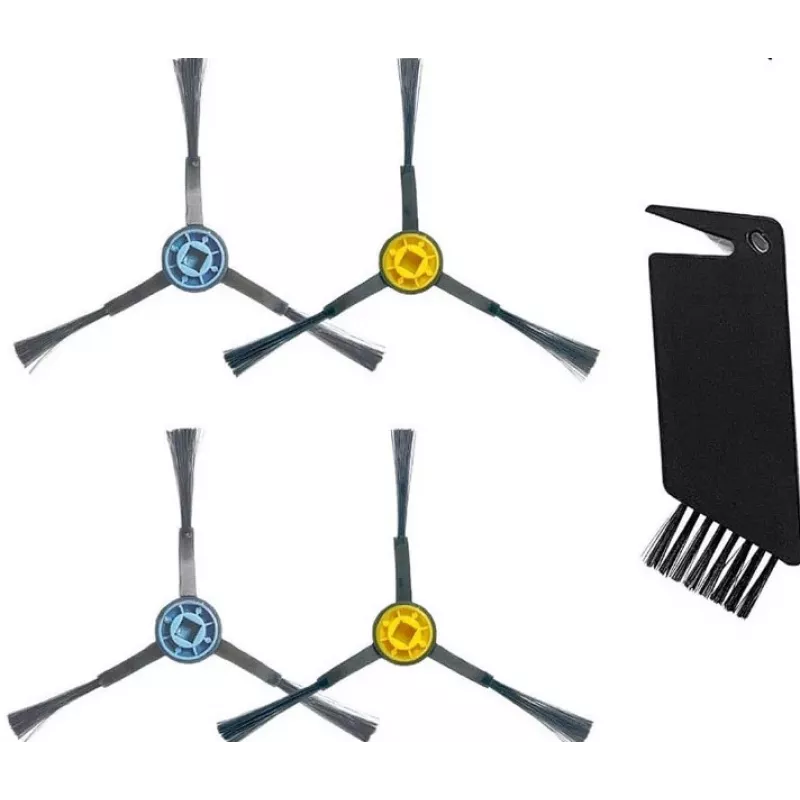
Replacement side brushes and cleaning brush set for Midea I5C – 4 side brushes + 1 cleaning brush

Replacement side brushes and cleaning brush set for Midea I5C – 4 side brushes + 1 cleaning brush
R384
Replacement spare parts kit for the Midea I5C robot vacuum consisting of four side brushes and one cleaning brush. The set is intended for routine maintenance and brush replacement to restore edge cleaning performance, remove hair and debris, and help maintain suction efficiency and prolong the appl... Read More
Stock 5 Code 301025 Brand MIDEA Model 12175000A43594 Warranty 2 Years
CategoryVacuum Accessories

Shipping & Returns

Estimated delivery Tuesday, November 3
You will be kept updated through our detailed tracking system
Payment options
EFTPayFastBank CardSnapScanZapperGoogle PayApple PayMobicredMoreTymePay on Arrival

Replacement spare parts kit for the Midea I5C robot vacuum consisting of four side brushes and one cleaning brush. The set is intended for routine maintenance and brush replacement to restore edge cleaning performance, remove hair and debris, and help maintain suction efficiency and prolong the appliance’s service life.

Advantages

The kit includes four side brushes and a dedicated cleaning brush designed to fit the Midea I5C model. Parts are lightweight and easy to install, enabling quick maintenance without tools. Replacing worn brushes improves edge and corner cleaning and reduces the risk of hair tangles that can lower suction performance.

Suitable for

  • Owners of Midea I5C robot vacuum
  • Routine maintenance and brush replacement
  • Homes with pets or long hair where brushes wear faster
  • Restoring edge and corner cleaning performance

Key specifications

  • Brand: Midea
  • Model compatibility: For I5C
  • Contents: Side Brush ×4, Cleaning Brush ×1
  • Producer product name: Spare Parts Kit: Side Brush×4pcs, Cleaning Brush×1pc for I5C
  • MPN: 12175000A43594
  • EAN: 6956079723064
  • Net weight: 0.02 kg
  • Gross weight (package): 0.18 kg
  • Packing quantity: 1 pc
  • Package dimensions (W×D×H): 144 × 340 × 68 mm

How to use

Turn off and, if applicable, remove the dustbin before performing maintenance. Unclip the old side brushes from the Midea I5C and fit the new side brushes in the same mounting positions until they click into place. Use the included cleaning brush to remove hair and debris from the main brush, side brushes, brush housing and wheels. Reassemble any removed parts and restart the robot to verify correct operation.

Recommendations

Replace side brushes when bristles are bent or worn, or at least every 3–6 months depending on use and floor conditions. Clean brushes and brush housing regularly to maintain suction performance; keep spare brushes on hand for faster maintenance.
Key Highlights
  • Owners of Midea I5C robot vacuum
  • Routine maintenance and brush replacement
  • Homes with pets or long hair where brushes wear faster
  • Restoring edge and corner cleaning performance
  • Brand: Midea
  • Model compatibility: For I5C
  • Contents: Side Brush ×4, Cleaning Brush ×1
  • Producer product name: Spare Parts Kit: Side Brush×4pcs, Cleaning Brush×1pc for I5C
  • MPN: 12175000A43594
  • EAN: 6956079723064
  • Net weight: 0.02 kg
  • Gross weight (package): 0.18 kg
  • Packing quantity: 1 pc
  • Package dimensions (W×D×H): 144 × 340 × 68 mm
Price history over the last 6 months
Replacement side brushes and cleaning brush set for Midea I5C – 4 side brushes + 1 cleaning brush
Current
R384
Lowest
R247
Highest
R384
Change 24H
+R136   +55%
Week
—   
Month
—   

Write a review

Rating *
Your name will be shown publicly – you can use a nickname. We invite buyers to write reviews; we check reviews before publishing and publish critical ones too.

Same series and alternatives

Popular products in this category

WhatsApp
Messenger
Hi, I’m DistriNode’s AI assistant. I can help you find products, compare options, create quote PDFs, or open support requests.
All categories