Account Contact
Your Cart
Pay the courier with no extra fees.
Need help? DistriNode AI can handle any task on our site.

Remote Control Logitech BCC950 IR Wireless Webcam 11 Buttons

Remote Control Logitech BCC950 IR Wireless Webcam 11 Buttons
R721
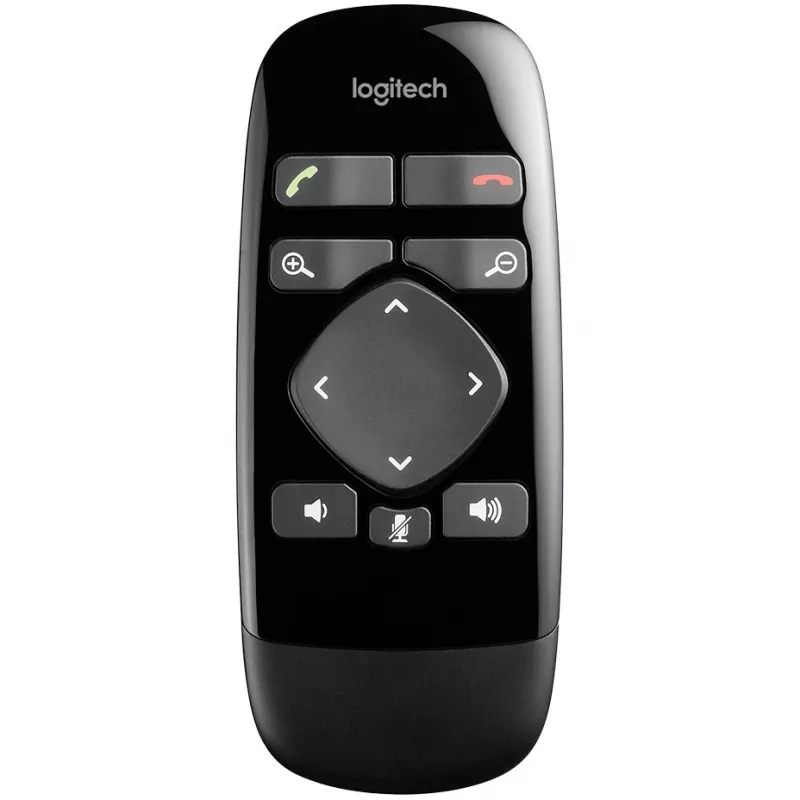
The Logitech BCC950 IR Wireless Remote Control is designed to operate the Logitech ConferenceCam and compatible webcams. It provides IR wireless connectivity with a maximum range of 3 meters and eleven press buttons to control camera functions and call handling. The remote is compact, black in color... Read More
Stock 6 Code 1176010 Brand LOGITECH Model 993-000754 Warranty 2 Years

Shipping & Returns

Estimated delivery Tuesday, October 6
You will be kept updated through our detailed tracking system
Payment options
EFTPayFastBank CardSnapScanZapperGoogle PayApple PayMobicredMoreTymePay on Arrival

The Logitech BCC950 IR Wireless Remote Control is designed to operate the Logitech ConferenceCam and compatible webcams. It provides IR wireless connectivity with a maximum range of 3 meters and eleven press buttons to control camera functions and call handling. The remote is compact, black in color, and intended for single-device use with webcams.

Advantages

The remote offers simple, tactile control with 11 press buttons that let users pan, tilt and zoom the camera, answer and hang up calls, adjust volume and mute the microphone. IR wireless operation requires no pairing and provides straightforward compatibility with the BCC950 ConferenceCam. Its compact form factor and familiar button layout make it easy to use in meeting rooms and personal workspaces.

Suitable for

  • Controlling a Logitech BCC950 ConferenceCam from a short distance
  • Small meeting rooms and huddle spaces where a single webcam is used
  • Users who prefer physical button controls for camera and call functions

Key specifications

  • Connectivity: IR wireless
  • Buttons: 11 press buttons
  • Maximum operating range: 3 m
  • Number of supported devices: 1
  • Button backlight: no
  • Rechargeable: no (battery-powered)
  • Intended use: webcam remote control
  • Color: black

How to use

Point the remote toward the Logitech BCC950 ConferenceCam within the 3-meter range and press the appropriate buttons to pan, tilt or zoom the camera, answer or end calls, change volume and mute the microphone. No pairing procedure is required; replace batteries as needed to ensure reliable operation.

Recommendations

For reliable IR reception, keep a clear line of sight between the remote and the camera. Use the remote from within 3 meters and avoid bright direct sunlight or reflective surfaces that can interfere with the IR signal.
Key Highlights
  • Controlling a Logitech BCC950 ConferenceCam from a short distance
  • Small meeting rooms and huddle spaces where a single webcam is used
  • Users who prefer physical button controls for camera and call functions
  • Connectivity: IR wireless
  • Buttons: 11 press buttons
  • Maximum operating range: 3 m
  • Number of supported devices: 1
  • Button backlight: no
  • Rechargeable: no (battery-powered)
  • Intended use: webcam remote control
  • Color: black
Specifications
Backlight buttons
No
Battery type
CR2032
Brand compatibility
Logitech
Buttons quantity
11
Compatible products
BCC950
Harmonized System (HS) code
85299097
Input type
Press buttons
Interface
IR Wireless
Maximum range
3 m
Number of devices supported
1
Product colour
Black
Rechargeable
No
Remote control proper use
Webcam

Leaflet

Open Leaflet
Price history over the last 6 months
Remote Control Logitech BCC950 IR Wireless Webcam 11 Buttons
Current
R721
Lowest
R691
Highest
R807
Change 24H
+R28   +4%
Week
+R21   +3%
Month
-R46   -6%

Popular products in this category

WhatsApp
Hi, I’m DistriNode’s AI assistant. I can help you find products, compare options, create quote PDFs, or open support requests.