Account Contact
Your Cart
Pay the courier with no extra fees.
Need help? DistriNode AI can handle any task on our site.

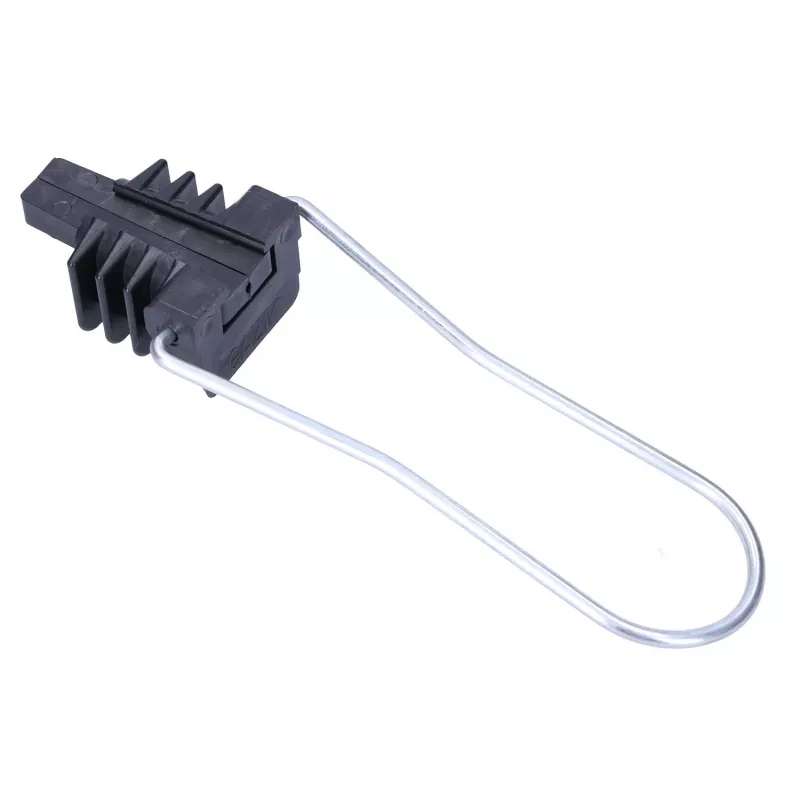
Optic cable mounting Extralink AC-12 for 2–24 fibres, max bundle Ø 1.2 cm, ABS and metal, black

Optic cable mounting Extralink AC-12 for 2–24 fibres, max bundle Ø 1.2 cm, ABS and metal, black
R66
Extralink AC-12 is an optic cable mounting designed to secure single cable bundles containing from 2 to 24 fibres. Made of a combination of ABS plastic and metal components, the black mounting provides mechanical support and strain relief for fibre optic runs in both outdoor and indoor environments.... Read More
Stock 200 Code 1541083 Brand EXTRALINK Model EX.2503 Warranty 2 Years

Shipping & Returns

Estimated delivery Thursday, October 1
You will be kept updated through our detailed tracking system
Payment options
EFTPayFastBank CardSnapScanZapperGoogle PayApple PayMobicredMoreTymePay on Arrival

Extralink AC-12 is an optic cable mounting designed to secure single cable bundles containing from 2 to 24 fibres. Made of a combination of ABS plastic and metal components, the black mounting provides mechanical support and strain relief for fibre optic runs in both outdoor and indoor environments. It is suitable for attachment to walls or poles and helps organise cable routing while protecting the fibre sheath from excessive bending or movement. The mounting accepts cable bundles with a maximum outer diameter of 1.2 cm.

Advantages

The design combines the impact resistance of ABS with metal reinforcement to ensure stable long-term fixation of small to medium fibre bundles. Its compact profile and black finish reduce visual exposure on exterior and interior installations. The mounting provides reliable strain relief and keeps cables aligned to prevent microbending, while its construction allows quick installation and durable performance under typical environmental conditions.

Suitable for

Key specifications

How to use

Position the mounting at the chosen attachment point on a wall or pole, aligning the cable route to minimise bends. Open or adjust the clamp mechanism, place the fibre cable bundle inside ensuring the bundle diameter does not exceed 1.2 cm, then secure the clamp to provide gentle but firm strain relief. Fasten the mounting to the surface using appropriate screws or straps for the substrate and install any additional cable ties or protective routing as required. Avoid overtightening the clamp to prevent deformation of the cable sheath or stress on the fibres.

Recommendations

For reliable long-term performance, use this mounting with cable bundles within the specified diameter range, avoid exposing the assembly to prolonged immersion or direct mechanical impact, and combine with appropriate weatherproofing or protective covers in exposed outdoor locations.
Key Highlights
  • Securing aerial or wall-mounted fibre cable bundles (2–24 fibres)
  • Indoor cable routing in equipment rooms, distribution points and enclosures
  • Pole attachment for short outdoor spans and drop lines
  • Organising and fastening fibre runs to prevent sagging and movement
  • Compatible fibre count: 2–24 fibres
  • Maximum accepted bundle diameter: 1.2 cm
  • Body materials: ABS plastic with metal reinforcement
  • Finish: black
  • Application environments: indoor and outdoor mounting
Specifications
Material
ABS, Metal
Maximum bundle diameter
12 mm
Product colour
Black
Price history over the last 6 months
Optic cable mounting Extralink AC-12 for 2–24 fibres, max bundle Ø 1.2 cm, ABS and metal, black
Current
R66
Lowest
R22
Highest
R90
Change 24H
+R43   +188%
Week
+R43   +191%
Month
+R42   +181%

Popular products in this category

WhatsApp
Hi, I’m DistriNode’s AI assistant. I can help you find products, compare options, create quote PDFs, or open support requests.