Account Contact
Your Cart
Pay the courier with no extra fees.
Need help? DistriNode AI can handle any task on our site.

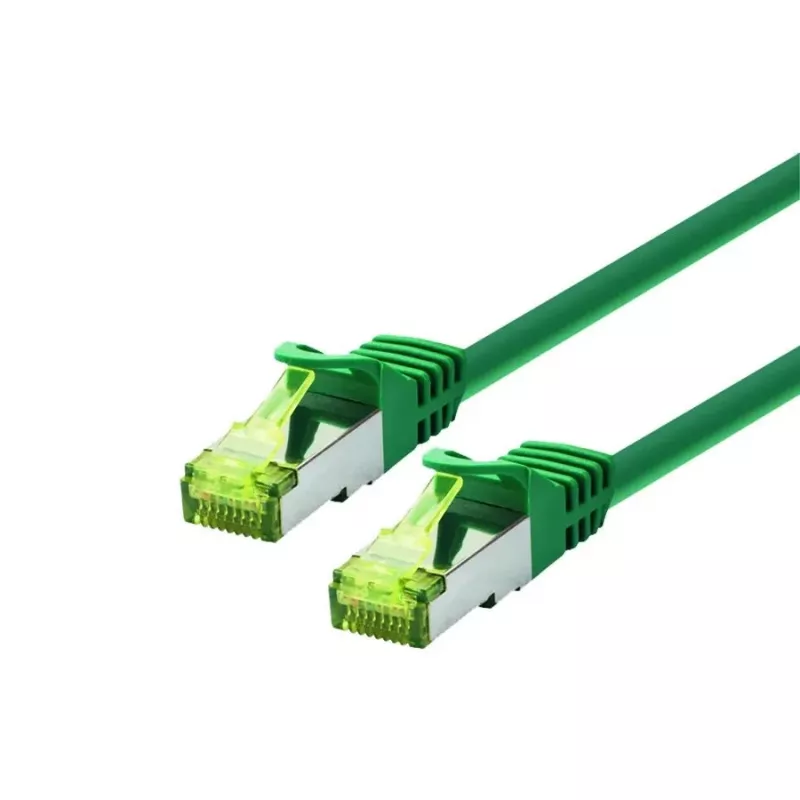
Networking Cable LOGON SSTP Cat6a RJ-45 RJ-45 5 m Green

Networking Cable LOGON SSTP Cat6a RJ-45 RJ-45 5 m Green
R220
The LOGON SSTP Cat6a RJ-45 to RJ-45 networking cable (5 m) is designed for high-speed wired connections in home and office networks. It uses SSTP shielding (foil plus braided drain) around four twisted pairs (4 x 2 x AWG 26/7) with a nominal impedance of 100 Ohm and supports the Cat6a specification ... Read More
Stock 397 Code 1205616 Brand LOGON Model TCR6ASS050G Warranty 2 Years

Shipping & Returns

Estimated delivery Tuesday, October 6
You will be kept updated through our detailed tracking system
Payment options
EFTPayFastBank CardSnapScanZapperGoogle PayApple PayMobicredMoreTymePay on Arrival

The LOGON SSTP Cat6a RJ-45 to RJ-45 networking cable (5 m) is designed for high-speed wired connections in home and office networks. It uses SSTP shielding (foil plus braided drain) around four twisted pairs (4 x 2 x AWG 26/7) with a nominal impedance of 100 Ohm and supports the Cat6a specification for up to 10 Gbps transmission. The cable comes in green and features two shielded RJ45 male connectors with boots that provide kink protection and strain relief; the wiring follows a 1:1 EIA/TIA 568B pinout.

Advantages

SSTP shielding with both foil and full braid reduces electromagnetic interference and improves signal integrity over longer runs. The twisted pair construction (AWG 26/7) and Cat6a standard enable reliable 10 Gbps-capable links in suitable network environments. Molded boots with strain relief protect the connector from bending and mechanical stress, while shielded RJ45 connectors maintain grounding continuity for shielded installations.

Suitable for

  • 10 Gigabit Ethernet connections in data centers and offices
  • High-speed wired home networks and media streaming
  • Shielded network installations where EMI reduction is required
  • Connecting switches, routers, servers, and NAS devices

Key specifications

  • Cable type: SSTP Cat6a, 4 x 2 x AWG 26/7, twisted pair, 100 Ohm
  • Length: 5 m
  • Connectors: 2 x shielded RJ45 male (RJ-45 to RJ-45)
  • Pinout: 1:1 — EIA/TIA 568B
  • Colour: Green
  • Brand / MPN / EAN: LOGON PROFESSIONAL / TCR6ASS050G / 5420016811738

How to use

Plug each shielded RJ45 connector into the corresponding RJ45 sockets on your network devices (switch, router, computer, NAS). Ensure connectors click into place and that the boots seat against the device port to maintain strain relief. For shielded installations, connect the cable to network equipment with metal-bodied RJ45 ports or a properly grounded patch panel to ensure effective shielding.

Recommendations

For optimal performance, avoid sharp bends and tight cable ties; maintain separation from large power cables to reduce interference. Use within recommended Cat6a channel lengths for 10 Gbps links and verify grounding when installing in shielded environments.
Key Highlights
  • 10 Gigabit Ethernet connections in data centers and offices
  • High-speed wired home networks and media streaming
  • Shielded network installations where EMI reduction is required
  • Connecting switches, routers, servers, and NAS devices
  • Cable type: SSTP Cat6a, 4 x 2 x AWG 26/7, twisted pair, 100 Ohm
  • Length: 5 m
  • Connectors: 2 x shielded RJ45 male (RJ-45 to RJ-45)
  • Pinout: 1:1 — EIA/TIA 568B
  • Colour: Green
  • Brand / MPN / EAN: LOGON PROFESSIONAL / TCR6ASS050G / 5420016811738
Specifications
Cable length
5 m
Cable standard
Cat6a
Connector 1
RJ-45
Connector 1 gender
Male
Connector 2
RJ-45
Connector 2 gender
Male
Input impedance
100 Ω
Product colour
Green
Price history over the last 6 months
Networking Cable LOGON SSTP Cat6a RJ-45 RJ-45 5 m Green
Current
R220
Lowest
R210
Highest
R220
Change 24H
+R10   +5%
Week
+R5   +2%
Month
+R4   +2%

Popular products in this category

WhatsApp
Hi, I’m DistriNode’s AI assistant. I can help you find products, compare options, create quote PDFs, or open support requests.