Account Contact
Your Cart
Pay the courier with no extra fees.
Need help? DistriNode AI can handle any task on our site.

Network Media Converter DeLOCK 86215

Network Media Converter DeLOCK 86215
R816
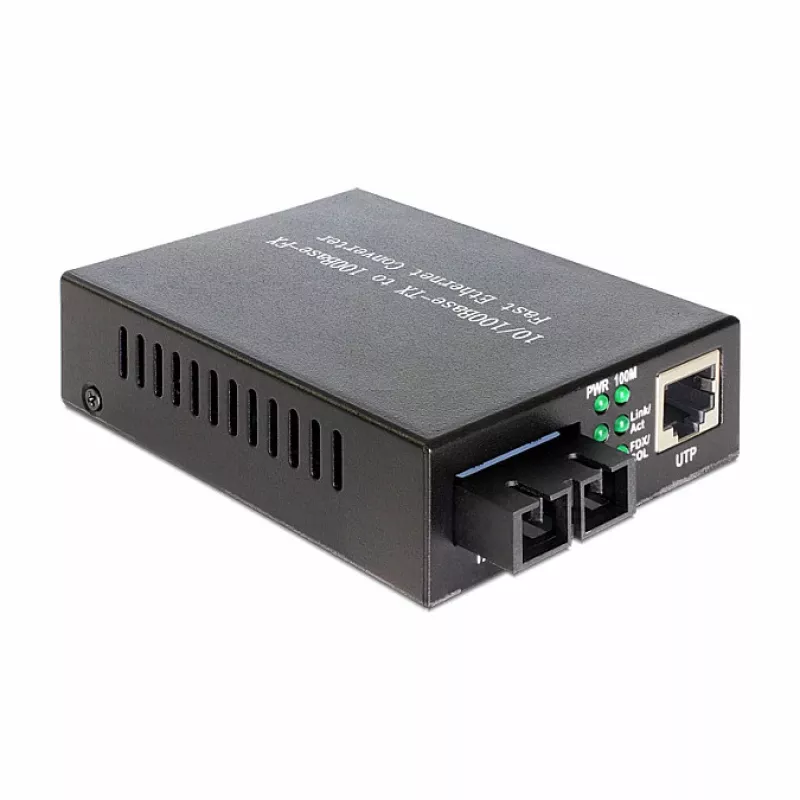
The DeLOCK 86215 is a network media converter that enables extending copper Ethernet networks with a single‑mode fiber optic link. It supports 10/100 Mbit/s Ethernet on the copper side and provides a 100Base‑FX SC fiber output operating at 1310 nm for transmission distances up to 20,000 m. The devic... Read More
Stock 24 Code 1741759 Brand DELOCK Model 86215 Warranty 2 Years

Shipping & Returns

Estimated delivery Thursday, October 1
You will be kept updated through our detailed tracking system
Payment options
EFTPayFastBank CardSnapScanZapperGoogle PayApple PayMobicredMoreTymePay on Arrival

The DeLOCK 86215 is a network media converter that enables extending copper Ethernet networks with a single‑mode fiber optic link. It supports 10/100 Mbit/s Ethernet on the copper side and provides a 100Base‑FX SC fiber output operating at 1310 nm for transmission distances up to 20,000 m. The device has a compact black housing and low power consumption of 2.5 W, suitable for installations where a simple, space‑saving converter is required.

Advantages

The media converter supports both 10Base‑T and 100Base‑TX input, and offers a 100 Mbit/s fiber output with an SC connector, enabling long‑distance single‑mode connections. Its low power consumption (2.5 W) and compact design simplify integration into existing network setups. The unit is supplied ready to use with a power adapter and user manual included.

Suitable for

  • Extending Ethernet networks over long distances via single‑mode fiber
  • Connecting 10/100 Mbit/s copper switches or routers to fiber links
  • Small office, campus or industrial network segments requiring an SC fiber interface

Key specifications

  • Maximum data transfer rate: 100 Mbit/s
  • Ethernet LAN data rates: 10, 100 Mbit/s
  • Fiber optic connector: SC (single‑mode)
  • Wavelength: 1310 nm
  • Maximum transfer distance: 20,000 m
  • Power consumption: 2.5 W
  • Product colour: Black

How to use

Connect the copper Ethernet cable to the 10/100Base‑T port and connect the single‑mode fiber cable with an SC connector to the 100Base‑FX port. Attach the supplied power supply to the converter and plug it into a mains outlet. After power‑up the link LEDs indicate connection status; ensure both ends of the fiber link use compatible optics and the correct wavelength (1310 nm) for reliable communication.

Recommendations

Install the converter in a dry, ventilated location away from strong electromagnetic interference. Use single‑mode fiber and SC connectors rated for 1310 nm, and verify end‑to‑end fiber continuity and signal levels when deploying near the maximum distance of 20 km.
Key Highlights
  • Extending Ethernet networks over long distances via single‑mode fiber
  • Connecting 10/100 Mbit/s copper switches or routers to fiber links
  • Small office, campus or industrial network segments requiring an SC fiber interface
  • Maximum data transfer rate: 100 Mbit/s
  • Ethernet LAN data rates: 10, 100 Mbit/s
  • Fiber optic connector: SC (single‑mode)
  • Wavelength: 1310 nm
  • Maximum transfer distance: 20,000 m
  • Power consumption: 2.5 W
  • Product colour: Black
Specifications
Converter input interface
10Base-T, 100Base-TX
Converter output interface
100Base-FX
Depth
95 mm
Ethernet LAN data rates
100, 10
Fiber cable diameters supported (core/cladding)
9/125
Fiber mode structure
Single-mode
Fiber optic connector
SC
Height
26 mm
Internal
No
Maximum data transfer rate
100 Mbit/s
Maximum transfer distance
20000 m
Power consumption (typical)
2.5 W
Product colour
Black
Wavelength
1310 nm
Width
70 mm
Price history over the last 6 months
Network Media Converter DeLOCK 86215
Current
R816
Lowest
R792
Highest
R834
Change 24H
+R14   +2%
Week
+R23   +3%
Month
+R20   +3%

Popular products in this category

WhatsApp
Hi, I’m DistriNode’s AI assistant. I can help you find products, compare options, create quote PDFs, or open support requests.