Account Contact
Your Cart
Pay the courier with no extra fees.
Need help? DistriNode AI can handle any task on our site.

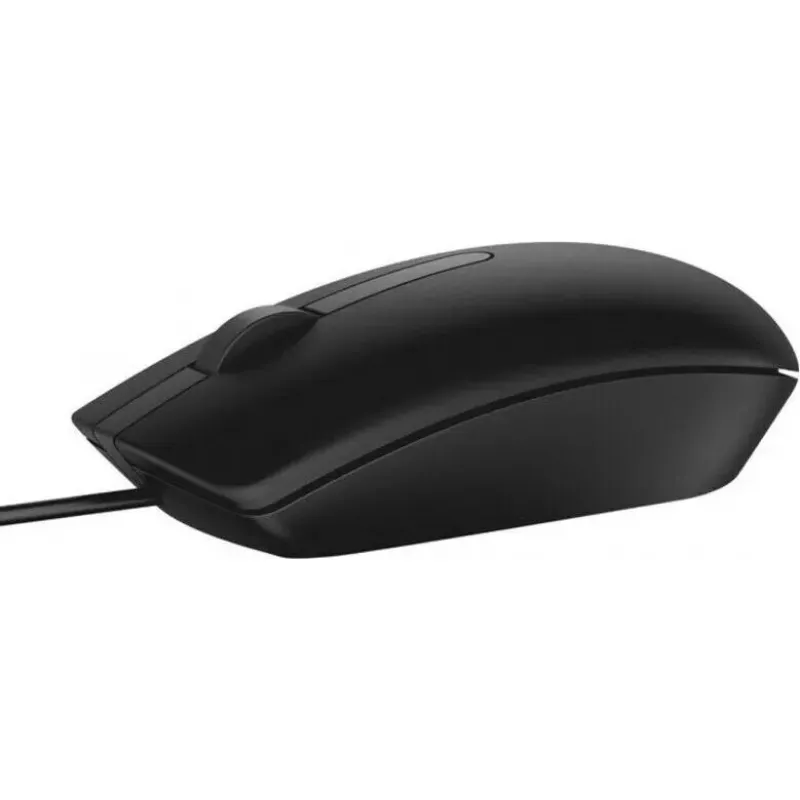
Mouse Dell USB Wired Optical DMV3P

Mouse Dell USB Wired Optical DMV3P
R365
The Dell USB Wired Optical DMV3P is a compact, wired computer mouse designed for everyday desktop and laptop use. It provides precise optical tracking via a USB connection and a contoured shape intended to support comfortable hand placement during extended use. The plug-and-play design requires no a... Read More
Stock 102 Code 2574029 Brand DELL Model DMV3P Warranty 2 Years

Shipping & Returns

Estimated delivery Tuesday, October 6
You will be kept updated through our detailed tracking system
Payment options
EFTPayFastBank CardSnapScanZapperGoogle PayApple PayMobicredMoreTymePay on Arrival

The Dell USB Wired Optical DMV3P is a compact, wired computer mouse designed for everyday desktop and laptop use. It provides precise optical tracking via a USB connection and a contoured shape intended to support comfortable hand placement during extended use. The plug-and-play design requires no additional drivers on most operating systems, enabling quick setup for office tasks, web browsing, and casual gaming.

Advantages

The mouse delivers consistent pointer control through an optical sensor that tracks on a variety of surfaces. Its wired USB interface offers a stable connection with minimal latency compared to wireless alternatives. The ergonomic profile reduces hand fatigue during prolonged periods of use, and the straightforward plug-and-play setup simplifies installation. Durable construction and standard-size dimensions make the device suitable for frequent daily use.

Suitable for

  • Office productivity tasks such as document editing and spreadsheet navigation
  • Web browsing and email management
  • Home computing and remote work setups
  • Casual and light gaming where precise but not specialized input is required

Key specifications

  • Connection type: USB wired
  • Sensor type: optical
  • Form factor: right- and left-compatible ergonomic shape (ambidextrous-friendly)
  • Buttons: standard left, right and scroll wheel/middle button
  • Compatibility: standard USB ports on Windows, macOS and Linux systems (plug-and-play)
  • Housing: durable plastic construction for daily use

How to use

Connect the mouse to an available USB port on your computer. The operating system should recognize the device automatically and install any basic input drivers required. Move the mouse on a flat surface to control the pointer, use the left and right buttons for selection and context actions, and use the scroll wheel to navigate long documents or web pages. Adjust pointer speed and button settings in your system's mouse or accessibility settings if customization is needed.

Recommendations

For best tracking performance, use the mouse on a clean, non-reflective mouse pad or matte surface. Keep the USB connector free from dust and avoid sharp bends in the cable to prolong cable life. If you experience cursor speed differences, adjust pointer sensitivity within system settings rather than forcing faster hand movement.

Key Highlights
  • Office productivity tasks such as document editing and spreadsheet navigation
  • Web browsing and email management
  • Home computing and remote work setups
  • Casual and light gaming where precise but not specialized input is required
  • Connection type: USB wired
  • Sensor type: optical
  • Form factor: right- and left-compatible ergonomic shape (ambidextrous-friendly)
  • Buttons: standard left, right and scroll wheel/middle button
  • Compatibility: standard USB ports on Windows, macOS and Linux systems (plug-and-play)
  • Housing: durable plastic construction for daily use
Price history over the last 6 months
Mouse Dell USB Wired Optical DMV3P
Current
R365
Lowest
R339
Highest
R532
Change 24H
-R12   -3%
Week
-R7   -2%
Month
-R8   -2%

Popular products in this category

WhatsApp
Hi, I’m DistriNode’s AI assistant. I can help you find products, compare options, create quote PDFs, or open support requests.