Account Contact
Your Cart
Pay the courier with no extra fees.
Need help? DistriNode AI can handle any task on our site.

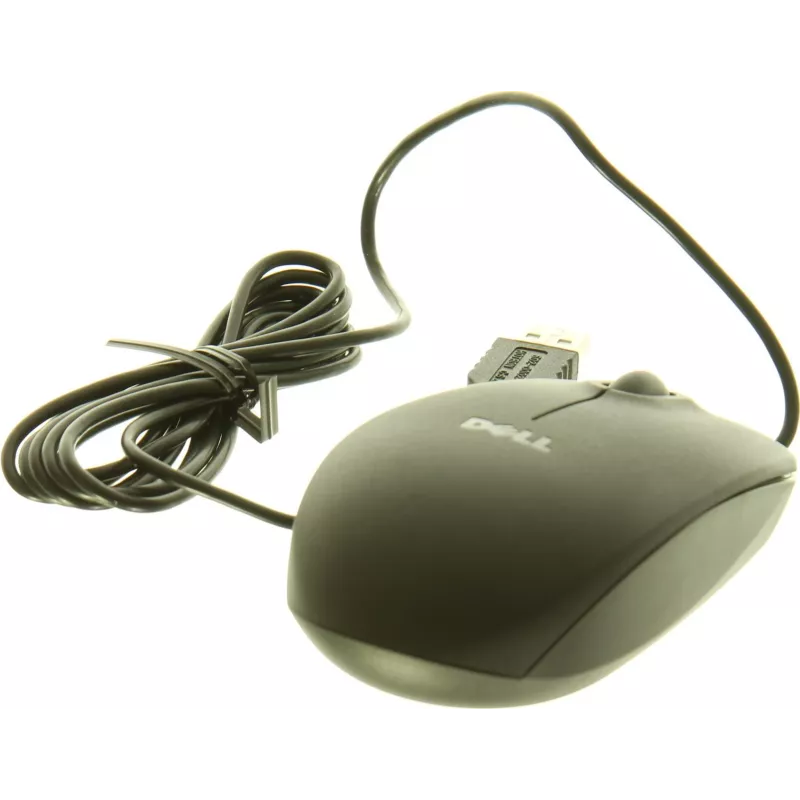
Mouse Dell Kit 9RRC7 USB 3 Buttons

Mouse Dell Kit 9RRC7 USB 3 Buttons
R423
The Dell Kit 9RRC7 USB 3 Buttons mouse is a wired optical mouse with a USB connection and three-button layout designed for everyday computer use. It offers plug-and-play setup with standard USB compatibility, an ergonomic shape intended to reduce hand fatigue during extended sessions, and responsive... Read More
Stock 1 Code 1502016 Brand DELL Model 9RRC7 Warranty 2 Years

Shipping & Returns

Estimated delivery Tuesday, September 29
You will be kept updated through our detailed tracking system
Payment options
EFTPayFastBank CardSnapScanZapperGoogle PayApple PayMobicredMoreTymePay on Arrival

The Dell Kit 9RRC7 USB 3 Buttons mouse is a wired optical mouse with a USB connection and three-button layout designed for everyday computer use. It offers plug-and-play setup with standard USB compatibility, an ergonomic shape intended to reduce hand fatigue during extended sessions, and responsive tracking suitable for desktop tasks and casual gaming. The device is compatible with common operating systems and provides a straightforward navigation experience for office work, browsing and multimedia control.

Advantages

The mouse provides a simple USB connection that requires no additional drivers for basic operation, ensuring quick setup across most PCs and laptops. Its three-button configuration delivers left, right and middle-click functionality for efficient workflow and improved control. The ergonomic housing supports a natural hand position to help minimize strain during prolonged use. Reliable optical tracking offers consistent pointer movement on a variety of surfaces when used with an appropriate mouse pad.

Key specifications

  • Interface: USB wired connection for plug-and-play use
  • Buttons: three-button layout (left, right, middle/scroll click)
  • Sensor type: optical tracking suitable for general use
  • Ergonomics: contoured shape designed for extended comfort
  • Compatibility: works with common desktop and laptop operating systems without extra drivers for basic functions
  • Power: bus-powered via USB — no batteries required

How to use

Connect the mouse to an available USB port on your computer. The system should recognize the device automatically and enable basic functions such as pointer movement and clicking. Use the left and right buttons for primary actions and the middle button (pressable scroll wheel) for scrolling or middle-click tasks. For optimal tracking, place the mouse on a flat, stable surface or a mouse pad; avoid highly reflective or uneven surfaces. Adjust pointer speed and button configuration in your operating system settings if needed.

Key Highlights
  • Офисной работы: набор текста, работа с электронными таблицами и почтой
  • Браузинга и управления мультимедиа
  • Домашнего использования и учебы
  • Повседневных и казуальных игровых задач
  • Interface: USB wired connection for plug-and-play use
  • Buttons: three-button layout (left, right, middle/scroll click)
  • Sensor type: optical tracking suitable for general use
  • Ergonomics: contoured shape designed for extended comfort
  • Compatibility: works with common desktop and laptop operating systems without extra drivers for basic functions
  • Power: bus-powered via USB — no batteries required
Price history over the last 6 months
Mouse Dell Kit 9RRC7 USB 3 Buttons
Current
R423
Lowest
R400
Highest
R430
Change 24H
+R17   +4%
Week
+R23   +6%
Month
+R19   +5%

Popular products in this category

WhatsApp
Hi, I’m DistriNode’s AI assistant. I can help you find products, compare options, create quote PDFs, or open support requests.