Account Contact
Your Cart
Pay the courier with no extra fees.
Need help? DistriNode AI can handle any task on our site.

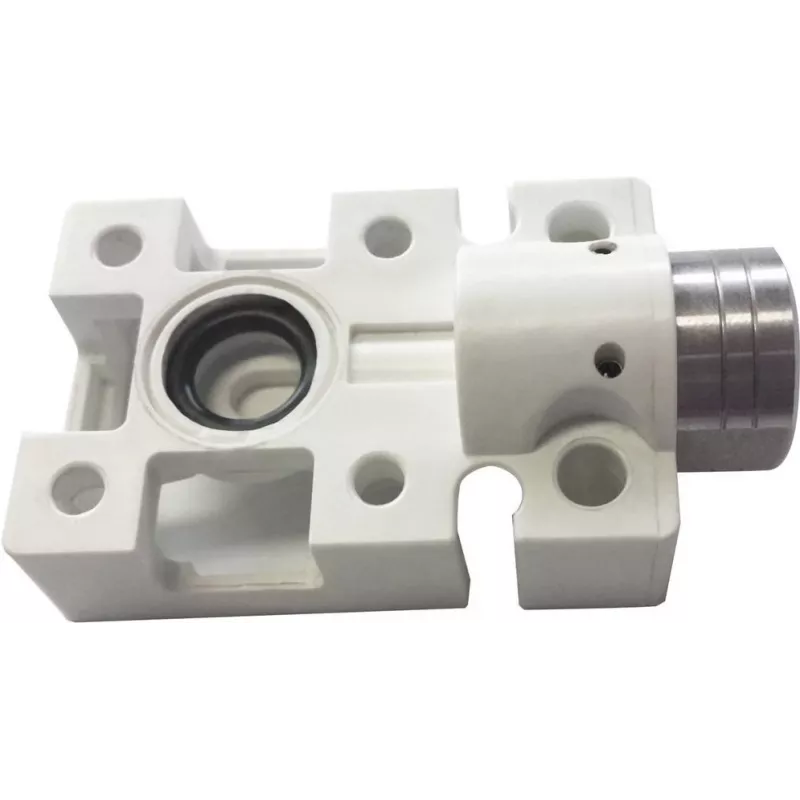
Mounting frame Panasonic MS-DP2-2 for panel installation, model MS-DP2-2

Mounting frame Panasonic MS-DP2-2 for panel installation, model MS-DP2-2
R389
The Panasonic MS-DP2-2 mounting frame is a metal installation accessory designed to secure compatible Panasonic devices into control panels and display housings. Intended for flush panel mounting, the frame provides a stable, fixed attachment that aligns device edges with a panel cutout and supports... Read More
Stock 7 Code 2217040 Brand PANASONIC Model MS-DP2-2 Warranty 2 Years

Shipping & Returns

Estimated delivery Tuesday, October 6
You will be kept updated through our detailed tracking system
Payment options
EFTPayFastBank CardSnapScanZapperGoogle PayApple PayMobicredMoreTymePay on Arrival

The Panasonic MS-DP2-2 mounting frame is a metal installation accessory designed to secure compatible Panasonic devices into control panels and display housings. Intended for flush panel mounting, the frame provides a stable, fixed attachment that aligns device edges with a panel cutout and supports professional electrical and AV installations where a precise, durable mount is required.

Advantages

The metal construction offers mechanical stability and long-term durability in environments where equipment is handled or exposed to vibration. The frame is engineered to fit common panel cutouts for compatible Panasonic models, simplifying installation and reducing the need for custom fabrication. Its design keeps the device flush with the panel surface for a clean, professional appearance and helps maintain correct alignment with connectors and controls.

Suitable for

  • Control panels and operator consoles
  • AV racks and integrated display installations
  • Industrial equipment housings requiring fixed panel-mounted components
  • Repair or retrofit projects replacing or upgrading panel-mounted devices

Key specifications

  • Material: metal frame for secure mechanical support
  • Mounting type: flush panel installation
  • Compatibility: designed for compatible Panasonic panel devices
  • Finish: corrosion-resistant surface treatment suitable for indoor installations
  • Form factor: fixed frame matching standard panel cutout dimensions for intended devices

How to use

Prepare the panel by cutting an opening that matches the dimensions required for the compatible Panasonic device. Insert the mounting frame into the panel cutout, ensuring it sits flush and aligns with the panel edges. Place the device into the frame and secure it using the recommended fasteners through the frame attachment points until the device is held firmly in position. Verify that connectors and controls are accessible and that the device is seated evenly within the panel plane.

Recommendations

Confirm device compatibility and required cutout dimensions before installation. Use appropriate safety practices when cutting panels and handling metal parts. For environments with moisture, dust, or corrosive agents, consider additional sealing or protective measures to preserve the frame and mounted device.

Key Highlights
  • Control panels and operator consoles
  • AV racks and integrated display installations
  • Industrial equipment housings requiring fixed panel-mounted components
  • Repair or retrofit projects replacing or upgrading panel-mounted devices
  • Material: metal frame for secure mechanical support
  • Mounting type: flush panel installation
  • Compatibility: designed for compatible Panasonic panel devices
  • Finish: corrosion-resistant surface treatment suitable for indoor installations
  • Form factor: fixed frame matching standard panel cutout dimensions for intended devices
Price history over the last 6 months
Mounting frame Panasonic MS-DP2-2 for panel installation, model MS-DP2-2
Current
R389
Lowest
R379
Highest
R389
Change 24H
+R9   +2%
Week
—   
Month
—   
WhatsApp
Hi, I’m DistriNode’s AI assistant. I can help you find products, compare options, create quote PDFs, or open support requests.