Account Contact
Your Cart
Pay the courier with no extra fees.
Need help? DistriNode AI can handle any task on our site.

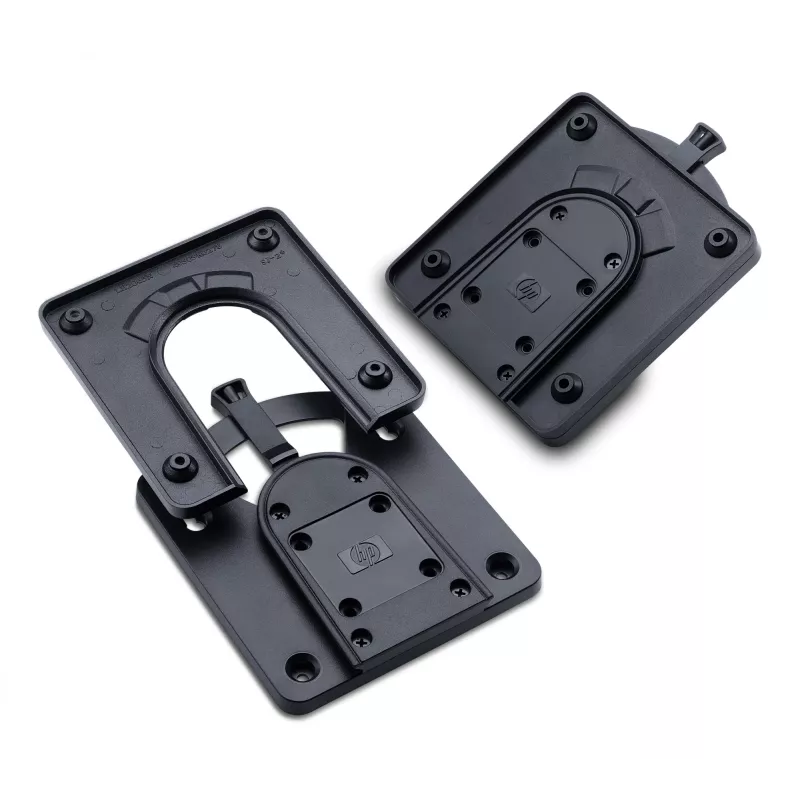
Mounting Bracket HP Quick Release Bracket 2

Mounting Bracket HP Quick Release Bracket 2
R612
Use the HP Quick Release Bracket 2 to attach an HP Desktop Mini to an HP display and a variety of stands, arms or wall mounts. The bracket provides a compact mounting solution that keeps the PC close to the display for a space-saving setup and straightforward cable routing.AdvantagesThe bracket incl... Read More
Stock 100 Code 123939 Brand HP Model 6KD15AA Warranty 2 Years

Shipping & Returns

Estimated delivery Friday, October 2
You will be kept updated through our detailed tracking system
Payment options
EFTPayFastBank CardSnapScanZapperGoogle PayApple PayMobicredMoreTymePay on Arrival

Use the HP Quick Release Bracket 2 to attach an HP Desktop Mini to an HP display and a variety of stands, arms or wall mounts. The bracket provides a compact mounting solution that keeps the PC close to the display for a space-saving setup and straightforward cable routing.

Advantages

The bracket includes a failsafe "Sure-Lock" mechanism that snaps the PC securely in place and a theft-deterrent security screw option for additional protection. It is compatible with HP Desktop Mini models and designed to work with HP displays and standard mounting accessories.

Key specifications

  • Compatibility: HP Desktop Mini and compatible HP displays
  • Mounting options: display, stands, arms, wall mounts
  • Locking mechanism: Sure-Lock snap-in
  • Security: theft-deterrent security screw compatible

How to use

Attach the bracket to the back of a compatible HP display or to a chosen stand, arm or wall mount following the mount manufacturer’s instructions. Slide the HP Desktop Mini into the bracket until the Sure-Lock mechanism engages and the unit snaps into place. If additional security is required, install the theft-deterrent screw to secure the Mini to the bracket.

Recommendations

Verify compatibility with your specific HP Desktop Mini model and display before installation and follow the mounting and safety instructions provided by HP and the mount manufacturer.
Key Highlights
  • Storefronts/kiosks: Mount flat panel monitors for easy viewing and add touchscreens for interactivity.
  • Trade shows: Securely mount LCD TVs or monitors in common areas and quickly remove them for safekeeping at the end of the day.
  • Front office environments: Minimize desk space requirements with wall or swing-arm mounting of monitors in reception areas.
  • Training labs: Mount a monitor directly on a 100 mm VESA-compatible PC or HP Compaq t5720 Thin Client for all-in-one convenience.
  • Medical/institutional settings: Securely mount monitors in nursing stations and public areas.
Specifications
Compatibility
All Essential and Advantage Monitor series. For detailed compatibility list, please check QuickSpec document.
Country of origin
China
Depth
130 mm
General Product Safety Regulation (GPSR) URL
https://support.hp.com/us-en/document/ish_6126692-6126777-16?openCLC=true
Height
17.9 mm
HP segment
Business
Package depth
147 mm
Package height
55 mm
Package weight
690 g
Package width
184 mm
UNSPSC-code
31162313
Weight
490 g
Width
167 mm

Document

Open Document

Leaflet

Open Leaflet
Price history over the last 6 months
Mounting Bracket HP Quick Release Bracket 2
Current
R612
Lowest
R366
Highest
R762
Change 24H
+R55   +10%
Week
-R66   -10%
Month
-R71   -10%

Popular products in this category

WhatsApp
Hi, I’m DistriNode’s AI assistant. I can help you find products, compare options, create quote PDFs, or open support requests.