Account Contact
Your Cart
Pay the courier with no extra fees.
Need help? DistriNode AI can handle any task on our site.

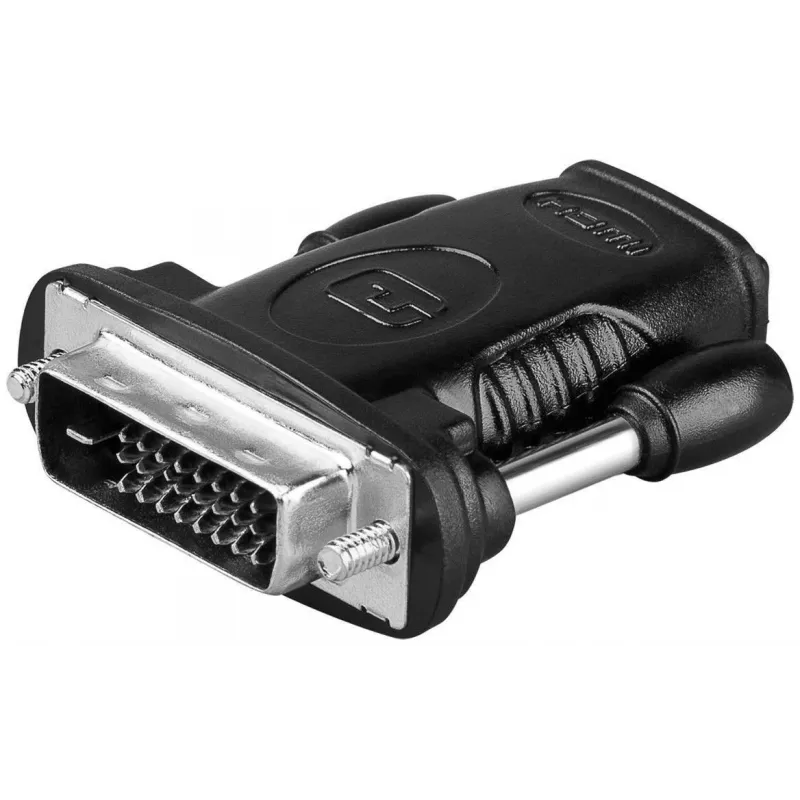
Microconnect HDM19F24 cable gender changer HDMI Type A DVI-D Dual Link (24+1 pin) Black

Microconnect HDM19F24 cable gender changer HDMI Type A DVI-D Dual Link (24+1 pin) Black
R510
The MicroConnect HDM19F24 is a compact cable gender changer that converts an HDMI Type A connector into a DVI‑D Dual Link (24+1 pin) connector. It is intended for use with devices such as computer monitors and flat screens to enable connection between HDMI output sources and DVI‑D inputs while maint... Read More
Stock 386 Code 1181325 Brand MICROCONNECT Model HDM19F24 Warranty 2 Years

Shipping & Returns

Estimated delivery Tuesday, October 6
You will be kept updated through our detailed tracking system
Payment options
EFTPayFastBank CardSnapScanZapperGoogle PayApple PayMobicredMoreTymePay on Arrival

The MicroConnect HDM19F24 is a compact cable gender changer that converts an HDMI Type A connector into a DVI‑D Dual Link (24+1 pin) connector. It is intended for use with devices such as computer monitors and flat screens to enable connection between HDMI output sources and DVI‑D inputs while maintaining digital signal integrity.

Advantages

The adapter features nickel‑plated contacts for reliable signal transmission and corrosion resistance. Its small, black housing offers a low‑profile solution that preserves desk and rack space and provides a simple, tool‑free way to adapt HDMI Type A to DVI‑D Dual Link interfaces.

Suitable for

  • Connecting an HDMI output (laptop, media player, graphics card) to a DVI‑D Dual Link monitor
  • Using HDMI devices with DVI‑only displays in home or office setups
  • Temporary or permanent interface conversion where digital video is required

Key specifications

  • Manufacturer: MicroConnect
  • Model: HDM19F24
  • Connector 1: HDMI Type A
  • Connector 2: DVI‑D Dual Link (24+1 pin)
  • Contact plating: Nickel‑plated contacts
  • Colour: Black
  • Weight: 0.02 kg
  • Category: Cable interface and gender adapters

How to use

Insert the HDMI Type A plug from the source device into the adapter’s HDMI port and then connect the adapter’s DVI‑D connector to the DVI cable or directly into the DVI‑D input on the display. Ensure both devices are powered off when making connections, then power them on and select the appropriate input on the display. This adapter carries a digital video signal only; it does not convert audio to DVI.

Recommendations

Use short, high‑quality DVI or HDMI cables to minimise signal loss. Verify that the display supports the resolution and refresh rate required by the source device; DVI‑D Dual Link supports higher resolutions if both devices and cables are compatible.
Key Highlights
  • Connecting an HDMI output (laptop, media player, graphics card) to a DVI‑D Dual Link monitor
  • Using HDMI devices with DVI‑only displays in home or office setups
  • Temporary or permanent interface conversion where digital video is required
  • Manufacturer: MicroConnect
  • Model: HDM19F24
  • Connector 1: HDMI Type A
  • Connector 2: DVI‑D Dual Link (24+1 pin)
  • Contact plating: Nickel‑plated contacts
  • Colour: Black
  • Weight: 0.02 kg
  • Category: Cable interface and gender adapters
Specifications
Compliance certificates
RoHS
Connector 1
HDMI Type A
Connector 1 gender
Female
Connector 2
DVI-D Dual Link (24+1 pin)
Connector 2 gender
Male
Connector contacts plating
Nickel
Country of origin
China
Package depth
120 mm
Package height
21 mm
Package weight
32 g
Package width
157 mm
Product colour
Black
Weight
20 g

Leaflet

Open Leaflet
Price history over the last 6 months
Microconnect HDM19F24 cable gender changer HDMI Type A DVI-D Dual Link (24+1 pin) Black
Current
R510
Lowest
R104
Highest
R510
Change 24H
+R22   +5%
Week
+R405   +387%
Month
+R405   +385%

Popular products in this category

WhatsApp
Hi, I’m DistriNode’s AI assistant. I can help you find products, compare options, create quote PDFs, or open support requests.