Account Contact
Your Cart
Pay the courier with no extra fees.
Need help? DistriNode AI can handle any task on our site.

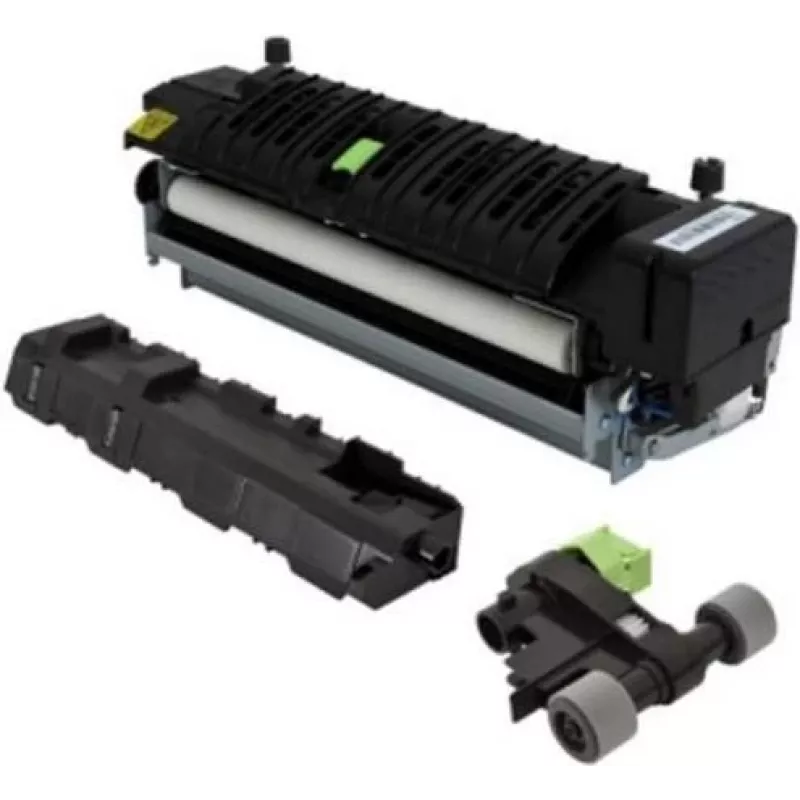
Maintenance kit for Lexmark CX735 multifunction — model 41X3883, fuser maintenance kit 220V, 1 pc

Maintenance kit for Lexmark CX735 multifunction — model 41X3883, fuser maintenance kit 220V, 1 pc
R12,612
Lexmark 41X3883 maintenance kit is a service spare designed for Lexmark CX735 series multifunction printers. The kit includes the necessary fuser maintenance components for 220V models, supplied as a single unit to support scheduled servicing and restore reliable paper handling and stable print perf... Read More
Stock 4 Code 1494838 Brand LEXMARK Model 41X3883 Warranty 2 Years

Shipping & Returns

Estimated delivery Wednesday, October 7
You will be kept updated through our detailed tracking system
Payment options
EFTPayFastBank CardSnapScanZapperGoogle PayApple PayMobicredMoreTymePay on Arrival

Lexmark 41X3883 maintenance kit is a service spare designed for Lexmark CX735 series multifunction printers. The kit includes the necessary fuser maintenance components for 220V models, supplied as a single unit to support scheduled servicing and restore reliable paper handling and stable print performance.

Advantages

This maintenance kit provides OEM-compatible fuser parts matched to the mechanical and electrical requirements of the CX735 series, helping maintain consistent print quality and reduce the likelihood of paper jams and fuser-related errors. By replacing worn fuser components with the correct 220V parts, the kit contributes to longer device uptime and predictable output for business workflows.

Suitable for

  • Scheduled maintenance of Lexmark CX735 series multifunction printers
  • Restoring print quality and reducing fuser-related print defects
  • Replacement of worn fuser components in 220V office environments

Key specifications

  • Product type: Fuser maintenance kit for multifunction printers
  • Compatible series: Lexmark CX735 family
  • Operating voltage: 220V
  • Contents: Fuser maintenance components supplied as one unit
  • Intended use: Scheduled servicing and component replacement

How to use

Turn off and unplug the printer before beginning any maintenance. Open the service access panels according to the device service guide, remove the worn fuser components, and install the replacement parts from the kit following the manufacturer's instructions. Reassemble panels, reconnect power, and run any recommended calibration or fuser conditioning procedures to verify correct operation and print quality.

Recommendations

Use this maintenance kit as part of a routine service schedule or when fuser-related issues appear. Verify that the device model is within the CX735 series and that the electrical supply is 220V before installing. Dispose of replaced components following local electronic waste regulations and consult the printer service manual for torque values, handling precautions, and safety instructions.

Key Highlights
  • Scheduled maintenance of Lexmark CX735 series multifunction printers
  • Restoring print quality and reducing fuser-related print defects
  • Replacement of worn fuser components in 220V office environments
  • Product type: Fuser maintenance kit for multifunction printers
  • Compatible series: Lexmark CX735 family
  • Operating voltage: 220V
  • Contents: Fuser maintenance components supplied as one unit
  • Intended use: Scheduled servicing and component replacement
Specifications
Brand compatibility
Lexmark
Compatibility
CX735
Device compatibility
Multifunctional
Quantity per pack
1 pc(s)
Type
Maintenance kit
Price history over the last 6 months
Maintenance kit for Lexmark CX735 multifunction — model 41X3883, fuser maintenance kit 220V, 1 pc
Current
R12,612
Lowest
R7,582
Highest
R12,856
Change 24H
+R1,809   +17%
Week
+R1,910   +18%
Month
+R1,829   +17%

Popular products in this category

WhatsApp
Hi, I’m DistriNode’s AI assistant. I can help you find products, compare options, create quote PDFs, or open support requests.