Account Contact
Your Cart
Pay on delivery – no extra fees
Need help? Ask our AI

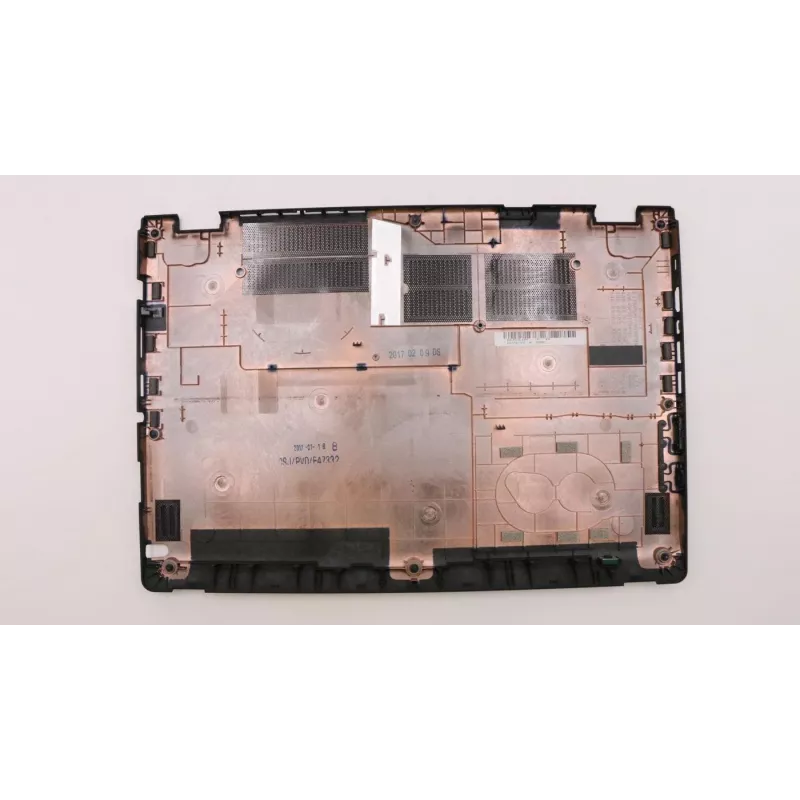
Laptop bottom cover Lenovo D Cover model 00UP081 (FRU00UP081)

Laptop bottom cover Lenovo D Cover model 00UP081 (FRU00UP081)
R1,435
Replacement bottom cover for Lenovo laptops, model D Cover 00UP081. This OEM-fit chassis part is designed to restore the original enclosure fit and finish, protect internal components from dust and impact, and provide the necessary mounting points for internal modules and service access. The cover m... Read More
Stock Out Of StockNo Stock Code 2234505 Brand LENOVO Model 00UP081 Warranty 2 Years

Shipping & Returns

Replacement bottom cover for Lenovo laptops, model D Cover 00UP081. This OEM-fit chassis part is designed to restore the original enclosure fit and finish, protect internal components from dust and impact, and provide the necessary mounting points for internal modules and service access. The cover matches the original shape and ventilation openings to maintain heat dissipation and structural integrity for compatible Lenovo laptop models.

Advantages

The Lenovo D Cover provides an exact-fit replacement that preserves factory tolerances and alignment of ports, feet, and attachment points. Made to the same physical specifications as the original part, it ensures proper ventilation and stability while carrying out repair or refurbishment work. Using an OEM-style bottom cover reduces risk of loose fittings, unusual vibration, or blocked vents compared with generic alternatives.

Suitable for

  • Repairing a damaged or cracked laptop base
  • Refurbishment projects to restore original chassis condition
  • Technicians performing internal component replacement or upgrades
  • Users needing original-fit parts for warranty-compliant repairs

Key specifications

  • Material: durable plastic composite designed for laptop chassis use
  • Form factor: bottom enclosure compatible with designated Lenovo D series models
  • Features: built-in ventilation openings and mounting bosses for internal components
  • Finish: factory-style textured surface to match original aesthetics
  • Access: service cutouts and screw locations aligned for original assembly

How to use

Power down the laptop, disconnect the battery if removable, and remove all external cables before beginning. Unscrew and remove the damaged bottom cover following the laptop manufacturer’s disassembly sequence, then position the replacement cover and secure it with the original screws in the specified locations. Confirm that vents, rubber feet, and port cutouts are correctly aligned and that internal components are seated properly before reassembling and testing.

Recommendations

Handle the cover with care during installation to avoid overtightening screws, which can warp the plastic. Use the original fasteners where possible and verify airflow paths remain unobstructed to maintain thermal performance.

Key Highlights
  • Repairing a damaged or cracked laptop base
  • Refurbishment projects to restore original chassis condition
  • Technicians performing internal component replacement or upgrades
  • Users needing original-fit parts for warranty-compliant repairs
  • Material: durable plastic composite designed for laptop chassis use
  • Form factor: bottom enclosure compatible with designated Lenovo D series models
  • Features: built-in ventilation openings and mounting bosses for internal components
  • Finish: factory-style textured surface to match original aesthetics
  • Access: service cutouts and screw locations aligned for original assembly
Price history is not available yet
We are still collecting enough daily price data for this product.

Popular products in this category

WhatsApp
Hi, I’m DistriNode’s AI assistant. I can help you find products, compare options, create quote PDFs, or open support requests.