Account Contact
Your Cart
Pay the courier with no extra fees.
Need help? DistriNode AI can handle any task on our site.

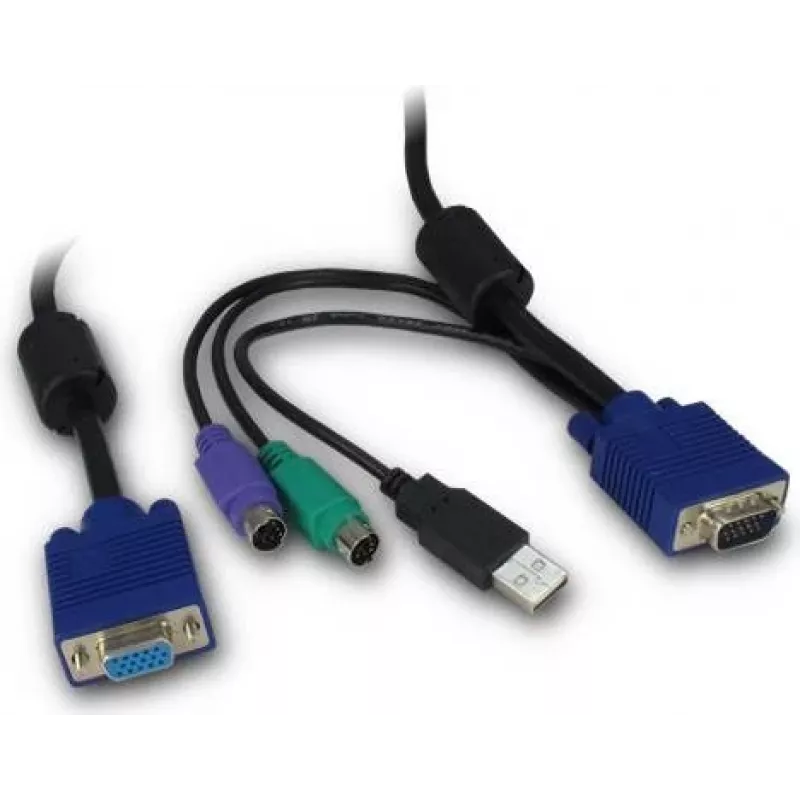
KVM cable Inter-Tech 88887250 Black Blue 3 m

KVM cable Inter-Tech 88887250 Black Blue 3 m
R548
The Inter-Tech 88887250 KVM cable is a 3 m PS/2 connection cable designed to link a keyboard and mouse to a KVM switch or directly to compatible systems. It provides separate PS/2 connectors for keyboard and mouse, enabling a single workstation to control multiple computers without changing input de... Read More
Stock 6 Code 2187083 Brand INTER-TECH Model 88887250 Warranty 2 Years

Shipping & Returns

Estimated delivery Tuesday, October 6
You will be kept updated through our detailed tracking system
Payment options
EFTPayFastBank CardSnapScanZapperGoogle PayApple PayMobicredMoreTymePay on Arrival

The Inter-Tech 88887250 KVM cable is a 3 m PS/2 connection cable designed to link a keyboard and mouse to a KVM switch or directly to compatible systems. It provides separate PS/2 connectors for keyboard and mouse, enabling a single workstation to control multiple computers without changing input devices. The cable’s black and blue color scheme helps identify connectors and routing while its length supports flexible placement of equipment within small to medium-sized work areas.

Advantages

The cable offers a straightforward setup with dedicated PS/2 plugs for both keyboard and mouse, reducing the chance of misconnection. A 3 m length balances reach and signal integrity for typical desktop environments. The use of durable materials and reliable connector housings ensures consistent operation during repeated plug-and-unplug cycles. Color-coded connectors simplify installation and maintenance in multi-cable rigs.

Suitable for

  • Connecting a keyboard and mouse to a KVM switch in office or lab environments
  • Linking legacy PS/2 peripherals to desktop computers or servers
  • Setting up shared input devices across multiple machines in service rooms or workshops
  • Replacing worn PS/2 connection cables in existing installations

Key specifications

  • Cable length: 3 m
  • Keyboard port type: PS/2
  • Mouse port type: PS/2
  • Product colour: Black and Blue

How to use

Connect the PS/2 keyboard plug to the keyboard port and the PS/2 mouse plug to the mouse port on the KVM switch or target computer. Ensure connectors are aligned with the socket pins and gently push until the plug seats fully without forcing. Route the cable to avoid sharp bends and interference from power cables. After connection, switch the KVM to the appropriate channel or power on the target computer to verify keyboard and mouse responsiveness.

Recommendations

For reliable operation, avoid frequent sharp bends or kinks and keep the cable away from high-power cables or strong electromagnetic sources. When connecting to older systems, power down equipment before inserting or removing PS/2 connectors to protect peripheral and motherboard ports.

Key Highlights
  • Connecting a keyboard and mouse to a KVM switch in office or lab environments
  • Linking legacy PS/2 peripherals to desktop computers or servers
  • Setting up shared input devices across multiple machines in service rooms or workshops
  • Replacing worn PS/2 connection cables in existing installations
  • Cable length: 3 m
  • Keyboard port type: PS/2
  • Mouse port type: PS/2
  • Product colour: Black and Blue
Specifications
Cable length
3 m
Connector 1
VGA, USB, 2x PS/2
Connector 1 gender
Male
Connector 2
KVM
Connector 2 gender
Female
Harmonized System (HS) code
84733080
Keyboard port type
PS/2
Mouse port type
PS/2
Product colour
Black, Blue
Video port type
VGA
Price history over the last 6 months
KVM cable Inter-Tech 88887250 Black Blue 3 m
Current
R548
Lowest
R536
Highest
R548
Change 24H
+R12   +2%
Week
—   
Month
—   

Popular products in this category

WhatsApp
Hi, I’m DistriNode’s AI assistant. I can help you find products, compare options, create quote PDFs, or open support requests.