Account Contact
Your Cart
Pay the courier with no extra fees.
Need help? DistriNode AI can handle any task on our site.

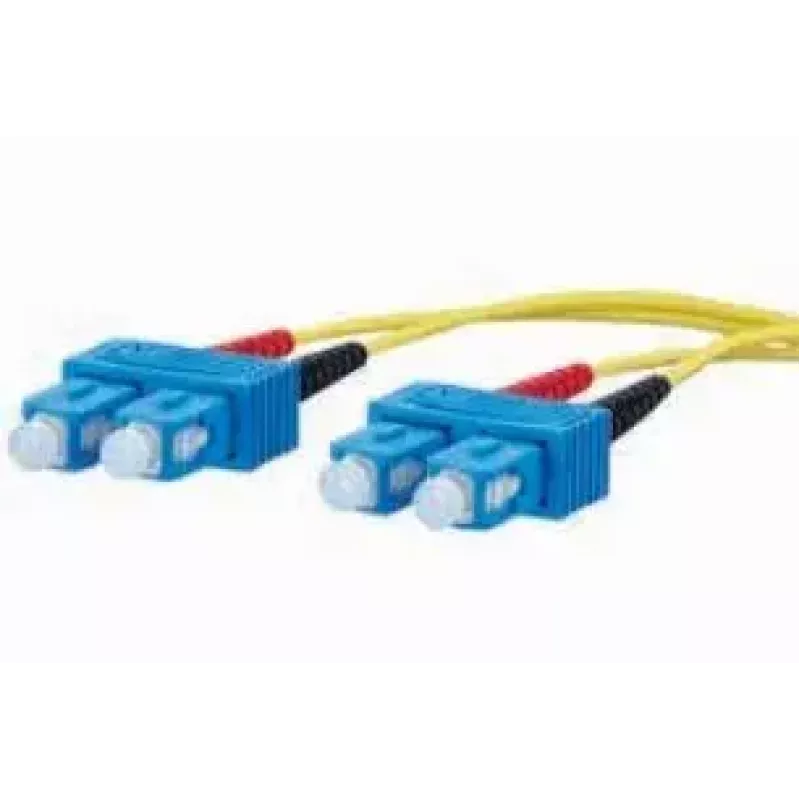
InfiniBand/fibre optic cable METZ CONNECT 151P1EOEO20E 2m 2x SC Yellow

InfiniBand/fibre optic cable METZ CONNECT 151P1EOEO20E 2m 2x SC Yellow
R564
The METZ CONNECT 151P1EOEO20E is a 2 m InfiniBand/fibre optic cable with two SC connectors designed for high-speed data transmission in professional network environments. With a single-mode core diameter of 9 µm and OS2 specification compatibility, this yellow cable supports long-distance, low-loss ... Read More
Stock 3 Code 2569074 Brand METZ Model 151P1EOEO20E Warranty 2 Years

Shipping & Returns

Estimated delivery Tuesday, October 6
You will be kept updated through our detailed tracking system
Payment options
EFTPayFastBank CardSnapScanZapperGoogle PayApple PayMobicredMoreTymePay on Arrival

The METZ CONNECT 151P1EOEO20E is a 2 m InfiniBand/fibre optic cable with two SC connectors designed for high-speed data transmission in professional network environments. With a single-mode core diameter of 9 µm and OS2 specification compatibility, this yellow cable supports long-distance, low-loss optical links and is suitable for data center interconnects, server racks and high-performance computing clusters.

Advantages

This single-mode fibre cable provides stable signal integrity and low attenuation over longer distances, reducing the need for repeaters or signal boosters. The two SC connectors offer reliable push-pull coupling with consistent optical contact, while the robust jacket and precise optical alignment minimise signal reflection and mechanical wear. The cable’s standardized OS2 performance ensures interoperability with equipment designed for single-mode long-haul applications.

Suitable for

  • Data centre uplinks and cross-connects
  • InfiniBand and high-performance computing interconnects
  • Server-to-switch fibre connections
  • Long-distance single-mode optical links
  • Telecommunications and backbone network segments

Key specifications

  • Cable length: 2 m
  • Connector type: 2× SC female connectors
  • Fibre type: single-mode
  • Core diameter: 9 µm
  • Optical class: OS2
  • Colour: yellow

How to use

Inspect both SC connector endfaces before installation and clean them if necessary using an appropriate fibre optic cleaning tool. Route the cable along existing cable trays or management paths, avoiding sharp bends and tight radii that exceed the manufacturer’s recommended minimum bend radius. Insert the SC connectors into the corresponding ports until the latch engages, ensuring correct polarity for transmit and receive channels. After connection, verify link status and perform an optical power or continuity test to confirm correct operation.

Recommendations

Store and handle the cable in a dry, dust-free environment. Minimise repeated mating cycles at the connector interfaces and use protective dust caps when connectors are not in use. For critical links, perform periodic optical loss measurements and visual inspections to maintain reliable performance.

Key Highlights
  • Data centre uplinks and cross-connects
  • InfiniBand and high-performance computing interconnects
  • Server-to-switch fibre connections
  • Long-distance single-mode optical links
  • Telecommunications and backbone network segments
  • Cable length: 2 m
  • Connector type: 2× SC female connectors
  • Fibre type: single-mode
  • Core diameter: 9 µm
  • Optical class: OS2
  • Colour: yellow
Specifications
Cable length
2 m
Cladding diameter
125 µm
Connector 1
2x SC
Connector 1 gender
Male
Connector 2
2x SC
Connector 2 gender
Male
Core diameter
9 µm
Fibre optic type
OS2
Product colour
Yellow
Price history over the last 6 months
InfiniBand/fibre optic cable METZ CONNECT 151P1EOEO20E 2m 2x SC Yellow
Current
R564
Lowest
R553
Highest
R845
Change 24H
+R9   +2%
Week
-R258   -31%
Month
-R267   -32%

Popular products in this category

WhatsApp
Hi, I’m DistriNode’s AI assistant. I can help you find products, compare options, create quote PDFs, or open support requests.