Account Contact
Your Cart
Pay the courier with no extra fees.
Need help? DistriNode AI can handle any task on our site.

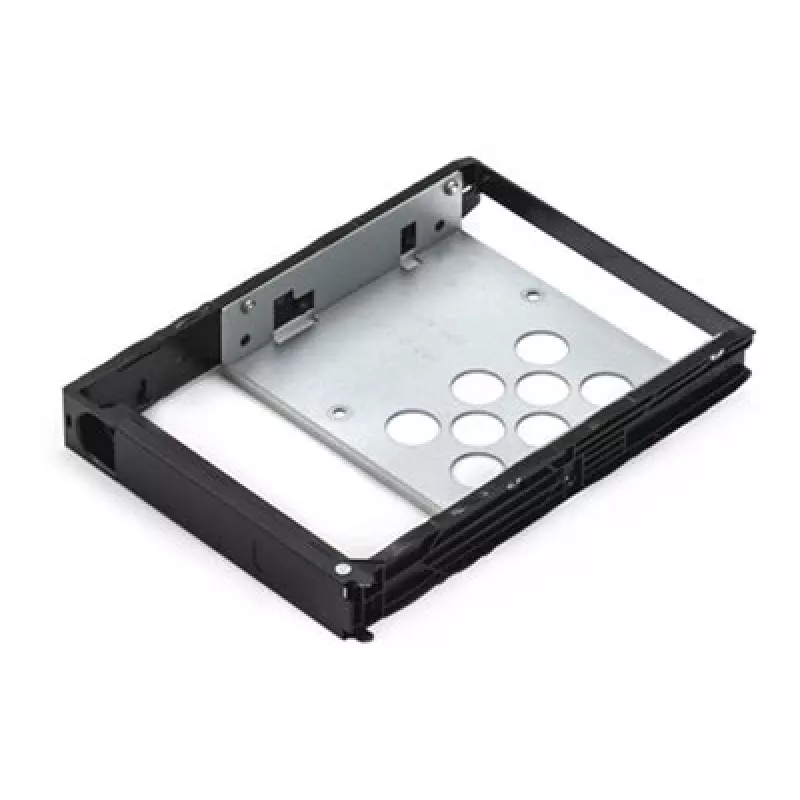
HDD Tray Synology Type R5 2.5/3.5 inch Black 171mm Width

HDD Tray Synology Type R5 2.5/3.5 inch Black 171mm Width
R1,012
The Synology HDD Tray Type R5 is a drive caddy compatible with both 2.5" and 3.5" hard drives. Finished in black and sized at 171 mm width, 104 mm depth and 27 mm height, the tray is intended for use in Synology NAS systems to provide a stable mounting solution and simplify drive installation and re... Read More
Stock 1 Code 1430096 Brand SYNOLOGY Model 89-DTTR05001 Warranty 2 Years

Shipping & Returns

Estimated delivery Tuesday, October 6
You will be kept updated through our detailed tracking system
Payment options
EFTPayFastBank CardSnapScanZapperGoogle PayApple PayMobicredMoreTymePay on Arrival

The Synology HDD Tray Type R5 is a drive caddy compatible with both 2.5" and 3.5" hard drives. Finished in black and sized at 171 mm width, 104 mm depth and 27 mm height, the tray is intended for use in Synology NAS systems to provide a stable mounting solution and simplify drive installation and replacement.

Advantages

The tray supports two common drive form factors (2.5" and 3.5") in a single caddy and is manufactured to match Synology bay dimensions for secure fit and alignment. Its compact profile and standardized mounting points make drive swaps straightforward while the black finish integrates with Synology NAS aesthetics.

Suitable for

  • Replacing or expanding drive bays in compatible Synology NAS enclosures
  • Mounting 2.5" SATA SSDs or 3.5" HDDs in Synology systems
  • System administrators and home users upgrading NAS storage capacity

Key specifications

  • Compatibility: Synology Type R5 drive tray
  • Supported drives: 2.5" and 3.5" hard drives
  • Dimensions (W×D×H): 171 mm × 104 mm × 27 mm
  • Color: Black
  • Brand: SYNOLOGY
  • MPN: 89-DTTR05001
  • EAN: 4711174728312

How to use

Slide the 2.5" or 3.5" drive into the tray aligning the drive's screw holes with the tray's mounting points, then secure the drive with the appropriate screws. Insert the loaded tray into the Synology NAS drive bay until it clicks or locks in place according to your NAS model's procedure. For removal, unlock or unlatch the bay and pull the tray straight out.

Recommendations

Use compatible SATA drives and follow your Synology NAS manual for hot-swap procedures and drive handling. Ensure the NAS is powered down if your model does not support hot-swapping, and handle drives on an anti-static surface to avoid damage.
Key Highlights
  • Replacing or expanding drive bays in compatible Synology NAS enclosures
  • Mounting 2.5" SATA SSDs or 3.5" HDDs in Synology systems
  • System administrators and home users upgrading NAS storage capacity
  • Compatibility: Synology Type R5 drive tray
  • Supported drives: 2.5" and 3.5" hard drives
  • Dimensions (W×D×H): 171 mm × 104 mm × 27 mm
  • Color: Black
  • Brand: SYNOLOGY
  • MPN: 89-DTTR05001
  • EAN: 4711174728312
Specifications
Compatible products
RS10613xs+, RS3617xs, RS3614xs+, RS3614RPxs, RS3614xs, RS3413xs+, RS2414RP+, RS2414+, RX1214RP, RX1214, RX1213sas
Depth
104 mm
Harmonized System (HS) code
85389099
Height
27 mm
Number of HDDs supported
1
Number of SSDs supported
1
Product colour
Black
Size (imperial)
2.5 "
Type
Tray
Weight
0.09 kg
Width
171 mm
Price history over the last 6 months
HDD Tray Synology Type R5 2.5/3.5 inch Black 171mm Width
Current
R1,012
Lowest
R975
Highest
R1,028
Change 24H
+R29   +3%
Week
+R25   +2%
Month
+R16   +2%

Popular products in this category

WhatsApp
Hi, I’m DistriNode’s AI assistant. I can help you find products, compare options, create quote PDFs, or open support requests.