Account Contact
Your Cart
Pay the courier with no extra fees.
Need help? DistriNode AI can handle any task on our site.

Handle OKI 3PP4025-2871P021

Handle OKI 3PP4025-2871P021
R364
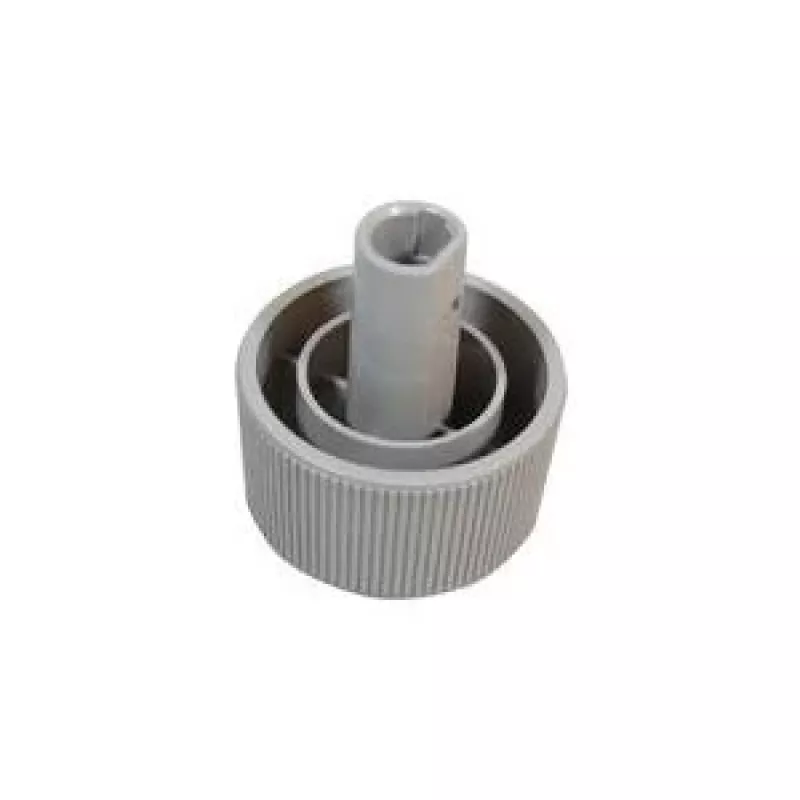
The OKI 3PP4025-2871P021 handle is a replacement spare part intended for dot matrix printers. Designed in grey, it is compatible with a range of OKI MICROLINE models including ML5590, ML5591, ML3320, ML3390, ML3321 and ML3391. The handle is built to restore or maintain the printer's paper-feed and c... Read More
Stock 21 Code 1744117 Brand OKI Model 3PP4025-2871G021 Warranty 2 Years

Shipping & Returns

Estimated delivery Tuesday, October 6
You will be kept updated through our detailed tracking system
Payment options
EFTPayFastBank CardSnapScanZapperGoogle PayApple PayMobicredMoreTymePay on Arrival

The OKI 3PP4025-2871P021 handle is a replacement spare part intended for dot matrix printers. Designed in grey, it is compatible with a range of OKI MICROLINE models including ML5590, ML5591, ML3320, ML3390, ML3321 and ML3391. The handle is built to restore or maintain the printer's paper-feed and cover manipulation functions, providing straightforward fitment where the original handle has become worn or broken.

Advantages

This handle offers a durable construction suitable for repeated manual operation in office or industrial environments. Its form factor matches the original equipment geometry to ensure correct engagement with the printer's latches and mounting points. The neutral grey finish helps it blend with existing printer casing while resisting visible dirt during prolonged use.

Suitable for

  • Replacement of broken or worn handles on compatible OKI dot matrix printers
  • Maintenance and refurbishment of office or production-line printers
  • Service technicians performing on-site repairs or spare-parts stocking

Key specifications

  • Compatibility: OKI MICROLINE series dot matrix printers (listed models)
  • Color: grey
  • Function: manual handle for cover/paper-feed operation
  • Material: durable molded plastic designed for repeated use
  • Mounting: designed to match original mounting points and latch engagement

How to use

Power off the printer and follow the manufacturer's instructions to access the existing handle. Remove any retaining screws or clips, carefully detach the old handle, and align the replacement so its mounting points engage the printer's latches. Secure the handle with the original screws or clips, verify smooth movement of the cover or paper-feed mechanism, and restore power to the printer before testing with a sample print job.

Recommendations

Use compatible fastening hardware and avoid applying excessive force during installation. Inspect the surrounding latch and hinge components for wear and replace them if necessary to prevent premature failure of the new handle. Keep a spare on hand for minimal downtime in environments with high printer usage.

Key Highlights
  • Replacement of broken or worn handles on compatible OKI dot matrix printers
  • Maintenance and refurbishment of office or production-line printers
  • Service technicians performing on-site repairs or spare-parts stocking
  • Compatibility: OKI MICROLINE series dot matrix printers (listed models)
  • Color: grey
  • Function: manual handle for cover/paper-feed operation
  • Material: durable molded plastic designed for repeated use
  • Mounting: designed to match original mounting points and latch engagement
Specifications
Brand compatibility
OKI
Compatibility
MICROLINE ML5590, ML5591, ML3320, ML3390, ML3321, ML3391
Device compatibility
Dot matrix printer
Harmonized System (HS) code
84439990
Product colour
Grey
Type
Handle
Price history over the last 6 months
Handle OKI 3PP4025-2871P021
Current
R364
Lowest
R350
Highest
R373
Change 24H
+R8   +2%
Week
+R13   +4%
Month
+R9   +3%

Popular products in this category

WhatsApp
Hi, I’m DistriNode’s AI assistant. I can help you find products, compare options, create quote PDFs, or open support requests.