Account Contact
Your Cart
Pay the courier with no extra fees.
Need help? DistriNode AI can handle any task on our site.

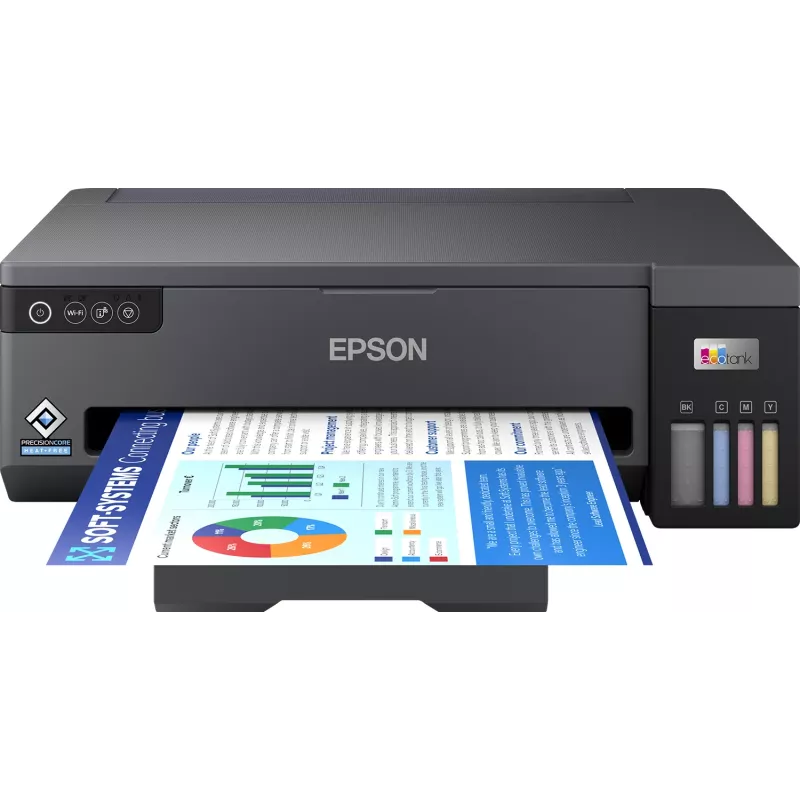
Epson EcoTank ET-14100 inkjet printer Colour 4800 x 1200 DPI A3 Wi-Fi

Epson EcoTank ET-14100 inkjet printer Colour 4800 x 1200 DPI A3 Wi-Fi
R12,702
The Epson EcoTank ET-14100 Colour 4800 x 1200 DPI is an A3-capable inkjet printer engineered for high-resolution colour and monochrome output. It delivers detailed prints at a maximum resolution of 4800 x 1200 DPI and produces up to 30 pages per minute for black-and-white documents. The model uses a... Read More
Stock 1 Code 130438 Brand EPSON Model C11CK39401 Warranty 2 Years

Shipping & Returns

Estimated delivery Thursday, October 1
You will be kept updated through our detailed tracking system
Payment options
EFTPayFastBank CardSnapScanZapperGoogle PayApple PayMobicredMoreTymePay on Arrival

The Epson EcoTank ET-14100 Colour 4800 x 1200 DPI is an A3-capable inkjet printer engineered for high-resolution colour and monochrome output. It delivers detailed prints at a maximum resolution of 4800 x 1200 DPI and produces up to 30 pages per minute for black-and-white documents. The model uses a four-ink system and refillable ink tanks to reduce running costs, while wireless connectivity simplifies printing from multiple devices. Its compact black housing is designed to fit home offices and small business workspaces where A3 capability and economical operation are required.

Advantages

The printer combines high optical resolution with a cost-efficient EcoTank ink system, offering low-cost per page compared with traditional cartridge models. Wi-Fi connectivity enables direct printing from laptops, smartphones and tablets without a wired connection. A3 support expands the range of printable materials, accommodating larger documents, posters and drawings. The unit's lightweight construction contributes to easier placement and repositioning in office environments.

Suitable for

  • Printing A3 posters, diagrams and spreadsheets
  • Home office and small business document needs
  • High-resolution colour images and marketing materials
  • Everyday monochrome printing with higher throughput

Key specifications

  • Maximum print resolution: 4800 x 1200 DPI
  • Print speed (black): up to 30 ppm
  • Max paper size: A3
  • Ink system: four separate refillable ink tanks (colour and black)
  • Connectivity: Wi‑Fi enabled (wireless)
  • Colour printing: Yes
  • Product colour: Black
  • Weight: 6.4 kg

How to use

Install the printer on a stable, level surface and connect it to your local Wi‑Fi network following the included setup instructions or the Epson software wizard. Fill the visible refillable ink tanks with the appropriate inks before initialisation, then run any required alignment and nozzle checks from the printer control panel or driver utility. Load paper into the input tray sized for A3 or smaller formats, select the correct paper size and quality settings in the print dialog, and send print jobs from your computer or mobile device. Regularly check ink levels via the on-screen status indicator and perform maintenance tasks such as printhead cleaning when print quality declines.

Recommendations

For consistent colour and detail, use manufacturer-recommended inks and paper types matched to the intended output. When printing large A3 jobs, allow time for pages to dry and avoid stacking immediately to prevent smudging. Keep the printer in a dust-free environment and perform periodic nozzle checks to maintain optimal print quality.

Key Highlights
  • Printing A3 posters, diagrams and spreadsheets
  • Home office and small business document needs
  • High-resolution colour images and marketing materials
  • Everyday monochrome printing with higher throughput
  • Maximum print resolution: 4800 x 1200 DPI
  • Print speed (black): up to 30 ppm
  • Max paper size: A3
  • Ink system: four separate refillable ink tanks (colour and black)
  • Connectivity: Wi‑Fi enabled (wireless)
  • Colour printing: Yes
  • Product colour: Black
  • Weight: 6.4 kg
Specifications
AC input frequency
50/60 Hz
AC input voltage
100 - 240 V
Built-in display
No
Colour
Yes
Depth
358 mm
Energy Star Typical Electricity Consumption (TEC)
0.16 kWh/week
Envelopes sizes
10, C4, C6, DL
Ethernet LAN
No
Height
165 mm
ISO A-series sizes (A0...A9)
A3, A4, A5, A6
ISO B-series sizes (B0...B9)
B4, B5, B6
Mac operating systems supported
Mac OS X 11.0 Big Sur, Mac OS X 12.0 Monterey, Mac OS X 13.0 Ventura
Market positioning
Home & office
Maximum ISO A-series paper size
A3
Maximum number of input trays
1
Maximum resolution
4800 x 1200 DPI
Mobile printing technologies
Epson Connect, Epson Email Print, Epson Remote Print
Non-ISO print media sizes
Legal, Letter
Number of print cartridges
4
Paper tray media types
Envelopes
Paper tray media weight
64 - 300 g/m²
Power consumption (off)
0.2 W
Power consumption (printing)
16 W
Power consumption (ready)
4.2 W
Print speed (black, normal quality, A4/US Letter)
30 ppm
Print speed (colour, draft quality, A4/US Letter)
20 ppm
Printing colours
Black, Cyan, Magenta, Yellow
Product colour
Black
Security algorithms
64-bit WEP, 128-bit WEP, WPA-PSK, WPA-TKIP, WPA2-AES, WPA2-PSK, WPA2-TKIP, WPA3-SAE
Server operating systems supported
Windows Server 2003, Windows Server 2003 R2, Windows Server 2008 R2, Windows Server 2012 R2, Windows Server 2016
Time to first page (black, normal)
8 s
Time to first page (colour, normal)
12 s
Total number of input trays
1
Total output capacity
100 sheets
USB port
Yes
Weight
6.4 kg
Wi-Fi
Yes
Wi-Fi Direct
Yes
Width
498 mm
Windows operating systems supported
Windows 10, Windows 11, Windows 7, Windows 8, Windows Vista

Manual

Open Manual

Leaflet

Open Leaflet
Price history over the last 6 months
Epson EcoTank ET-14100 inkjet printer Colour 4800 x 1200 DPI A3 Wi-Fi
Current
R12,702
Lowest
R9,996
Highest
R14,280
Change 24H
+R2,612   +26%
Week
+R2,706   +27%
Month
+R1,474   +13%

Popular products in this category

WhatsApp
Hi, I’m DistriNode’s AI assistant. I can help you find products, compare options, create quote PDFs, or open support requests.