Account Contact
Your Cart
Pay on delivery – no extra fees
Need help? Ask our AI

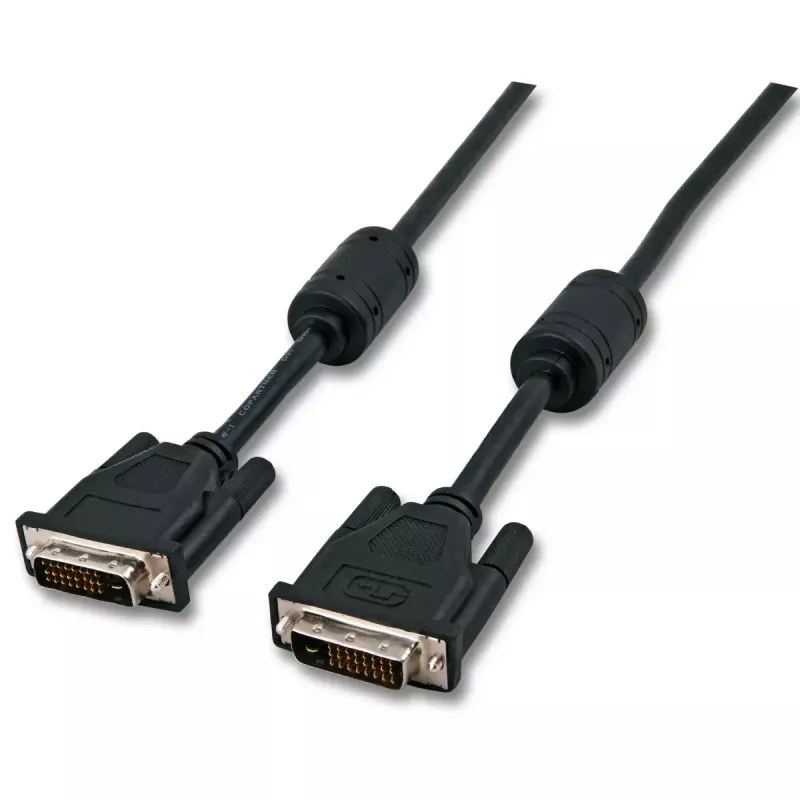
DVI cable EFB Elektronik DVI-D 5m

DVI cable EFB Elektronik DVI-D 5m
R484
The EFB Elektronik DVI-D 5m cable is a digital video connection cable designed to transmit uncompressed high-resolution video between computers, monitors and projectors. With DVI-D connectors on both ends and a 5 metre length, this cable provides a stable digital link for setups where device distanc... Read More
Stock 73 Code 2567121 Brand EFB ELEKTRONIK Model K5434.5V2 Warranty 2 Years

Shipping & Returns

Estimated delivery Thursday, October 22
You will be kept updated through our detailed tracking system
Payment options
EFTPayFastBank CardSnapScanZapperGoogle PayApple PayMobicredMoreTymePay on Arrival

The EFB Elektronik DVI-D 5m cable is a digital video connection cable designed to transmit uncompressed high-resolution video between computers, monitors and projectors. With DVI-D connectors on both ends and a 5 metre length, this cable provides a stable digital link for setups where device distance requires additional reach. The cable's black jacket and molded connectors are intended for reliable everyday use in home, office and professional AV environments.

Advantages

This DVI-D cable delivers a direct digital signal path that reduces signal degradation compared with analogue connections. The 5 m length offers flexible placement of displays and source devices without the need for adapters. Durable connector housings and a protective outer sheath help maintain connection integrity during repeated plugging and movement. The cable is compatible with devices that support single-link DVI-D digital video transmission.

Suitable for

  • Connecting desktop PCs or laptops to DVI-D compatible monitors
  • Linking computers to projectors for presentations
  • Use in office workstations and home setups that require a 5 m reach
  • Applications needing reliable digital video for gaming or multimedia playback

Key specifications

  • Cable length: 5 m
  • Connector type (both ends): DVI-D
  • Signal type: Digital video (DVI-D)
  • Colour: Black
  • Intended use: Video transmission between source and display devices

How to use

Ensure both source and display devices support DVI-D input/output. Align the DVI-D connector with the corresponding port on the source device and the display, then insert the connector gently and secure any fastening screws if present to avoid loosening. Power on the devices and select the appropriate input on the monitor or projector; the operating system or display settings can be used to configure resolution and refresh rate. For optimal image quality choose display settings supported by both devices.

Recommendations

Route the cable away from sources of strong electromagnetic interference and avoid tight bends or kinks to preserve signal integrity. For long-term installations secure the cable using clips or cable ties and avoid placing heavy objects on top of it. If higher resolutions or dual-link DVI features are required, verify device compatibility and consider using a cable that explicitly supports those features.

Key Highlights
  • Connecting desktop PCs or laptops to DVI-D compatible monitors
  • Linking computers to projectors for presentations
  • Use in office workstations and home setups that require a 5 m reach
  • Applications needing reliable digital video for gaming or multimedia playback
  • Cable length: 5 m
  • Connector type (both ends): DVI-D
  • Signal type: Digital video (DVI-D)
  • Colour: Black
  • Intended use: Video transmission between source and display devices
Specifications
Cable length
5 m
Connector 1
DVI-D
Connector 2
DVI-D
Harmonized System (HS) code
84733080
Maximum resolution
2560 x 1600
Product colour
Black
Price history over the last 6 months
DVI cable EFB Elektronik DVI-D 5m
Current
R484
Lowest
R473
Highest
R484
Change 24H
+R6   +1%
Week
+R9   +2%
Month
—   

Popular products in this category

WhatsApp
Hi, I’m DistriNode’s AI assistant. I can help you find products, compare options, create quote PDFs, or open support requests.