

Ask a Question About This Product


Shipping & Returns
Ask a question – the AI assistant answers instantly.


Description
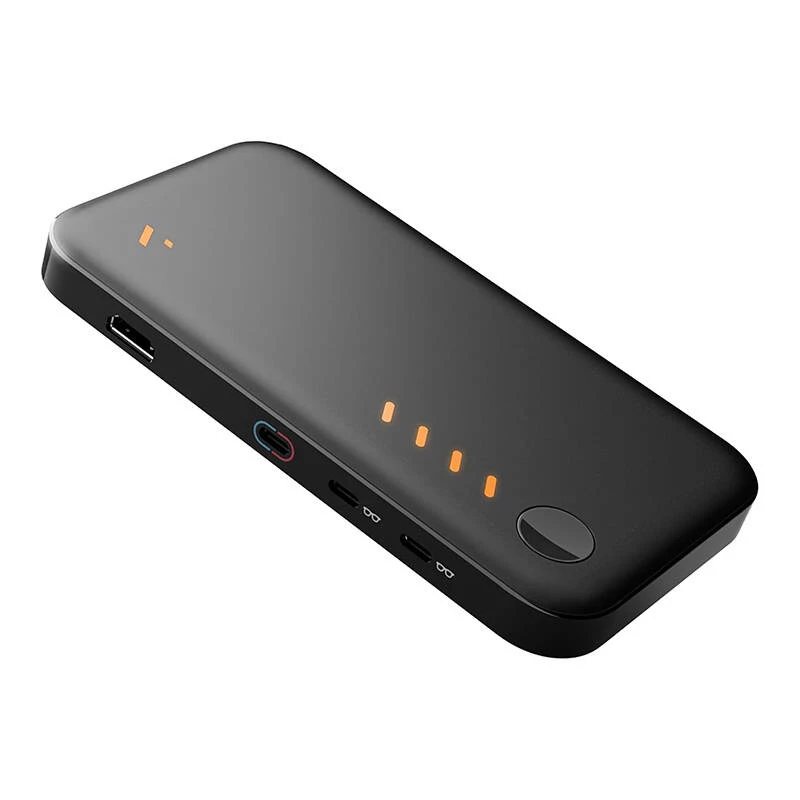
VITURE Pro mobile docking station
Are you using XR glasses? Elevate your mobile entertainment to a whole new level with the VITURE Pro Mobile Dock, designed specifically for fans of Nintendo Switch and other devices with video output. With it, every trip, journey or outing with friends can become an unforgettable multimedia experience. The station offers full support for 135-inch Full HD display and 120 Hz refresh rate - turning a small screen into an amazing XR space.

Share the experience with friends
The VITURE Pro Mobile Dock is the only XR dock that supports screen sharing, so you can enjoy local multiplayer gameplay of, say, "Super Smash Bros" or "Mario Kart" with friends! Simply connect two pairs of XR glasses or additional USB-C displays to play or watch movies together, wherever you are - just like in a movie theater, but without having to leave home.

A new dimension of entertainment with support for 3D
The new VITURE Pro Mobile Dock offers support for 3D content, opening up a world of 3D movies and games. Immerse yourself in extraordinary visual effects and feel like the hero of your favorite productions.

Full compatibility with HDMI and USB-C
With the station you will connect virtually any device that supports HDMI or USB-C output - from computers to Xbox consoles to smartphones and TV sticks. If your equipment has a video-out function, the VITURE Pro Mobile Dock will let you share video in the XR space, giving you maximum flexibility and convenience.

Longer operating time
The VITURE Pro Mobile Dock comes with a rechargeable battery to extend the runtime of your devices. Enjoy up to 8 hours of additional gaming on Switch, and up to 20 hours when using TV sticks or smartphones. It's ideal for entertainment lovers who want to make sure their devices can last through an entire movie marathon or a long evening of gaming.

Included
- VITURE Pro Mobile Docking Station
- USB-C to USB-C cable
- Protective case
- Quick start guide
| Manufacturer | VITURE |
|---|---|
| Model | VITURE Pro Mobile Dock |
| Manufacturer code | Pro-MbDk-Blk |
| HDMI port | Compatible with Chromecast, Fire TV Stick, PlayStation 4/5, Xbox Series, Roku Streaming Stick, and other devices with HDMI output. |
| USB-C port | Support for Nintendo Switch, Switch OLED, handheld consoles, iPhone 15 Series, and other smartphones and tablets with video-out function. |
| Battery capacity | 7500 mAh (5V/3A) (up to 8h); Connected to Steam Deck (up to 3h); connected to HDMI (up to 20h) |
| Compatibility: | Devices with HDMI Output: Gaming consoles, laptops, TV sticks; Devices with USB-C Output: Smartphones, tablets, Nintendo Switch and other mobile devices with video-out function. |
| Dimensions | 167 x 90.4 x 17.5 mm |
| Weight | 359 g |
| Interface | HDMI 1.4; USB-C 1: Input: 5V3A; 9V2.22A; 12V1.67A; 15V1.33A: Output: 5V3A; 9V2.22A; 12V1.67A; 15V1.33A; USB-C2: Output: 5V/1A; USB-C3: Output: 5V/1A. |
How to use
Connect a source device with HDMI or USB-C video-out to the VITURE Pro Mobile Dock using the appropriate cable. If using USB-C, plug into the dock's USB-C port; if using an HDMI device such as a TV stick or console, connect via the HDMI port. To share the screen between two XR glasses or additional USB-C displays, connect both displays to the dock simultaneously following device-specific pairing or display selection procedures. Charge the dock beforehand or connect to a power source to ensure extended runtime.
Recommendations
For best results, use HDMI 1.4-compatible cables and ensure connected devices support the declared video-out modes. Keep the dock charged before extended sessions, and verify device-specific display settings (refresh rate and resolution) to match the 135-inch Full HD / 120 Hz capability when applicable.
Specifications
Popular products in this category
8
- StarTech.com DKM31C3HVCPD USB-C Multiport Adapter / Dual Monitor Docking Station, 4K HDMI 2.0, VGA, USB-C DP Alt Mode Video, 100W PD Pass-Through, 2x USB-A 10Gbps, GbE, MST, Grey
- i-tec USB-C Metal Nano 2x Display Docking Station + Power Delivery 100 W
- ASUS Triple Display USB-C Dock Duo DC301 Docking Station, Wired, Black (90XB0A5N-BDS010)
- StarTech.com USB 3.0 Mini Dock - Dual Monitor USB-A Docking Station with DisplayPort 4K 60Hz Video & Gigabit Ethernet - 1ft (30cm) cable - Portable USB 3.1 Gen 1 Type-A Laptop Adapter
- OWC Go Dock - docking station - Thunderbolt 4 - HDMI, 2 x Thunderbolt 4 - GigE, 2.5 GigE - 120 Watt
- Docking station Lenovo ThinkPad USB4 Dock 5000 — Wired Thunderbolt 4, 65 W PD, 3840×2160, HDMI, 4× USB-A, Gigabit Ethernet, Black
- UNITEK USB-C Docking Station with DisplayLink 4K@30Hz 5Gbps PD 100W
- OWC Thunderbolt 4 Wired Dock Black Grey 3.5mm Ethernet 1000 Mbit/s