Account Contact
Your Cart
Black Weekup to −30%ends in 1 d 12:40:49
Pay on delivery – no extra fees
Need help? Ask our AI

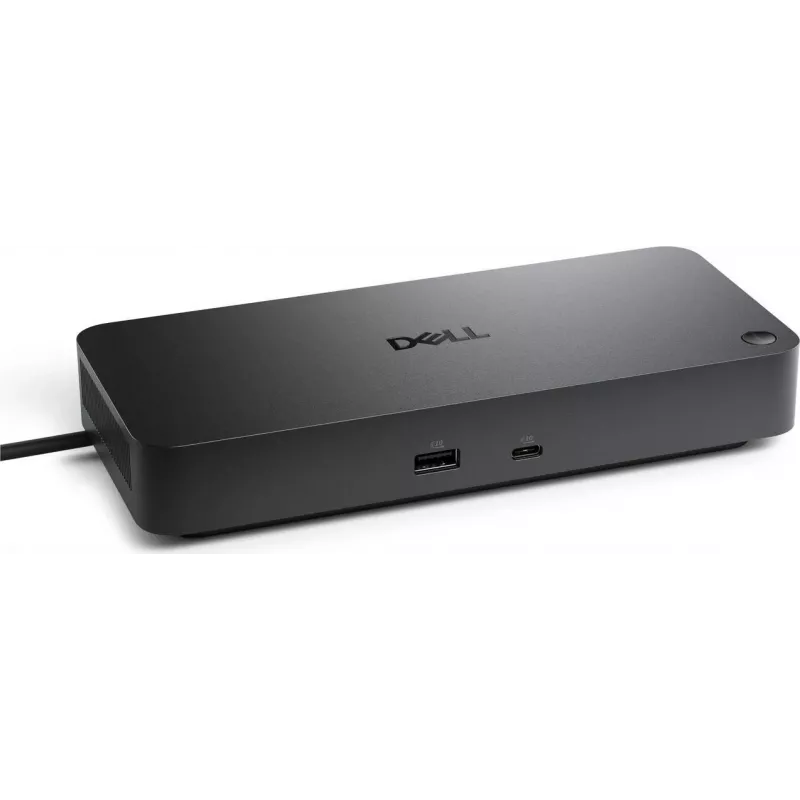
Docking station Dell Pro Thunderbolt 4 Dock WD25TB4 — Thunderbolt 4 connectivity for laptops

Docking station Dell Pro Thunderbolt 4 Dock WD25TB4 — Thunderbolt 4 connectivity for laptops
-10%
Black Week
Docking station Dell Pro Thunderbolt 4 Dock WD25TB4 — Thunderbolt 4 connectivity for laptops
R6,307
R7,003−10%
PDF
PDF
Stock 61 Code 2260027 Model WD25TB4 Warranty 2 Years

Shipping & Returns

Estimated delivery Wednesday, December 23
You will be kept updated through our detailed tracking system
Payment options
EFTPayFastBank CardSnapScanZapperGoogle PayApple PayMobicredMoreTymePay on Arrival

Ask a question – the AI assistant answers instantly.

Description

The Dell Pro Thunderbolt 4 Dock WD25TB4 is a professional docking station that expands connectivity for compatible laptops using Thunderbolt 4. It centralizes connections for displays, peripherals and wired network access while supporting high-speed data transfer and power delivery when the host laptop supports these features. The dock is designed for office and remote work environments where a compact, single-cable connection to a full workstation setup is needed.

Advantages

The docking station offers a single-cable workflow that reduces clutter and simplifies connecting multiple devices. Thunderbolt 4 connectivity ensures consistent high bandwidth for external displays and fast data transfer to compatible storage devices. Integrated power delivery capabilities allow supported laptops to charge through the dock, reducing the need for separate power adapters. A variety of downstream ports provides flexibility to connect monitors, keyboards, mice, external drives and wired Ethernet without frequent cable swapping.

Suitable for

  • Office workstations that require multiple external displays and peripherals
  • Hybrid or home offices where a single-cable laptop connection is preferred
  • Users who need high-speed data transfer to external storage
  • Environments that require reliable wired Ethernet connectivity

Key specifications

  • Host interface: Thunderbolt 4 compatibility for connection to laptops
  • Display support: Ability to drive multiple external monitors via Thunderbolt/DisplayPort/USB-C display protocols (subject to host graphics capabilities)
  • Data transfer: High-bandwidth data channels suitable for fast external storage and peripherals
  • Power delivery: Supports charging of compatible laptops through the dock when the host supports power input via Thunderbolt/USB-C
  • Network: Wired Ethernet port for stable LAN connectivity
  • Peripheral connectivity: Multiple downstream ports for USB devices and accessories
  • Form factor: Compact desktop docking unit designed for workstation desk placement

How to use

Connect the dock to a compatible laptop using a Thunderbolt 4 cable. Attach external monitors, keyboard, mouse, external drives and Ethernet cable to the dock’s downstream ports. If the laptop supports power delivery over Thunderbolt/USB-C, the dock can provide power to the laptop while other devices remain connected. Configure display settings and network preferences on the laptop operating system as needed. For optimal performance, use Thunderbolt 4-certified cables and ensure laptop firmware and drivers are up to date.

Recommendations

Place the dock on a stable surface near the laptop and connected devices; use certified Thunderbolt 4 cables for full bandwidth and power delivery. Keep host drivers and firmware updated to ensure compatibility and maximum performance with external displays and storage.

Key Highlights
  • Office workstations that require multiple external displays and peripherals
  • Hybrid or home offices where a single-cable laptop connection is preferred
  • Users who need high-speed data transfer to external storage
  • Environments that require reliable wired Ethernet connectivity
  • Host interface: Thunderbolt 4 compatibility for connection to laptops
  • Display support: Ability to drive multiple external monitors via Thunderbolt/DisplayPort/USB-C display protocols (subject to host graphics capabilities)
  • Data transfer: High-bandwidth data channels suitable for fast external storage and peripherals
  • Power delivery: Supports charging of compatible laptops through the dock when the host supports power input via Thunderbolt/USB-C
  • Network: Wired Ethernet port for stable LAN connectivity
  • Peripheral connectivity: Multiple downstream ports for USB devices and accessories
  • Form factor: Compact desktop docking unit designed for workstation desk placement
Price history over the last 6 months
Docking station Dell Pro Thunderbolt 4 Dock WD25TB4 — Thunderbolt 4 connectivity for laptops
Current
R6,307
Lowest 7d
R6,307
Highest 7d
R7,135
Change 24H
-R696   -10%
Change 7D
-R476   -7%
Change 30D
-R1,076   -15%

Write a review

Rating *
Your name will be shown publicly – you can use a nickname. We invite buyers to write reviews; we check reviews before publishing and publish critical ones too.

Same series and alternatives

3

Popular products in this category

8
WhatsApp
Messenger
Hi, I’m DistriNode’s AI assistant. I can help you find products, compare options, create quote PDFs, or open support requests.
All categories