Account Contact
Your Cart
Pay the courier with no extra fees.
Need help? DistriNode AI can handle any task on our site.

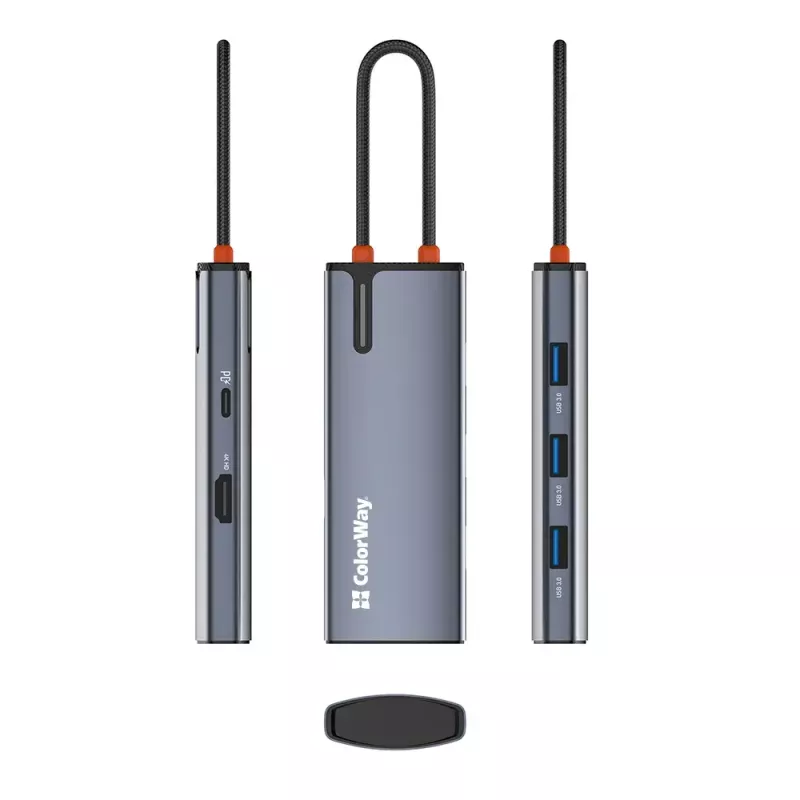
Docking station ColorWay CW-HUB01 5-in-1 USB-C with HDMI and Ethernet

Docking station ColorWay CW-HUB01 5-in-1 USB-C with HDMI and Ethernet
R552
ColorWay CW-HUB01 5-in-1 USB-C with HDMI and Ethernet is a compact docking station that expands a laptop or compatible USB-C device with essential ports for displays, wired networks and USB accessories. The hub provides a single USB-C connection to add an HDMI output for external monitors, an Ethern... Read More
Stock 1 Code 303526 Brand COLORWAY Model CW-HUB01 Warranty 2 Years

Shipping & Returns

Estimated delivery Thursday, October 1
You will be kept updated through our detailed tracking system
Payment options
EFTPayFastBank CardSnapScanZapperGoogle PayApple PayMobicredMoreTymePay on Arrival

ColorWay CW-HUB01 5-in-1 USB-C with HDMI and Ethernet is a compact docking station that expands a laptop or compatible USB-C device with essential ports for displays, wired networks and USB accessories. The hub provides a single USB-C connection to add an HDMI output for external monitors, an Ethernet port for stable wired internet, and additional USB ports for peripherals. Its portable design suits mobile workflows, meetings and simple workstation setups where a slim, multiport adapter is required.

Advantages

The docking station consolidates multiple interfaces into one device, reducing cable changes and enabling quick transitions between work locations. HDMI output supports connection to external screens for presentations or extended desktop use, while the Ethernet port delivers reliable network performance where Wi-Fi is weak or unavailable. The compact and lightweight housing makes the hub easy to carry, and plug-and-play operation requires no additional drivers on most operating systems.

Suitable for

  • Connecting a laptop to an external monitor for presentations or dual-screen productivity
  • Establishing a wired network connection for stable internet access during remote work or streaming
  • Attaching USB peripherals such as keyboard, mouse or external storage
  • Travel and mobile work where a lightweight multiport adapter is preferred

Key specifications

  • Interface type: USB-C host connection
  • Video output: HDMI port for external displays
  • Network: Gigabit Ethernet port for wired LAN connection
  • USB ports: multiple USB ports for peripherals (data transfer)
  • Form factor: compact and lightweight docking hub

How to use

Connect the ColorWay CW-HUB01 to the USB-C port of your laptop or compatible device. Attach an external display to the HDMI port and connect a network cable to the Ethernet port if wired internet is required. Plug in USB peripherals such as a keyboard, mouse or external drive into the available USB ports. Most systems will recognize the hub automatically; check the device’s USB-C port capabilities (DisplayPort Alt Mode and power delivery support if needed) to ensure full functionality.

Recommendations

Use a compatible USB-C port on the host device that supports video output for HDMI functionality. For the most stable network performance, connect directly to a router or managed switch via Ethernet. When transporting the hub, store it in a padded compartment to avoid cable strain or physical damage to ports.

Key Highlights
  • Connecting a laptop to an external monitor for presentations or dual-screen productivity
  • Establishing a wired network connection for stable internet access during remote work or streaming
  • Attaching USB peripherals such as keyboard, mouse or external storage
  • Travel and mobile work where a lightweight multiport adapter is preferred
  • Interface type: USB-C host connection
  • Video output: HDMI port for external displays
  • Network: Gigabit Ethernet port for wired LAN connection
  • USB ports: multiple USB ports for peripherals (data transfer)
  • Form factor: compact and lightweight docking hub
Price history over the last 6 months
Docking station ColorWay CW-HUB01 5-in-1 USB-C with HDMI and Ethernet
Current
R552
Lowest
R533
Highest
R552
Change 24H
+R14   +3%
Week
+R19   +4%
Month
+R18   +3%

Popular products in this category

WhatsApp
Hi, I’m DistriNode’s AI assistant. I can help you find products, compare options, create quote PDFs, or open support requests.