Account Contact
Your Cart
Pay the courier with no extra fees.
Need help? DistriNode AI can handle any task on our site.

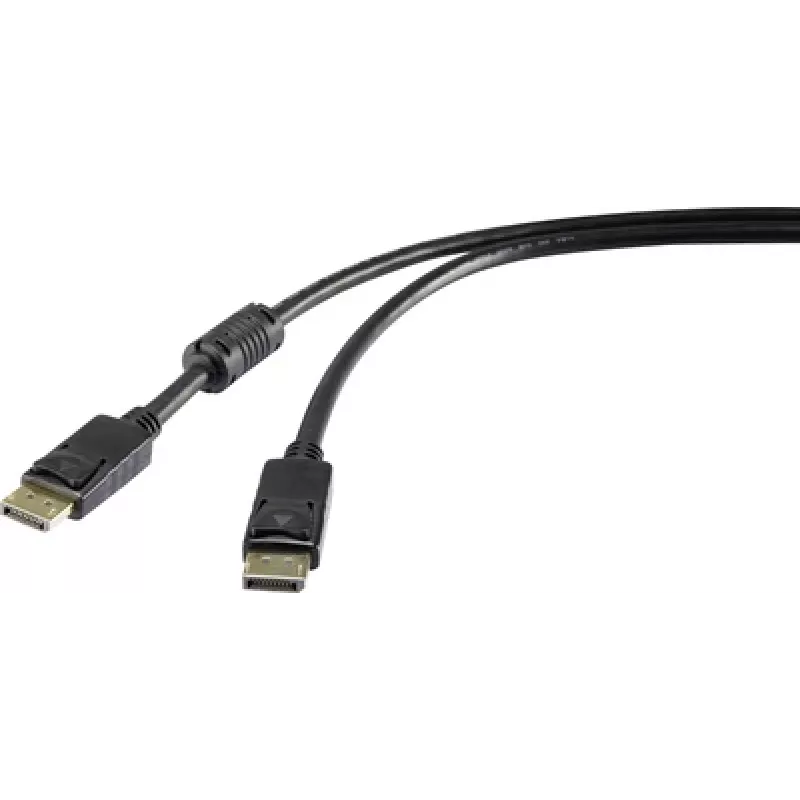
DisplayPort cable Renkforce 1409674 — 50 cm, Digital Video, DisplayPort 1.2

DisplayPort cable Renkforce 1409674 — 50 cm, Digital Video, DisplayPort 1.2
R472
The Renkforce DisplayPort cable 1409674 is a 50 cm cable designed for digital video transmission using the DisplayPort 1.2 standard. It enables connection between compatible PCs, laptops and monitors to deliver high-definition video signals in short-distance desktop environments. The cable is suitab... Read More
Stock 768 Code 2230722 Brand RENKFORCE Model 1409674 Warranty 2 Years

Shipping & Returns

Estimated delivery Tuesday, October 6
You will be kept updated through our detailed tracking system
Payment options
EFTPayFastBank CardSnapScanZapperGoogle PayApple PayMobicredMoreTymePay on Arrival

The Renkforce DisplayPort cable 1409674 is a 50 cm cable designed for digital video transmission using the DisplayPort 1.2 standard. It enables connection between compatible PCs, laptops and monitors to deliver high-definition video signals in short-distance desktop environments. The cable is suitable for single- and multi-monitor setups, docking stations and other scenarios where a compact, reliable DisplayPort link is required.

Advantages

This DisplayPort cable supports the DisplayPort 1.2 specification, allowing for higher bandwidth compared with earlier versions and enabling higher resolutions and refresh rates within the limits of the standard. Its 50 cm length minimises clutter in compact workspaces and reduces cable slack behind monitors and docking stations. The cable is built for consistent digital video transmission and is appropriate for short connections where signal integrity and a standard-compliant interface are needed.

Suitable for

  • Connecting a desktop PC or laptop to a monitor at short distance
  • Multi-monitor setups where short interconnects are preferred
  • Docking stations and port replicators with DisplayPort output
  • Home and office workstations with limited cable routing space

Key specifications

  • Connector type: DisplayPort to DisplayPort
  • Standard: DisplayPort 1.2
  • Length: 50 cm
  • Signal type: Digital video
  • Supports high-definition video resolutions and refresh rates as per DisplayPort 1.2 capabilities

How to use

Connect one end of the cable to the DisplayPort output on your computer or docking station and the other end to the DisplayPort input on your monitor. Ensure both devices are powered on and set the monitor to the correct input source if it does not switch automatically. For multi-monitor setups, connect cables to the appropriate outputs and configure display settings in your operating system to extend or duplicate displays as required.

Recommendations

For optimal performance, avoid running the cable alongside high-power electrical lines or tightly coiling it; keep the cable length as short as needed for the installation. If you require higher resolutions or features beyond DisplayPort 1.2, verify device compatibility and consider cables and devices that support newer DisplayPort standards.

Key Highlights
  • Connecting a desktop PC or laptop to a monitor at short distance
  • Multi-monitor setups where short interconnects are preferred
  • Docking stations and port replicators with DisplayPort output
  • Home and office workstations with limited cable routing space
  • Connector type: DisplayPort to DisplayPort
  • Standard: DisplayPort 1.2
  • Length: 50 cm
  • Signal type: Digital video
  • Supports high-definition video resolutions and refresh rates as per DisplayPort 1.2 capabilities
Price history over the last 6 months
DisplayPort cable Renkforce 1409674 — 50 cm, Digital Video, DisplayPort 1.2
Current
R472
Lowest
R461
Highest
R472
Change 24H
+R9   +2%
Week
—   
Month
—   

Popular products in this category

WhatsApp
Hi, I’m DistriNode’s AI assistant. I can help you find products, compare options, create quote PDFs, or open support requests.