Account Contact
Your Cart
Pay on delivery – no extra fees
Need help? Ask our AI

Disk Tray Type D7 Synology

Disk Tray Type D7 Synology
R849
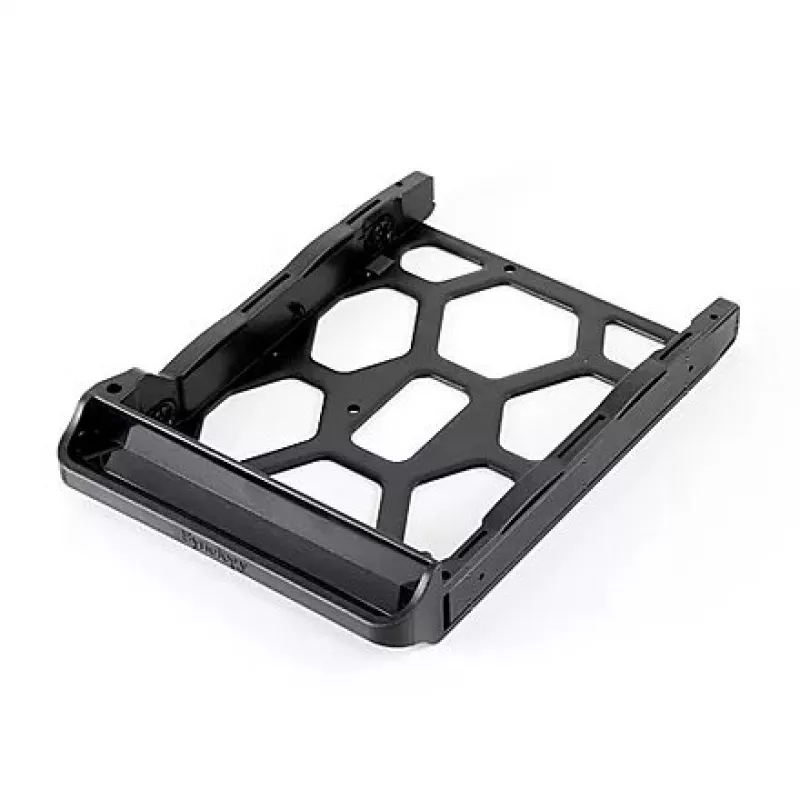
The Synology Disk Tray (Type D7) is an accessory designed to hold 2.5" and 3.5" drives in compatible Synology NAS models including DS214, DS214play, DS412+, and DS414. The tray has a black bezel panel and dimensions of 164 x 120 x 27.5 mm, providing a form-fit solution for secure drive installation ... Read More
Stock Out Of Stock Code 2572144 Brand SYNOLOGY Model HDDTRAY_D7 Warranty 2 Years

Shipping & Returns

The Synology Disk Tray (Type D7) is an accessory designed to hold 2.5" and 3.5" drives in compatible Synology NAS models including DS214, DS214play, DS412+, and DS414. The tray has a black bezel panel and dimensions of 164 x 120 x 27.5 mm, providing a form-fit solution for secure drive installation and mounting in supported bays.

Advantages

This disk tray offers straightforward drive installation and a secure mounting interface that aligns with Synology drive bays. Its compact dimensions and lightweight construction (0.06 kg) help maintain proper internal spacing and airflow while preserving the original chassis appearance with a matching black bezel.

Suitable for

  • Replacing or adding 2.5" or 3.5" HDD/SSD drives in Synology DS214
  • Use with Synology DS214play for media or backup storage expansion
  • Drive installation in Synology DS412+ and DS414 NAS units

Key specifications

  • Compatible models: DS214, DS412+, DS214play, DS414
  • Supported drive sizes: 2.5" and 3.5"
  • Dimensions: 164 x 120 x 27.5 mm
  • Colour: Black
  • Weight: 0.06 kg
  • Brand: Synology
  • MPN: DISK TRAY (Type D7)
  • EAN: 846504009954

How to use

Align the 2.5" or 3.5" drive with the tray mounting points and secure it according to the drive type (screws or tool-free clips as supported by your NAS model). Insert the assembled tray into the corresponding drive bay of the Synology NAS until it engages with the bay latching mechanism. Verify the drive is seated and recognized by the NAS following your system startup and disk management checks.

Recommendations

Handle drives and the disk tray on an anti-static surface and power off the NAS before installing or removing drives. Use manufacturer-recommended screws if your NAS requires them, and ensure the tray model (Type D7) matches your Synology unit for proper fit and operation.

Key Highlights
  • Replacing or adding 2.5" or 3.5" HDD/SSD drives in Synology DS214
  • Use with Synology DS214play for media or backup storage expansion
  • Drive installation in Synology DS412+ and DS414 NAS units
  • Compatible models: DS214, DS412+, DS214play, DS414
  • Supported drive sizes: 2.5" and 3.5"
  • Dimensions: 164 x 120 x 27.5 mm
  • Colour: Black
  • Weight: 0.06 kg
  • Brand: Synology
  • MPN: DISK TRAY (Type D7)
  • EAN: 846504009954
Specifications
Compatible products
DS214, DS412+, DS214play, DS414.
Depth
120 mm
Dimensions (WxDxH)
164 x 120 x 27.5
Height
27.5 mm
Product colour
Black
Size (imperial)
2.5 "
Type
Bezel panel
Weight
0.06 kg
Width
164 mm
Price history is not available yet
We are still collecting enough daily price data for this product.

Popular products in this category

WhatsApp
Hi, I’m DistriNode’s AI assistant. I can help you find products, compare options, create quote PDFs, or open support requests.