Account Contact
Your Cart
Pay the courier with no extra fees.
Need help? DistriNode AI can handle any task on our site.

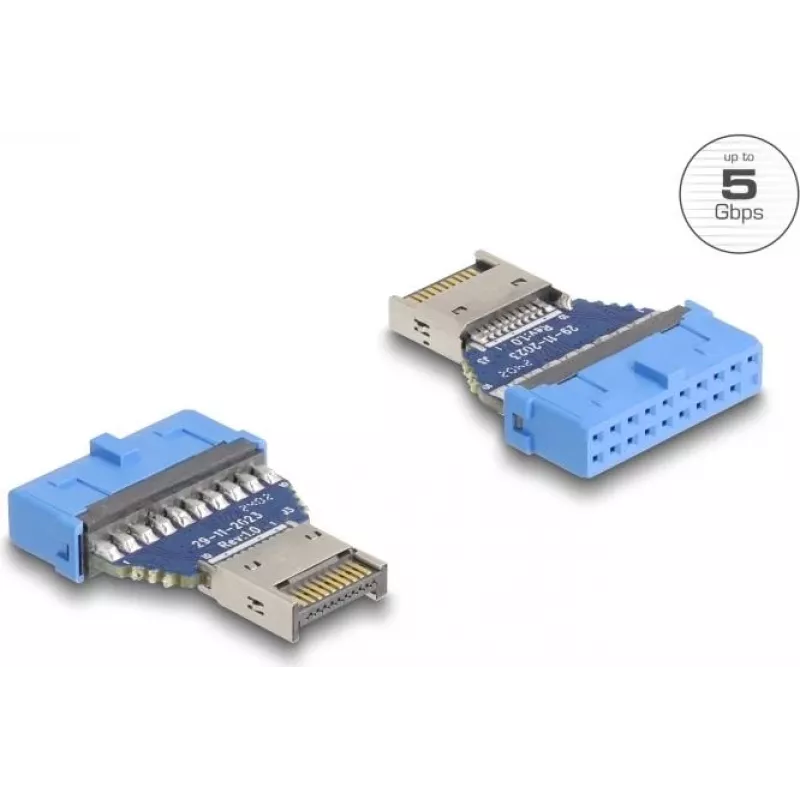
DeLOCK USB Adapter Pin Header female to internal USB Type-E male 5 Gbps

DeLOCK USB Adapter Pin Header female to internal USB Type-E male 5 Gbps
R288
The DeLOCK USB adapter converts an internal 19‑pin USB header into an internal USB Type‑E Key A male connector, enabling connection of either a USB Type‑C or a USB Type‑A cable inside a device. It supports USB 3.2 Gen 1 (USB 3.1 Gen 1) data transfer rates up to 5 Gbps and is intended for internal us... Read More
Stock 100 Code 1738833 Brand DELOCK Model 67129 Warranty 2 Years

Shipping & Returns

Estimated delivery Thursday, October 1
You will be kept updated through our detailed tracking system
Payment options
EFTPayFastBank CardSnapScanZapperGoogle PayApple PayMobicredMoreTymePay on Arrival

The DeLOCK USB adapter converts an internal 19‑pin USB header into an internal USB Type‑E Key A male connector, enabling connection of either a USB Type‑C or a USB Type‑A cable inside a device. It supports USB 3.2 Gen 1 (USB 3.1 Gen 1) data transfer rates up to 5 Gbps and is intended for internal use. The product is blue and suitable for adding internal USB ports or routing USB signals to internal peripherals.

Advantages

The adapter provides a compact solution to change a 19‑pin internal USB header to an internal USB Type‑E male connector compatible with Type‑A and Type‑C cables. It supports high‑speed data transfer up to 5 Gbps (USB 3.2 Gen 1), is designed for internal installation, and simplifies internal cabling without requiring soldering or complex modifications.

Suitable for

  • Adding or redirecting internal USB ports in desktop PCs or workstations
  • Connecting internal peripherals that require a Type‑A or Type‑C interface
  • Internal cable routing in custom installations and compact systems

Key specifications

  • Connector 1: 19 pin USB header
  • Connector 2: Internal USB Type‑E Key A male
  • USB version: USB 3.2 Gen 1 (3.1 Gen 1)
  • Maximum data transfer: 5 Gbps
  • Product colour: Blue
  • Brand: DELOCK, MPN: 67129, EAN: 4043619671298

How to use

Insert the adapter onto the device’s internal 19‑pin USB header, ensuring correct orientation and alignment with the header pins. Connect the required internal USB cable (Type‑A or Type‑C) to the adapter’s internal USB Type‑E Key A male connector. Route the cable inside the chassis to the target peripheral, secure the connection, and power on the system. Verify device recognition in the operating system and check for expected USB 3.2 Gen 1 performance.

Recommendations

Use the adapter only for internal connections in powered‑off systems during installation. Ensure pins are aligned to avoid damage, and use appropriate cable shielding and routing to maintain signal integrity at high speeds.
Key Highlights
  • Adding or redirecting internal USB ports in desktop PCs or workstations
  • Connecting internal peripherals that require a Type‑A or Type‑C interface
  • Internal cable routing in custom installations and compact systems
  • Connector 1: 19 pin USB header
  • Connector 2: Internal USB Type‑E Key A male
  • USB version: USB 3.2 Gen 1 (3.1 Gen 1)
  • Maximum data transfer: 5 Gbps
  • Product colour: Blue
  • Brand: DELOCK, MPN: 67129, EAN: 4043619671298
Specifications
Connector 1
19 pin USB
Connector 1 form factor
Straight
Connector 1 gender
Female
Connector 2
USB Type-E
Connector 2 form factor
Straight
Connector 2 gender
Male
Data transfer rate
5 Gbit/s
Depth
29.5 mm
Height
5.4 mm
Package type
Zip bag
Product colour
Blue
Quantity per pack
1 pc(s)
USB version
3.2 Gen 1 (3.1 Gen 1)
Width
20.6 mm

Leaflet

Open Leaflet
Price history over the last 6 months
DeLOCK USB Adapter Pin Header female to internal USB Type-E male 5 Gbps
Current
R288
Lowest
R275
Highest
R288
Change 24H
+R9   +3%
Week
+R12   +4%
Month
+R11   +4%

Popular products in this category

WhatsApp
Hi, I’m DistriNode’s AI assistant. I can help you find products, compare options, create quote PDFs, or open support requests.