Account Contact
Your Cart
Pay the courier with no extra fees.
Need help? DistriNode AI can handle any task on our site.

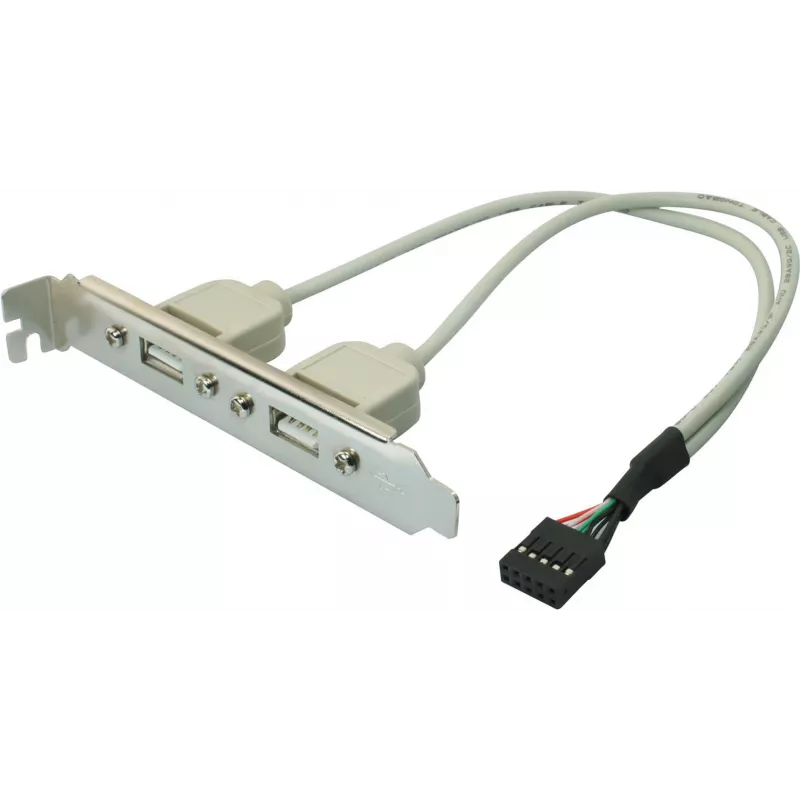
USB 2.0 internal bracket ShiverPeaks 75620 with 2 × Type-A ports and 10-pin motherboard connector

USB 2.0 internal bracket ShiverPeaks 75620 with 2 × Type-A ports and 10-pin motherboard connector
R318
Internal USB 2.0 bracket ShiverPeaks 75620 provides two front-access Type-A ports and connects to the motherboard via a 10-pin internal header. Designed to add external USB 2.0 connectivity to desktop PCs, this bracket delivers standard USB 2.0 data transfer speeds and a compact, bay-mounted solutio... Read More
Stock 95 Code 2352000 Brand SHIVERPEAKS Model 75620 Warranty 2 Years

Shipping & Returns

Estimated delivery Wednesday, October 7
You will be kept updated through our detailed tracking system
Payment options
EFTPayFastBank CardSnapScanZapperGoogle PayApple PayMobicredMoreTymePay on Arrival

Internal USB 2.0 bracket ShiverPeaks 75620 provides two front-access Type-A ports and connects to the motherboard via a 10-pin internal header. Designed to add external USB 2.0 connectivity to desktop PCs, this bracket delivers standard USB 2.0 data transfer speeds and a compact, bay-mounted solution for connecting peripherals and flash storage from the front of the case. The unit fits into a standard drive bay opening and routes through the chassis to the motherboard's internal header for a secure connection.

Advantages

The bracket offers straightforward installation and a low-profile design that integrates with most desktop cases. It supplies two easily accessible Type-A ports for USB devices without requiring changes to the motherboard layout. Using the motherboard's internal header ensures a direct connection with stable power and data lines. The solution is compatible with USB 2.0 hosts and provides reliable backward compatibility for older peripherals.

Suitable for

  • Adding front-panel USB ports to a desktop PC
  • Connecting USB flash drives and external storage at USB 2.0 speed
  • Attaching keyboards, mice and other peripherals with Type-A connectors
  • Systems requiring an internal, bay-mounted USB expansion

Key specifications

  • Interface: USB 2.0 (High Speed) compatible
  • Front ports: 2 × USB Type-A
  • Motherboard connection: 10-pin internal header cable
  • Form factor: internal bracket designed for standard 3.5"/5.25" bay openings (case-dependent fit)
  • Data transfer: up to USB 2.0 defined speeds (high-speed mode)

How to use

Power down the PC and open the chassis. Mount the bracket into a compatible bay or slot in the front panel and secure it according to the case design. Route the attached cable to the motherboard and align the 10-pin connector with the corresponding internal USB header, taking care to match the pin orientation. Reassemble the case, power on the system and the front USB Type-A ports will be available for device connection. No additional drivers are normally required for standard operating systems that support USB 2.0.

Recommendations

For stable performance, connect only USB 2.0 or USB 1.1 devices to these ports; high-power devices may require an externally powered hub. Ensure the internal connector is fully seated and that case clearance allows the bracket to sit flush. Avoid forcing the connector or bending pins when installing.

Key Highlights
  • Adding front-panel USB ports to a desktop PC
  • Connecting USB flash drives and external storage at USB 2.0 speed
  • Attaching keyboards, mice and other peripherals with Type-A connectors
  • Systems requiring an internal, bay-mounted USB expansion
  • Interface: USB 2.0 (High Speed) compatible
  • Front ports: 2 × USB Type-A
  • Motherboard connection: 10-pin internal header cable
  • Form factor: internal bracket designed for standard 3.5"/5.25" bay openings (case-dependent fit)
  • Data transfer: up to USB 2.0 defined speeds (high-speed mode)
Price history over the last 6 months
USB 2.0 internal bracket ShiverPeaks 75620 with 2 × Type-A ports and 10-pin motherboard connector
Current
R318
Lowest
R308
Highest
R318
Change 24H
+R10   +3%
Week
—   
Month
—   

Popular products in this category

WhatsApp
Hi, I’m DistriNode’s AI assistant. I can help you find products, compare options, create quote PDFs, or open support requests.