Account Contact
Your Cart
Pay the courier with no extra fees.
Need help? DistriNode AI can handle any task on our site.

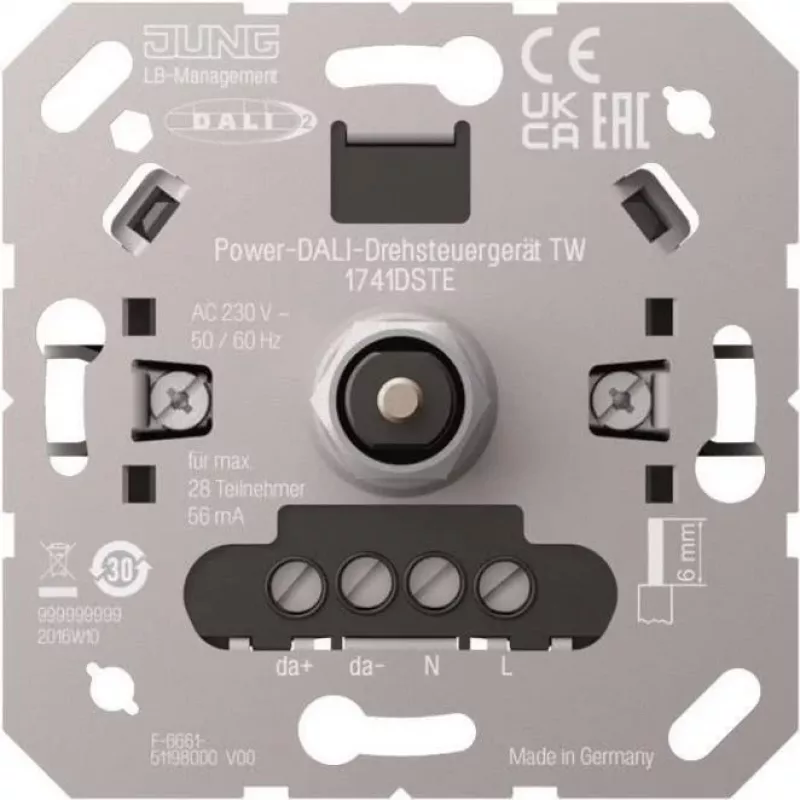
DALI rotary dimming control unit Jung 1741 DSTE Power-DALI-Drehsteuergerät TW

DALI rotary dimming control unit Jung 1741 DSTE Power-DALI-Drehsteuergerät TW
R2,785
The Jung 1741 DSTE Power-DALI rotary dimming control unit TW is a DALI-compatible rotary control intended for manual regulation of lighting levels and simple scene selection in DALI lighting installations. It connects to DALI networks and provides a tactile rotary interface for smooth dimming and in... Read More
Stock 34 Code 1498316 Brand JUNG Model 1741DSTE Warranty 2 Years

Shipping & Returns

Estimated delivery Thursday, October 1
You will be kept updated through our detailed tracking system
Payment options
EFTPayFastBank CardSnapScanZapperGoogle PayApple PayMobicredMoreTymePay on Arrival

The Jung 1741 DSTE Power-DALI rotary dimming control unit TW is a DALI-compatible rotary control intended for manual regulation of lighting levels and simple scene selection in DALI lighting installations. It connects to DALI networks and provides a tactile rotary interface for smooth dimming and intuitive adjustment of light output in residential and commercial spaces. The device is designed to be mounted and wired within standard electrical systems where DALI bus control is present, enabling local control alongside centralized lighting management.

Advantages

The rotary control offers precise, continuous dimming through a mechanical knob, allowing fine adjustment of luminance. As a DALI-compliant unit, it integrates with existing DALI systems without requiring proprietary communication protocols. The compact form factor and familiar rotary operation make it suitable for retrofit and new-install scenarios. It supports straightforward wiring into DALI power and control circuits and provides tactile feedback for users who prefer physical controls over touch panels.

Suitable for

Key specifications

How to use

Install the unit into the electrical box following local wiring standards and connect to the DALI bus and power supply according to the installer documentation. Use the rotary knob to increase or decrease light output; rotating slowly provides fine adjustment while faster rotation changes levels more quickly. If the installation supports scenes, use the knob or the associated push function (if provided by the device model) to recall or set simple scenes as configured in the DALI system. Commission the unit through the DALI controller or commissioning tool to assign addresses and integrate with group and scene configurations.

Recommendations

Ensure commissioning and wiring are performed by a qualified electrician familiar with DALI systems. Verify compatibility with the existing DALI power supply and controller before installation. For optimal performance, configure addressing and scenes using the central DALI commissioning tool and confirm mechanical mounting prevents strain on wiring.

Key Highlights
  • Manual dimming of luminaires in offices and meeting rooms
  • Light level adjustment in hotels, restaurants and hospitality areas
  • Local control points in residential living rooms and dining areas
  • Integration into DALI lighting networks for basic scene switching
  • Control type: Rotary dimmer for continuous dimming and scene control
  • Protocol compatibility: DALI digital lighting bus
  • Mounting: Flush mounting in standard electrical boxes or compatible housings
  • Operation: Manual mechanical knob with tactile feedback
  • Suitable environments: Indoor use in commercial and residential installations
Price history over the last 6 months
DALI rotary dimming control unit Jung 1741 DSTE Power-DALI-Drehsteuergerät TW
Current
R2,785
Lowest
R2,759
Highest
R3,335
Change 24H
+R0   +0%
Week
+R26   +1%
Month
+R21   +1%

Popular products in this category

WhatsApp
Hi, I’m DistriNode’s AI assistant. I can help you find products, compare options, create quote PDFs, or open support requests.