Account Contact
Your Cart
Pay the courier with no extra fees.
Need help? DistriNode AI can handle any task on our site.

CoreParts MSUB4300 storage drive enclosure HDD/SSD enclosure Black M.2

CoreParts MSUB4300 storage drive enclosure HDD/SSD enclosure Black M.2
R1,235
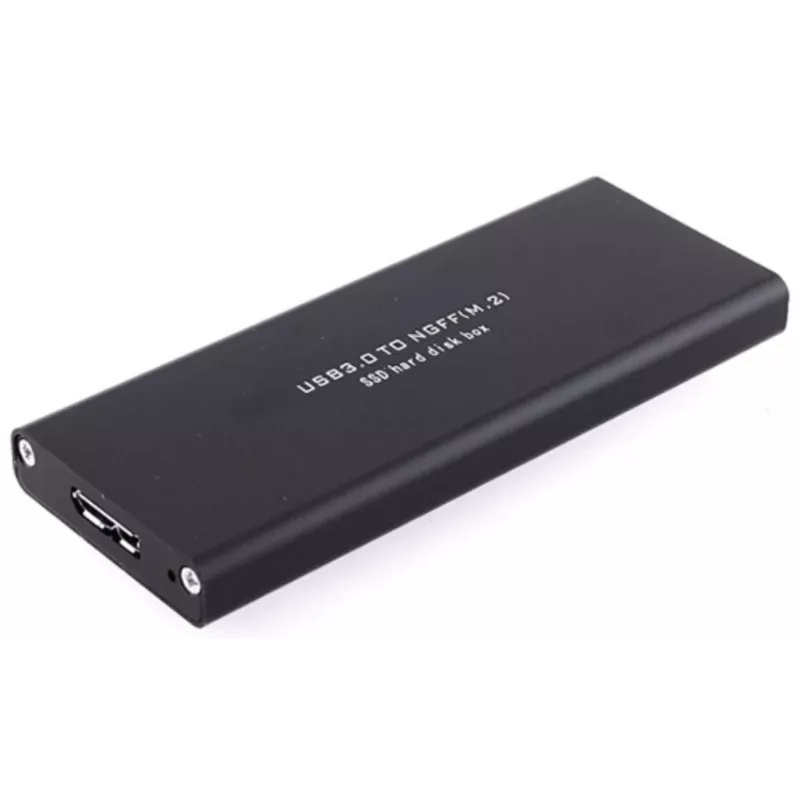
The CoreParts MSUB4300 is a black HDD/SSD enclosure for a single M.2 storage drive with a Serial ATA interface. It offers hot-swap capability and connects via USB 2.0 or USB 3.2 Gen 1 (3.1 Gen 1), combining a compact design with practical functionality for expanding or transporting storage.Advantage... Read More
Stock 2 Code 1731298 Brand COREPARTS Model MSUB4300 Warranty 2 Years

Shipping & Returns

Estimated delivery Tuesday, October 6
You will be kept updated through our detailed tracking system
Payment options
EFTPayFastBank CardSnapScanZapperGoogle PayApple PayMobicredMoreTymePay on Arrival

The CoreParts MSUB4300 is a black HDD/SSD enclosure for a single M.2 storage drive with a Serial ATA interface. It offers hot-swap capability and connects via USB 2.0 or USB 3.2 Gen 1 (3.1 Gen 1), combining a compact design with practical functionality for expanding or transporting storage.

Advantages

The enclosure supports one M.2 drive with SATA interface and enables easy drive replacement through hot-swap functionality. Its USB 2.0/USB 3.2 Gen 1 compatibility provides broad connectivity options, while the lightweight black housing (0.07 kg) makes it convenient to carry and integrate into existing setups.

Suitable for

  • Expanding external storage capacity for laptops and desktops
  • Portable data transfer and backups between devices
  • Testing or temporarily using M.2 SATA drives

Key specifications

  • Model: CoreParts MSUB4300
  • Supported storage drive size: M.2
  • Number of drives supported: 1
  • Supported drive interface: Serial ATA (SATA)
  • USB version: USB 2.0 / USB 3.2 Gen 1 (3.1 Gen 1)
  • Colour: Black
  • Weight: 0.07 kg

How to use

Open the enclosure according to the included instructions, insert a compatible M.2 SATA drive, secure it in place, and close the housing. Connect the enclosure to a computer using a compatible USB cable; the drive should be recognized as an external storage device. Use hot-swap to safely remove or replace the drive when the system supports it, following the operating system’s safe-eject procedure if required.

Recommendations

Use only M.2 drives with a Serial ATA (SATA) interface. Ensure the enclosure is connected to a USB 3.2 Gen 1 (3.1 Gen 1) port for optimal transfer speeds and follow safe-eject procedures before removing the drive to prevent data loss.
Key Highlights
  • Expanding external storage capacity for laptops and desktops
  • Portable data transfer and backups between devices
  • Testing or temporarily using M.2 SATA drives
  • Model: CoreParts MSUB4300
  • Supported storage drive size: M.2
  • Number of drives supported: 1
  • Supported drive interface: Serial ATA (SATA)
  • USB version: USB 2.0 / USB 3.2 Gen 1 (3.1 Gen 1)
  • Colour: Black
  • Weight: 0.07 kg
Specifications
Depth
81 mm
Harmonized System (HS) code
84733080
Height
17 mm
Hot-swap
Yes
Linux operating systems supported
Yes
Mac operating systems supported
Yes
Number of storage drives installed
0
Number of storage drives supported
1
Package depth
81 mm
Package height
17 mm
Package weight
72 g
Package width
143 mm
Plug and Play
Yes
Product colour
Black
Product type
HDD/SSD enclosure
Screwdriver included
Yes
Storage drive size
M.2
Supported storage drive interfaces
Serial ATA
Supported storage drive lengths
30 mm
USB connectivity
Yes
USB version
2.0/3.2 Gen 1 (3.1 Gen 1)
Weight
70 g
Width
143 mm
Windows operating systems supported
Yes

Leaflet

Open Leaflet
Price history over the last 6 months
CoreParts MSUB4300 storage drive enclosure HDD/SSD enclosure Black M.2
Current
R1,235
Lowest
R1,213
Highest
R1,235
Change 24H
+R18   +1%
Week
—   
Month
—   

Popular products in this category

WhatsApp
Hi, I’m DistriNode’s AI assistant. I can help you find products, compare options, create quote PDFs, or open support requests.