Account Contact
Your Cart
Pay the courier with no extra fees.
Need help? DistriNode AI can handle any task on our site.

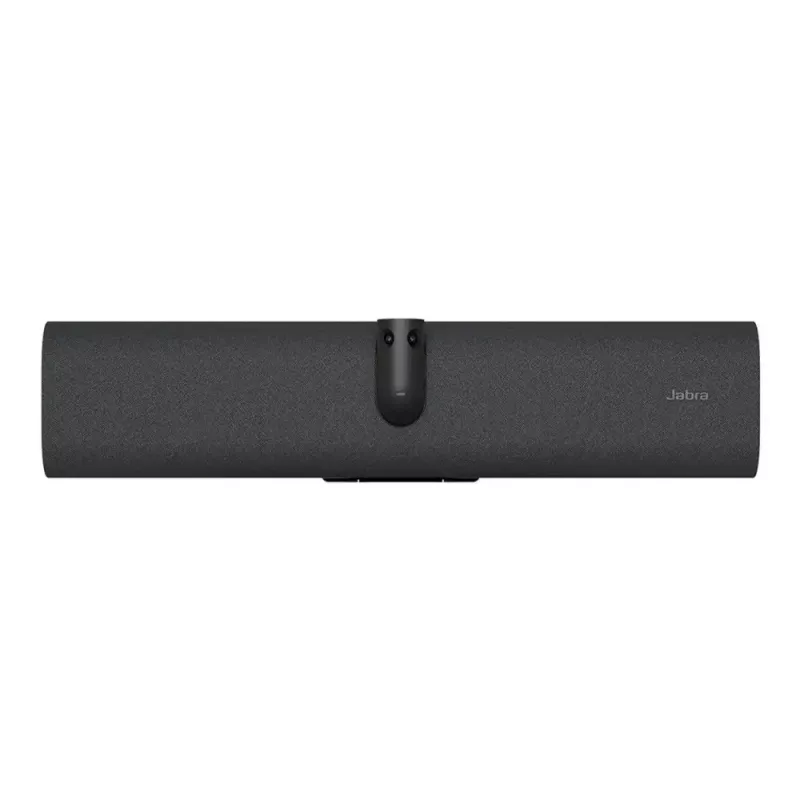
Conference camera Jabra PanaCast 40 — certified for Microsoft Teams Rooms, panoramic 180° field of view

Conference camera Jabra PanaCast 40 — certified for Microsoft Teams Rooms, panoramic 180° field of view
R26,313
The video bar that slots into small meeting roomsThis outstanding video bar enables you to create a simple videoconferencing set up with a touchscreen, without the need for a touch controller.The small room video bar. For meetings your way.See more. Hear more. Include more.From huddle rooms to small... Read More
Stock 1 Code 120774 Brand JABRA Model 8701-231 Warranty 2 Years

Shipping & Returns

Estimated delivery Wednesday, October 7
You will be kept updated through our detailed tracking system
Payment options
EFTPayFastBank CardSnapScanZapperGoogle PayApple PayMobicredMoreTymePay on Arrival
The video bar that slots into small meeting rooms

This outstanding video bar enables you to create a simple videoconferencing set up with a touchscreen, without the need for a touch controller.

The small room video bar. For meetings your way.

See more. Hear more. Include more.

From huddle rooms to small meeting rooms, PanaCast 40 VBS bar only can maximise every small meeting space. Its unique 180° field-of-view ensures everyone is seen and included – even those close to the screen, in the corner or sitting against the wall. No distortion. No blind spots. Just a 4K panoramic view of every in-room participant and a 4X digital zoom that captures the entire meeting space.

With outstanding audio, every voice is heard too.

- An array of beamforming, noise-cancelling microphones
- An impressive speaker
- Aux-Out for assistive listening devices

AI-powered features. More natural conversations.

There’s nothing quite like being face-to-face. But with its cutting-edge AI-powered video features, PanaCast 40 VBS bar only comes close.

Designed for more natural, productive hybrid meetings, it offers multiple views, tracks who’s talking, adjusts views, and brings speakers into focus – so remote participants feel just as present as those in the room.

From box to first meeting under minutes

Unique packaging designed for streamlined installation, with labelled windows enabling provisioning

Simply fix the integrated hinge to the wall or attach it to a VESA mount, table stand or tripod.

Clutter-free cable management for a no-fuss, clean with flexible deployment options.

Looking for the full system?

Check out the PanaCast 40 VBS here.

Secure and simple to manage

PanaCast 40 VBS bar only is built on the Microsoft Device Ecosystem Platform (MDEP) for robust security and peace of mind, and supported by our scalable, secure Jabra+ platform for remote management and updates of all your Jabra video devices in real-time.

Protect your investment for even longer with our Warranty+ add-on service to enjoy extended warranty coverage for up to five worry-free years.

CERTIFIED
PanaCast 40 VBS is certified for Microsoft Teams and Zoom Rooms to ensure a seamless experience.

Tailored services for a seamless workday

Make hybrid working a success with Jabra’s complete range of services

Maximize small meeting spaces

180° Field-of-View: Ensures everyone is seen, even those close to the screen or in the corner with no blind spots. 4K Panoramic view: Captures every in-room participant with a 4X digital zoom.

Outstanding Audio Quality

Array of beamforming, noise-cancelling microphones: Ensures every voice is heard clearly. HD speaker: Fills the room with immersive sound for natural conversations.

AI-Powered Features

Dynamic Composition: Close-ups of active speakers and room view simultaneously. Virtual Director: Real-time speaker tracking. Intelligent Zoom: Keeps everyone in the frame, even if they move. Intelligent Meeting Space: Sets virtual boundaries to focus on the meeting room participants.

Quick and Easy Installation

Streamlined set up.From box to meeting in under 12 minutes with a secure, wall-mounted installation. In-box provisioning: Configure without removing from the box and save time on rollouts. Flexible mounting options: Integrated hinge can be fixed directly to the wall, or attached to VESA mount, table stand, or tripod. Tidy cable management.

Seamless Integration

Seamless solution: For Microsoft Teams, includingExpress Install for Microsoft Teams Rooms, and Zoom. Flexible deployment: Use with Jabra touch controller, a touchscreen, or in permanent BYOD mode. Optional accessory: The Easy Clean Cover can be used to replace the fabric bar cover.

Secure and Manageable

Built on MDEP (Microsoft Device Ecosystem Platform): Secure & future-ready (Android 13 and beyond) Jabra+ : For remote management and real-time updates. Warranty+: Optional extended warranty coverage for up to five years.

How to use

Mount the Jabra PanaCast 40 in a central position facing the meeting area to maximize the 180° coverage. Connect the camera to the meeting room PC or appliance using the USB interface and allow the system to recognize the device; no additional drivers are typically required for Microsoft Teams Rooms setups. Configure camera settings from the Teams Rooms console or the device management portal as needed to adjust framing or enable intelligent video features. Position participants so they remain within the panoramic field of view for optimal framing and clarity.

Recommendations

Place the camera at or slightly above eye level and center it on the room’s main seating area. Use the camera’s intelligent framing to reduce manual adjustments and ensure consistent participant visibility in Teams Rooms meetings. For larger rooms, combine PanaCast 40 with appropriate audio solutions to maintain balanced audio-visual performance.

Key Highlights
  • Huddle rooms and small conference rooms
  • Medium meeting spaces with multiple participants
  • Microsoft Teams Rooms environments and hybrid meetings
  • Presentations and team collaboration sessions needing wide-angle coverage
  • Field of view: panoramic 180°
  • Connectivity: USB plug-and-play
  • Compatibility: certified for Microsoft Teams Rooms
  • Video features: intelligent framing and participant focus
  • Use case: designed for huddle rooms and medium meeting spaces
Specifications
AC input voltage
100 - 240 V
Bluetooth
Yes
Bluetooth version
5.2
Built-in speaker(s)
Yes
Cable lock slot
Yes
Cable lock slot type
Kensington
Cables included
HDMI, USB
Camera type
Dual camera
Certification
Microsoft Teams Rooms, Zoom Rooms,ADA
Depth
60 mm
Digital zoom
4x
Echo cancellation
Yes
Ethernet LAN (RJ-45) ports
1
Ethernet LAN data rates
10,100,1000 Mbit/s
HDMI ports quantity
1
Height
105 mm
Horizontal field of view
180°
Line-out
Yes
Maximum video resolution
3840 x 1080 pixels
Microphone sensitivity
-37 dB
Mobile operating systems supported
Android 13.0
Noise reduction
Yes
Number of microphones
6
Other operating systems supported
Android
Package depth
210 mm
Package height
110 mm
Package weight
4.19 kg
Package width
589 mm
Privacy camera
Yes
Privacy type
Privacy cover
Product colour
Black
PTZ control
Yes
Streaming capability
Yes
Supported network protocols
(IP) IPv4, IPv6
USB 3.2 Gen 1 (3.1 Gen 1) Type-A ports quantity
1
USB 3.2 Gen 1 (3.1 Gen 1) Type-C ports quantity
1
Vertical field of view
50°
Web-based management
Yes
Weight
1.8 kg
Wi-Fi
Yes
Width
530 mm
Zoom capability
Yes

Leaflet

Open Leaflet
Price history over the last 6 months
Conference camera Jabra PanaCast 40 — certified for Microsoft Teams Rooms, panoramic 180° field of view
Current
R26,313
Lowest
R22,957
Highest
R26,551
Change 24H
+R2,770   +12%
Week
+R2,988   +13%
Month
+R2,815   +12%

Popular products in this category

WhatsApp
Hi, I’m DistriNode’s AI assistant. I can help you find products, compare options, create quote PDFs, or open support requests.