Account Contact
Your Cart
Pay the courier with no extra fees.
Need help? DistriNode AI can handle any task on our site.

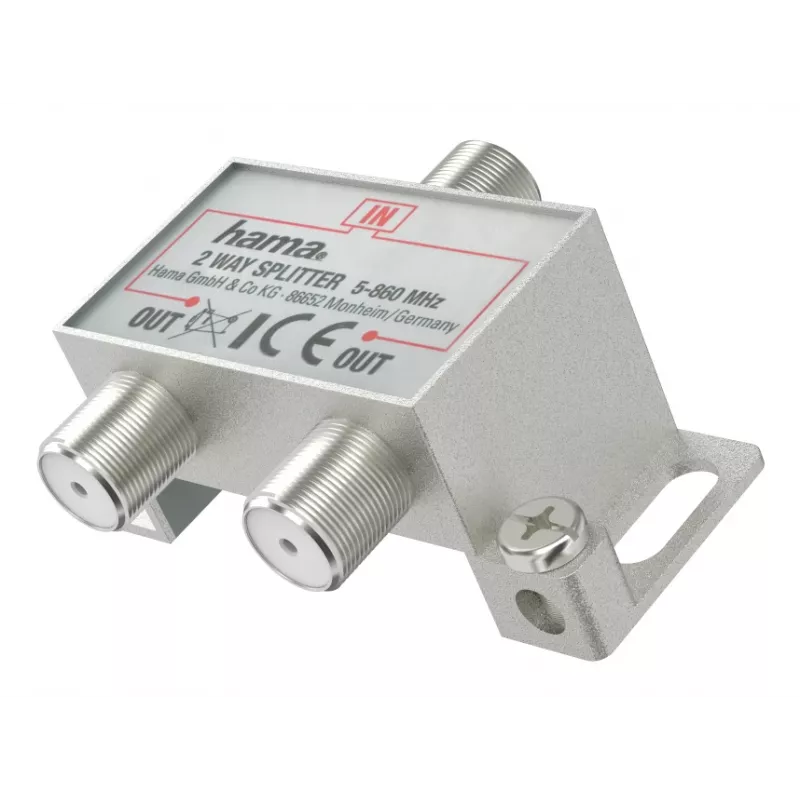
Cable splitter HAMA Classic Line 2-way — 2 outputs for coaxial TV/antenna cables

Cable splitter HAMA Classic Line 2-way — 2 outputs for coaxial TV/antenna cables
R525
The HAMA Classic Line 2-way cable splitter distributes a single coaxial TV/antenna signal to two outputs, allowing two receivers, smart TVs or radios to use the same antenna feed. This compact passive adapter features standard F-type/coax connectors and a space-saving housing designed for simple hom... Read More
Stock 400 Code 2225541 Brand HAMA Model 00305095 Warranty 2 Years

Shipping & Returns

Estimated delivery Wednesday, October 7
You will be kept updated through our detailed tracking system
Payment options
EFTPayFastBank CardSnapScanZapperGoogle PayApple PayMobicredMoreTymePay on Arrival

The HAMA Classic Line 2-way cable splitter distributes a single coaxial TV/antenna signal to two outputs, allowing two receivers, smart TVs or radios to use the same antenna feed. This compact passive adapter features standard F-type/coax connectors and a space-saving housing designed for simple home installations. The device requires no power supply and supports plug-and-play operation, making it suitable for quick signal distribution where no active amplification is needed.

Advantages

The splitter provides a straightforward method to share one coaxial line between two devices without altering the existing antenna wiring. Its F-type connectors ensure secure screw-on connections for stable signal transmission. The compact, low-profile design fits in tight spaces behind TV units or inside installation cabinets. As a passive component, it does not introduce additional noise from electronics or require external power, simplifying installation and maintenance.

Suitable for

Key specifications

How to use

Turn off connected receivers before connecting the splitter. Screw the incoming coaxial cable from the antenna into the splitter’s input connector, then attach the two outgoing coaxial cables to the splitter’s output connectors. Re-tighten connectors by hand to ensure a secure connection; avoid over-tightening with tools. After connections are made, power on the receivers and perform channel tuning if necessary. If signal strength appears reduced on one or both devices, consider using an amplified splitter or signal amplifier for longer cable runs or weak antenna signals.

Recommendations

Use the splitter for short to moderate cable runs within a typical home environment. Avoid using a passive splitter where signal loss could affect reception quality; in such cases choose an active splitter or inline amplifier. Keep connectors clean and dry and avoid bending coaxial cables sharply to maintain signal integrity.

Key Highlights
  • Splitting a single coaxial antenna/TV signal to two televisions or receivers
  • Connecting a TV and a radio to the same antenna feed
  • Home entertainment setups with two tuners or set-top boxes
  • Temporary or permanent installations where no signal amplification is required
  • Type: 2-way passive coaxial splitter
  • Connectors: F-type (female/male as standard for screw-on coax)
  • Frequency range: suitable for TV and FM antenna signals (VHF/UHF and radio bands)
  • Impedance: 75 ohm
  • Construction: compact metal/plastic housing for space-saving installation
  • Power: passive device — no external power required
Specifications
Connector gender
Female/Female
Connector(s)
F
Frequency range
5 - 862 MHz
Material
Metal
Number of connectors
3
Product colour
Silver
Quantity per pack
1 pc(s)
Type
Cable splitter

Leaflet

Open Leaflet
Price history over the last 6 months
Cable splitter HAMA Classic Line 2-way — 2 outputs for coaxial TV/antenna cables
Current
R525
Lowest
R515
Highest
R525
Change 24H
+R10   +2%
Week
—   
Month
—   

Popular products in this category

WhatsApp
Hi, I’m DistriNode’s AI assistant. I can help you find products, compare options, create quote PDFs, or open support requests.