Account Contact
Your Cart
Pay the courier with no extra fees.
Need help? DistriNode AI can handle any task on our site.

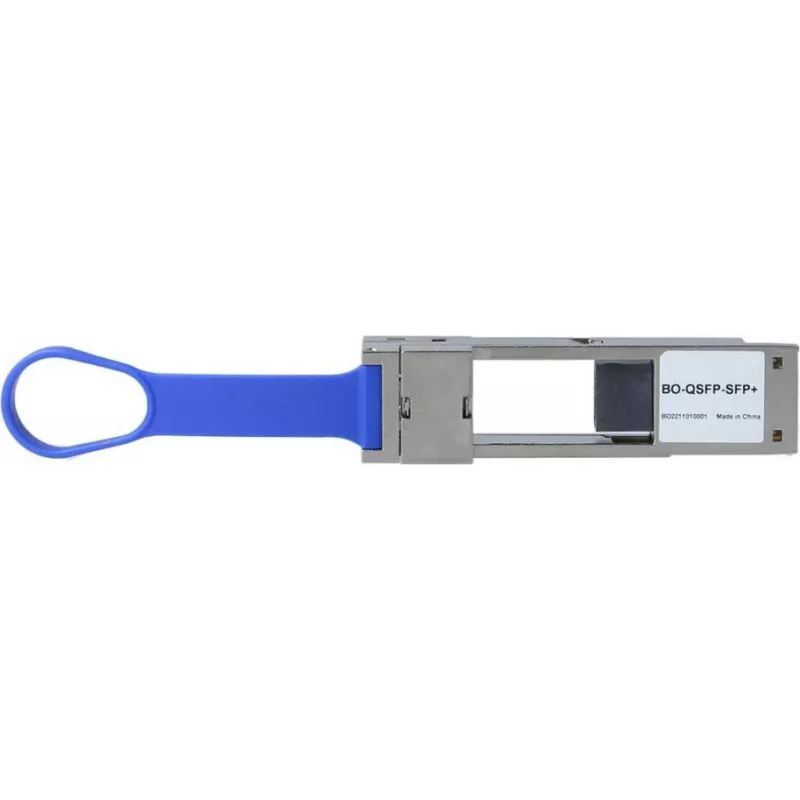
BlueOptics QSFP28 to SFP28 Converter 100Gbps (01FT845-BO) — SFP28 Transceiver Slot, Multimode & Singlemode, 0°C–+70°C

BlueOptics QSFP28 to SFP28 Converter 100Gbps (01FT845-BO) — SFP28 Transceiver Slot, Multimode & Singlemode, 0°C–+70°C
R2,500
BlueOptics QSFP28 to SFP28 Converter 100Gbps (01FT845-BO) provides a hot-pluggable SFP28 transceiver slot that converts a QSFP28 port to a single SFP28 interface. The module supports both multimode and singlemode SFP28 transceivers, enabling flexible adaptation between 100 Gbps QSFP28 ports and 25/2... Read More
Stock 90 Code 2249075 Brand BLUEOPTICS Model 01FT845-BO Warranty 2 Years

Shipping & Returns

Estimated delivery Wednesday, October 7
You will be kept updated through our detailed tracking system
Payment options
EFTPayFastBank CardSnapScanZapperGoogle PayApple PayMobicredMoreTymePay on Arrival

BlueOptics QSFP28 to SFP28 Converter 100Gbps (01FT845-BO) provides a hot-pluggable SFP28 transceiver slot that converts a QSFP28 port to a single SFP28 interface. The module supports both multimode and singlemode SFP28 transceivers, enabling flexible adaptation between 100 Gbps QSFP28 ports and 25/28 Gbps SFP28 modules as required by the network. It is designed for integration in data center switches, routers and transponder equipment and is specified to operate in ambient temperatures from 0°C to +70°C.

Advantages

The converter offers a compact, hot-swappable solution for port conversion without requiring firmware changes or additional cabling. Its compatibility with both multimode and singlemode SFP28 transceivers allows a single converter to support different fiber types and link distances. Passive conversion preserves QSFP28 host functionality while enabling deployment of widely available SFP28 modules for flexible network planning and migration.

Suitable for

Key specifications

How to use

Insert the converter into an available QSFP28 port on the host device with the module oriented according to the host vendor guidelines. After seating the converter, install a compatible SFP28 transceiver into the converter's SFP28 slot. The device is hot-pluggable so it can be added or removed while the host is powered, though following standard maintenance procedures and ensuring link stability after insertion is recommended. Verify link status and transceiver compatibility in the host system's management interface.

Recommendations

Choose SFP28 transceivers that match the required fiber type and link budget (multimode or singlemode) and check host compatibility lists when possible. Use in ambient conditions within the specified temperature range and handle the converter and transceivers using standard electrostatic discharge precautions. For critical links, perform acceptance testing after installation to confirm expected throughput and error rates.

Key Highlights
  • Adapting QSFP28 ports to SFP28 transceivers in data center switches and routers
  • Network upgrades and migration where mixed port types are required
  • Environments requiring hot-pluggable port changes with minimal downtime
  • Testing and lab setups that use a mixture of multimode and singlemode SFP28 modules
  • Converter type: QSFP28 to SFP28, hot-pluggable SFP28 slot
  • Supported transceiver types: multimode and singlemode SFP28
  • Data rate compatibility: designed for 100 Gbps QSFP28 hosts and SFP28 modules (25/28 Gbps lanes)
  • Operating temperature range: 0°C to +70°C
  • Form factor: QSFP28 module housing with integrated SFP28 receptacle
Price history over the last 6 months
BlueOptics QSFP28 to SFP28 Converter 100Gbps (01FT845-BO) — SFP28 Transceiver Slot, Multimode & Singlemode, 0°C–+70°C
Current
R2,500
Lowest
R2,482
Highest
R2,541
Change 24H
+R17   +1%
Week
+R5   +0%
Month
-R14   -1%

Popular products in this category

WhatsApp
Hi, I’m DistriNode’s AI assistant. I can help you find products, compare options, create quote PDFs, or open support requests.