Account Contact
Your Cart
Pay the courier with no extra fees.
Need help? DistriNode AI can handle any task on our site.

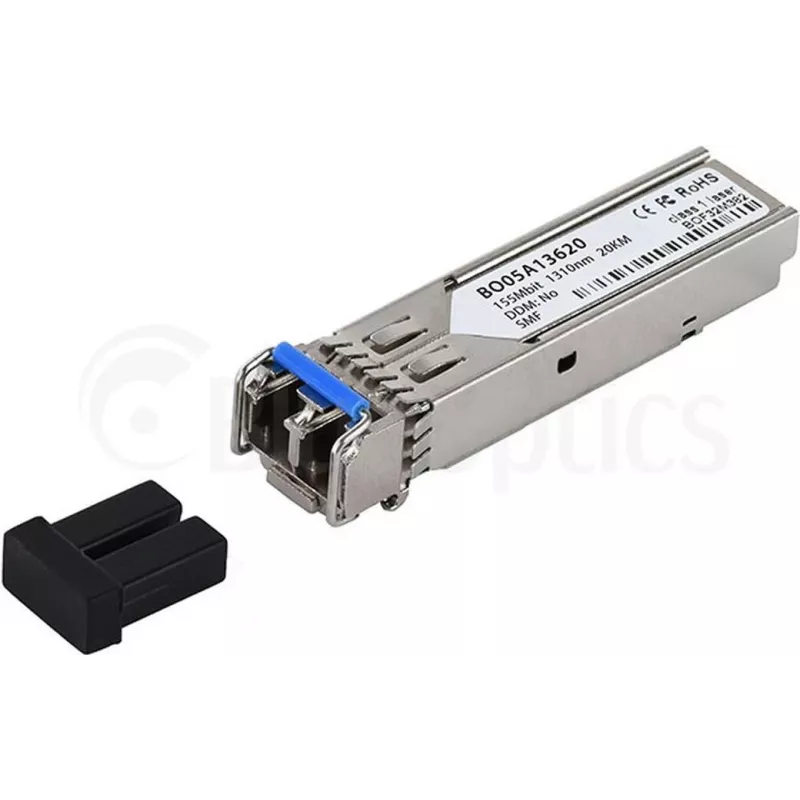
Fiber optic transceiver CBO SFP-2D-BO SFP module

Fiber optic transceiver CBO SFP-2D-BO SFP module
R1,007
CBO SFP-2D-BO is a fiber optic SFP transceiver module from BlueOptics designed for use in standard SFP slots of networking equipment. The module provides a hot-pluggable interface for single-fiber or dual-fiber optical links and is intended to enable reliable optical connectivity for switches, route... Read More
Stock 137 Code 1484119 Brand BLUEOPTICS Model SFP-2D-BO Warranty 2 Years

Shipping & Returns

Estimated delivery Tuesday, October 6
You will be kept updated through our detailed tracking system
Payment options
EFTPayFastBank CardSnapScanZapperGoogle PayApple PayMobicredMoreTymePay on Arrival

CBO SFP-2D-BO is a fiber optic SFP transceiver module from BlueOptics designed for use in standard SFP slots of networking equipment. The module provides a hot-pluggable interface for single-fiber or dual-fiber optical links and is intended to enable reliable optical connectivity for switches, routers and media converters. It supports straightforward replacement or upgrade of fiber ports during network maintenance or expansion without powering down the host device.

Advantages

The transceiver offers hot-pluggable installation, compact SFP form factor and compatibility with a wide range of networking devices that accept SFP modules. Its fiber interface provides stable optical links with low signal degradation over appropriate distances, and the module facilitates easy port replacement or upgrades to fiber connectivity while minimizing network downtime.

Suitable for

  • Establishing optical uplinks between switches and routers
  • Adding fiber ports to media converters and network appliances
  • Replacing or upgrading existing copper ports to optical connections
  • Maintenance tasks that require hot-swapping of transceivers

Key specifications

  • Form factor: SFP (Small Form-factor Pluggable)
  • Interface type: fiber optic transceiver for optical ports
  • Installation: hot-pluggable for in-service replacement
  • Compatibility: designed for standard SFP slots in switches, routers and media converters
  • Typical use: optical link for data networking applications

How to use

Power down is not required for installation; insert the SFP module into an empty SFP slot on the host device until it seats securely, then connect the fiber cable to the module's optical port using the appropriate fiber connector type and cable. Verify link status LEDs on the host device or check device management interfaces to confirm the optical link is active. For removal, disconnect the fiber cable first, then press the SFP eject mechanism and pull the module out of the slot.

Recommendations

Handle the optical connector end with care to avoid contamination; keep dust caps on when the module is not connected. Match the fiber type and connector standard used in the network and verify transceiver compatibility with the host device firmware or vendor interoperability lists before deployment.

Key Highlights
  • Establishing optical uplinks between switches and routers
  • Adding fiber ports to media converters and network appliances
  • Replacing or upgrading existing copper ports to optical connections
  • Maintenance tasks that require hot-swapping of transceivers
  • Form factor: SFP (Small Form-factor Pluggable)
  • Interface type: fiber optic transceiver for optical ports
  • Installation: hot-pluggable for in-service replacement
  • Compatibility: designed for standard SFP slots in switches, routers and media converters
  • Typical use: optical link for data networking applications
Price history over the last 6 months
Fiber optic transceiver CBO SFP-2D-BO SFP module
Current
R1,007
Lowest
R992
Highest
R1,169
Change 24H
+R12   +1%
Week
-R105   -9%
Month
-R109   -10%

Popular products in this category

WhatsApp
Hi, I’m DistriNode’s AI assistant. I can help you find products, compare options, create quote PDFs, or open support requests.