

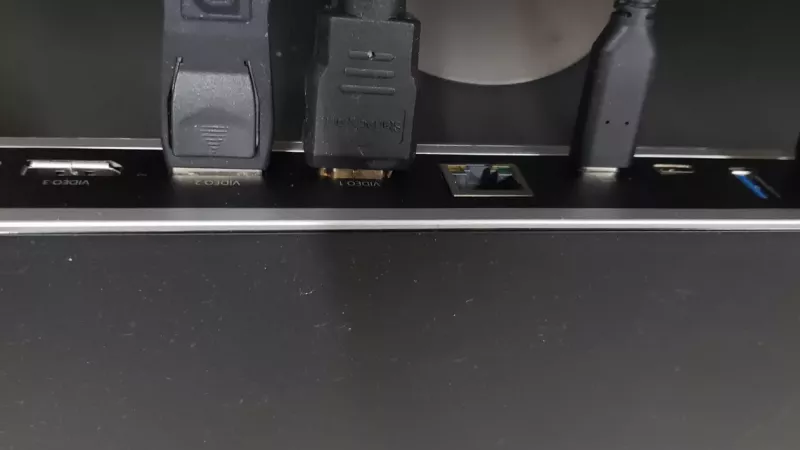
A USB-C docking station can turn a laptop into a full office desk — one cable for power, monitors, network and accessories — but the right dock depends on far more than the number of ports. The variables that actually matter are display support, power delivery, laptop compatibility, Ethernet, USB speed and whether the dock uses native USB-C, USB4, Thunderbolt or DisplayLink.
The useful question is not “which dock is best?” It is “which dock matches this laptop, these screens and this desk?” That is exactly where most returns and adapter headaches start in South African offices.
Key Takeaway: A USB-C port is a connector shape, not a feature guarantee. Before buying any dock, confirm what your laptop’s port actually supports — charging, display output, or full Thunderbolt/USB4 bandwidth — and how many external screens it can drive.
Dock Technologies at a Glance
| Dock Type | Best For | Watch Out For |
|---|---|---|
| Native USB-C | Single-monitor desks, simple setups | Display limits depend on the laptop |
| USB4 / Thunderbolt | Dual high-res screens, fast storage | Laptop must support the standard |
| DisplayLink | Multi-monitor on laptops with limited USB-C | Needs driver install to work |

Start With the Laptop Port
USB-C is a connector shape, not a promise that every feature works. One USB-C port may support charging only, another may add display output, and another may carry full Thunderbolt or USB4 bandwidth. Check the laptop specification before buying the dock — this single step prevents most compatibility disappointments.
One Screen, Two Screens or Three?
Display support is the biggest decision point. For one external monitor, many basic USB-C docks work fine. For two or three displays, confirm the exact resolution and refresh rate each dock supports — and note that some multi-display docks rely on DisplayLink technology, which requires drivers to be installed before the monitors light up.
Power Delivery Headroom
A dock with Power Delivery can charge the laptop through the same cable, but the wattage must match the machine. A light business laptop may be happy with lower wattage; a workstation-class laptop may need a higher-watt dock or its original charger to avoid charging slowly under load.

Ports That Matter for Office Use
- HDMI or DisplayPort: match your office monitor’s inputs.
- Ethernet: useful for stable fibre, VoIP and office networks.
- USB-A: still needed for keyboards, mice, scanners and printers.
- USB-C downstream: handy for newer storage and accessories.
- Audio and SD card slots: important for some creative desks.
Which Dock Fits Your Setup?
| Your Setup | What to Prioritise |
|---|---|
| Single monitor, basic office | Native USB-C dock with PD and Ethernet |
| Dual high-res monitors | USB4/Thunderbolt, confirm laptop support |
| Older laptop, needs 2+ screens | DisplayLink dock (plan for driver install) |
| Workstation laptop | High-watt PD or keep the original charger |
Key Takeaway: The most common mistake is buying a dock for its long port list, then finding the laptop cannot drive the required displays. Match the dock to the laptop and the screens first; treat the extra ports as a bonus, not the deciding factor.
How to Buy Your Docking Station in South Africa
DistriNode stocks USB-C hubs, Thunderbolt docks, cables and adapters to build a clean one-cable desk — with local stock, expertise and fast delivery. Browse docking stations, USB-C hubs, Thunderbolt docks, HDMI cables and DisplayPort cables.
Frequently Asked Questions
Will any USB-C dock work with my laptop?
Not necessarily. USB-C is only the connector shape — the features depend on what your laptop’s port supports. Some ports charge only, some add video, and some carry full Thunderbolt or USB4 bandwidth. Always check the laptop spec before buying.
How many monitors can a USB-C dock run?
It depends on the dock and the laptop. Many basic docks handle one external screen; two or three usually need USB4/Thunderbolt support or a DisplayLink dock with drivers. Confirm the resolution and refresh rate too, not just the number of ports.
What is DisplayLink and do I need drivers?
DisplayLink lets a dock drive extra monitors over USB even on laptops with limited video output, but it needs a small driver installed first. It’s a great fit for older machines — just plan for that one-time setup step.
How much Power Delivery wattage do I need?
Match it to your laptop. A thin business laptop may be fine with lower wattage, while a workstation laptop may need a higher-watt dock or its original charger to keep charging under heavy load.
Sources
- DisplayLink — connection support
- Belkin — DisplayLink dock support