

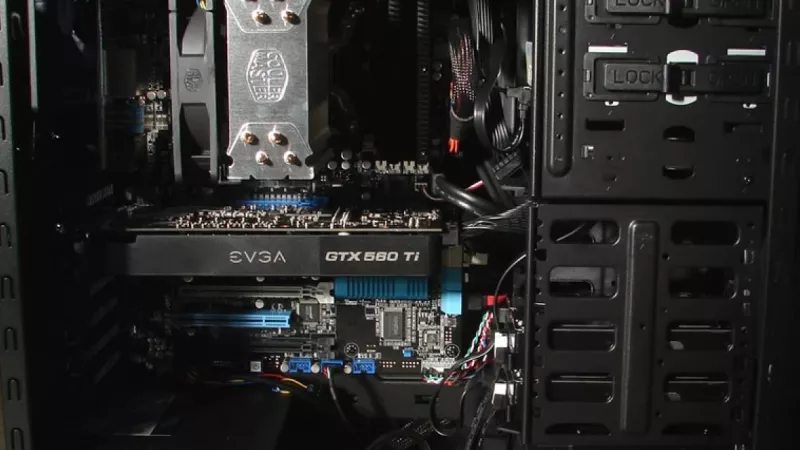
Air always follows the path of least resistance, and it moves from areas of higher pressure toward areas of lower pressure. Inside a computer chassis, the balance between what your intake fans push in and what your exhaust fans pull out decides the direction of flow through every gap, seam and grille in the enclosure. Set that balance deliberately and components run cooler, quieter and cleaner. Ignore it and you get dust-caked heatsinks, rising noise levels and thermal throttling during sustained workloads.
This guide explains the two competing approaches to chassis ventilation — positive and negative pressure — covers the physics behind each, and walks through proven fan arrangements for the most common build formats, from full-size towers to compact enclosures.
What case pressure actually means
Case pressure describes the relationship between the volume of air entering a chassis and the volume leaving it over the same period. When intake fans deliver more air than the exhaust fans remove, internal pressure rises fractionally above ambient — a positive pressure state. The surplus escapes through every unsealed opening: PCI slot covers, drive bay cutouts, cable grommets and panel seams. When exhaust capacity exceeds intake, internal pressure drops below ambient and those same openings reverse their role, drawing unfiltered air — and the dust it carries — into the system.
The pressure differences involved are tiny, far below anything a component would notice mechanically. What matters is directionality: that slight imbalance determines whether each gap in the chassis leaks air outward or inhales it. This single fact drives almost every practical decision about fan placement.
Positive pressure: intake takes the lead
Why most desktop builds benefit
The strongest argument for positive pressure is dust management. Since air exits through the gaps rather than entering through them, the only particles reaching the interior are those that pass the intake filters. Keep those filters clean and the inside of the machine stays presentable for years, which directly protects cooling performance — a dust blanket on a heatsink acts as insulation.
- Filtered ingress: practically all incoming air travels through washable mesh, so filter maintenance replaces internal cleaning.
- Predictable flow paths: the builder decides where fresh air enters and roughly where it leaves.
- Consistent long-term thermals: temperatures measured on day one remain representative a year later.
Where the approach struggles
Positive pressure only works when exhaust routing is planned. If heated air has no convenient exit, it recirculates around the CPU socket and behind the graphics card. Builds with a powerful front intake wall but no rear or top exhaust often report excellent GPU readings alongside elevated VRM and memory temperatures. The target is a modest intake surplus, not an overwhelming one — flooding the chassis with more air than it can shed simply wastes fan speed and generates noise.
Negative pressure: exhaust takes the lead
Its genuine strengths
Negative pressure removes heat aggressively. With multiple exhaust positions active, hot air spends very little time inside the enclosure, which can shave a few degrees off CPU package temperatures in exhaust-heavy layouts. Rack servers rely on this principle: they operate in climate-controlled rooms where incoming air is already filtered, so the main drawback of the approach never materialises.
The price you pay at home
A desktop under negative pressure in an ordinary room becomes a slow vacuum cleaner. Air sneaks in through expansion slot covers, panel edges, mesh sections and unused mounts, none of which carry filtration. Within months, dust settles visibly on the graphics card shroud, fan hubs and fin stacks. Cleaning intervals shorten, and thermals degrade steadily between them. For a machine that lives under a desk, this trade rarely makes sense unless raw exhaust performance is the absolute priority.
Is a perfectly neutral setup realistic?
True neutrality — intake precisely matching exhaust — is a moving target rather than an achievable state. Filters and grilles reduce effective intake by a measurable margin, manufacturing tolerances vary between fan samples, and PWM curves shift with load. Because the balance changes across the operating range, professionals generally aim for slightly positive pressure and let the margin absorb those variations.
Practical rule: after accounting for filter losses, rated intake airflow should exceed rated exhaust airflow by roughly 10 to 20 percent. That margin keeps the pressure positive across the entire fan curve, from idle to full load.
Fan specifications that decide the outcome
Choosing the right unit for each mounting position matters as much as the overall balance. Datasheets provide the necessary figures if you know which ones apply where.
- Airflow rating (CFM or m³/h): the volume moved with zero resistance — the relevant number for open exhaust mounts.
- Static pressure (mm H₂O): the ability to force air through resistance such as filters, radiators and tight fin stacks — the relevant number for intakes.
- RPM range with PWM control: a wide regulation band lets the motherboard hold fans near-silent at idle and ramp them only when sensors demand it.
- Bearing design: fluid dynamic and magnetically stabilised bearings sustain lower noise over a longer service life than basic sleeve types.
For filtered front mounts, prioritise static pressure optimised models; for unobstructed rear and top positions, airflow-optimised designs deliver more volume per decibel. A current selection of both types is available among our case fans.
Recommended layouts by chassis format
Standard mid-tower
Three filtered front intakes paired with one rear exhaust remain the most dependable pattern in this class. The arrangement produces a clear front-to-back flow, holds pressure slightly positive and leaves headroom for a single top-rear exhaust if CPU temperatures call for it. Avoid populating every top mount with exhaust units, as that typically flips the balance negative.
High-airflow mesh designs
Mesh front panels impose little resistance, so intake fans achieve close to their rated flow. These enclosures tolerate an additional exhaust without going negative, and they reward high-quality intakes more than any other format. If the side panel is also perforated, treat it as a passive outlet in a positive setup rather than adding fans to it.
Compact and small form factor systems
Limited mounts make every position count. A single filtered intake feeding directly onto the hottest component, plus one exhaust, usually beats scattered half-measures. When selecting a small enclosure, check the documentation for supported fan sizes and radiator clearances before committing — the range of computer cases varies enormously in this respect.
A realistic dust maintenance routine
Even a well-balanced positive pressure system needs periodic attention. Rinse or vacuum intake filters monthly in a typical home, more often with pets or carpeted floors. Inspect the interior quarterly; if dust is accumulating despite clean filters, an unfiltered opening is acting as an inlet and the balance needs rechecking. A soft brush and short bursts of compressed air handle heatsink fins without risking fan bearings — hold rotors still while blowing them out.
Frequently asked questions
How many intake and exhaust fans does a typical build need?
Two intakes and one exhaust cover the majority of mid-range systems. High-power graphics cards justify a third intake. Beyond roughly five units, additional fans deliver rapidly diminishing returns while adding noise sources.
Does positive pressure genuinely keep dust out?
It reduces unfiltered ingress dramatically, though nothing eliminates dust entirely. Openings still exchange small amounts of air during fan spin-down and thermal cycling. Expect far cleaner internals, not hermetically sealed ones.
Do radiator fans count as intake or exhaust?
They count according to the direction they move air relative to the chassis. A front-mounted radiator with fans pushing inward contributes to intake, though the radiator core reduces its effective flow — subtract roughly a quarter to a third when estimating balance.
Will negative pressure damage my hardware?
No damage occurs from the pressure difference itself; it is negligible in mechanical terms. The concern is accelerated dust accumulation, which degrades cooling over time and shortens cleaning intervals rather than harming parts directly.
Can I simply run all fans at full speed and ignore balance?
Full speed maximises both airflow and noise but does not fix directionality. If the configuration is exhaust-heavy at 50 percent duty cycle, it remains exhaust-heavy at 100 percent. Balance comes from fan placement and selection, not from RPM.
Deliberate pressure planning costs nothing beyond a few minutes of thought during assembly, yet it shapes how a system sounds, how often it needs cleaning and how it performs in its third year of service. DistriNode supplies fans, enclosures and cooling accessories in distribution volumes for partners who build with those years in mind.
Leave a comment