

The best GPU for gaming is all about hitting the sweet spot between your budget and the resolution you play at. For most people, that means looking at the NVIDIA GeForce RTX 4060 for 1080p, the RTX 4070 Super for 1440p, or the RTX 4080 Super if you're chasing uncompromising 4K performance. The perfect card for you is one that delivers buttery-smooth gameplay in your favourite titles without you paying for power you’ll never actually use.
Your Guide to the Best Gaming GPUs
Choosing the right graphics card is easily the most critical part of any PC build. It’s the heart of your gaming rig, the component that determines whether you get stunning visuals and high frame rates or a stuttery mess. With so many models, confusing specs, and prices that seem to change daily, picking the best GPU for gaming can feel overwhelming. This guide is here to cut through the noise.
We’ve broken down our recommendations into real-world tiers that match how people actually game. Whether you’re a competitive player who needs every last frame at 1080p, an enthusiast after a beautiful 1440p experience, or a creator who needs serious 4K horsepower, we’ve got a clear winner for you.
Making the Right Choice for Your Build
Ultimately, two things will shape your decision more than anything else: your budget and your monitor's resolution. There's no point in buying a monster 4K-capable card if you're plugging it into a 1080p screen, just as a budget card will crumble under the pressure of a high-resolution display.
This handy flowchart lays out the core decision every builder faces—balancing what you can spend with the performance you want for 1080p, 1440p, or 4K gaming.
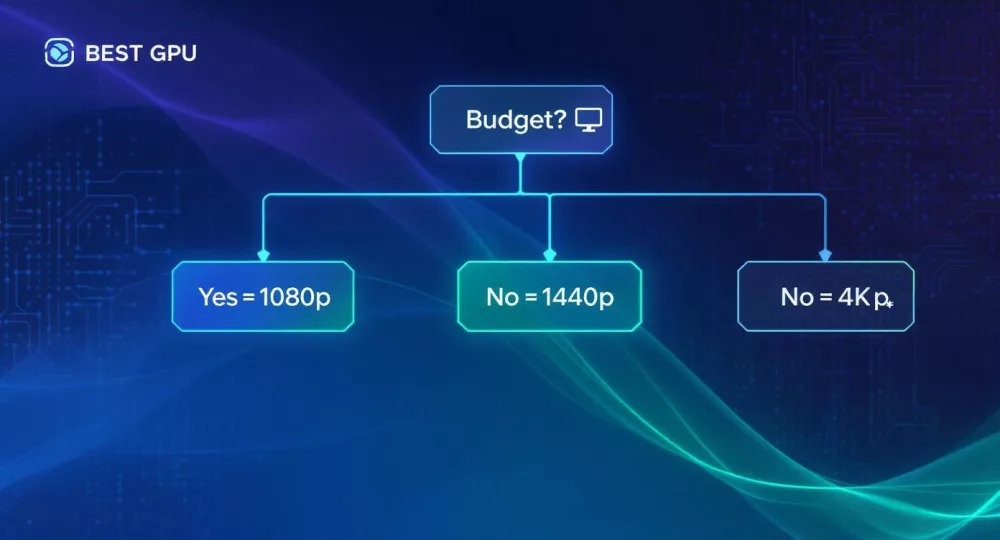
As the diagram shows, your journey starts with your budget, which sets the stage for the resolution and performance you can realistically expect.
The "sweet spot" for most gamers has shifted from 1080p to 1440p. It offers a huge jump in visual clarity without the brutal performance tax of 4K. Cards in this category give you the best mix of price, performance, and longevity.
Top Gaming GPU Picks at a Glance
To give you a quick starting point, this table summarises our top picks for each major gaming category. Use it to find the GPU that best fits your needs before we dive into the detailed comparisons.
| Category | Recommended GPU | Ideal For | Key Feature | Price Tier |
|---|---|---|---|---|
| Budget 1080p | NVIDIA RTX 4060 | High frame rates in esports titles & AAA games at high settings. | Excellent efficiency & DLSS 3 performance. | R6,000 - R7,500 |
| High-Refresh 1440p | NVIDIA RTX 4070 Super | Maxed-out settings at 1440p with reliable 100+ FPS. | Strong ray tracing & 12GB VRAM for longevity. | R12,000 - R15,000 |
| Entry 4K & Workstation | AMD Radeon RX 7900 XTX | High-refresh 1440p and solid 4K gaming performance. | Massive 24GB VRAM & superb rasterization. | R20,000 - R24,000 |
| Ultimate 4K | NVIDIA RTX 4080 Super | No-compromise 4K gaming with all settings maxed out. | Unmatched ray tracing & AI performance. | R24,000 - R28,000 |
This table should help you narrow down your options. In the next sections, we’ll get into the specifics of why these cards earned their spots and how they stack up against the competition.
What Specs Matter for Gaming GPUs
To find the right graphics card, you've got to look past the marketing hype and get comfortable with the numbers on the spec sheet. Sure, a bigger model number usually means more power, but understanding why helps you make a smarter choice that truly fits your games, your monitor, and your wallet. These core specs are the real engine behind every frame you see.
The one everyone talks about is VRAM (Video Random Access Memory). Think of it as the GPU's own super-fast, short-term memory for holding all the game textures and models it needs right now. If it runs out, your game starts to stutter and lag as it pulls data from slower storage. These days, 8GB of VRAM is the practical minimum for a solid 1080p experience. For 1440p or 4K, you'll want to aim for 12GB to 16GB to handle those massive, high-resolution textures without a hitch.
Core Processing and Memory Speed
The raw muscle of a GPU comes down to its processing cores. NVIDIA calls them CUDA Cores, while AMD calls them Stream Processors. Simply put, more cores mean the card can juggle more calculations at once, which translates directly to higher frame rates. But a word of caution: you can't compare these numbers across brands. An NVIDIA card's core count isn't equivalent to an AMD card's count because their underlying architecture is completely different. Use this spec to compare cards within the same family, like an RTX 4060 versus an RTX 4070.
Just as important is Memory Bandwidth, which is measured in gigabytes per second (GB/s). This tells you how fast the GPU can access all that data stored in its VRAM. A wider memory bus (like 256-bit versus 128-bit) combined with faster memory (like GDDR6X) creates a wider "highway" for data, preventing bottlenecks. A GPU with a ton of cores is wasted if its memory bandwidth is too slow to feed them data quickly enough.
When looking at price-to-performance, it helps to understand a card's raw power. Mid-range favourites in South Africa, like NVIDIA’s RTX 4060 and AMD’s RX 7600, typically offer between 20 to 30 teraflops (TFLOPS) of performance. TFLOPS stands for trillions of floating-point operations per second and is a good measure of raw computational grunt. For a deeper dive into these metrics, the guides on Tom's Hardware are an excellent resource.
Power, Heat, and Modern Technologies
A graphics card is almost always the hungriest component in a gaming PC. Its TDP (Thermal Design Power), measured in watts, gives you a clear idea of how much heat it will generate and how much power it will pull from the wall. You absolutely must check that your Power Supply Unit (PSU) has enough wattage and the right connectors to handle your new GPU alongside your CPU and everything else.
Beyond the raw numbers, modern gaming is defined by a few key technologies.
- Ray Tracing: This simulates the actual physics of light to create unbelievably realistic shadows, reflections, and lighting. It looks incredible but puts a massive strain on the GPU.
- Upscaling (DLSS & FSR): Both NVIDIA’s Deep Learning Super Sampling (DLSS) and AMD’s FidelityFX Super Resolution (FSR) are game-changers. They render the game at a lower resolution and then use clever AI algorithms to scale the image up to your screen's resolution, giving you a huge FPS boost with very little impact on visual quality.
It's all about the balance. A card with a massive core count is useless without enough VRAM and memory bandwidth to keep it fed. Likewise, a power-hungry GPU with a high TDP needs a beefy PSU and a case with good airflow to run properly. Finding the card where all these elements work in harmony for your specific needs is the real secret to a great build.
Comparing the Best GPUs for 1080p Gaming
For a massive chunk of the PC gaming world, 1080p (Full HD) is still the king. It hits that sweet spot, delivering crisp visuals without forcing you to spend a fortune on top-tier hardware. It's the perfect resolution for building a powerful but budget-conscious gaming rig.
The main goal here is simple: lock in a rock-solid 60+ frames per second (FPS) in the latest AAA games at high settings. For competitive esports titles, we're aiming even higher to take full advantage of high-refresh-rate monitors.
The battle for 1080p dominance is a fierce one, mostly fought between two key cards: the NVIDIA GeForce RTX 4060 and the AMD Radeon RX 7600. Both are fantastic options, but they get the job done in very different ways. Figuring out which approach suits you is the key to making the right choice.
The Main Contenders: NVIDIA vs. AMD
NVIDIA's GeForce RTX 4060 comes to the fight loaded with features. Its biggest selling point is DLSS 3 with Frame Generation, an impressive AI-driven technology that can give your frame rates a massive shot in the arm. This is a game-changer for pushing well past 100 FPS in fast-paced shooters or for smoothing out performance in those graphically stunning single-player adventures.
On the other side of the ring, the AMD Radeon RX 7600 focuses on delivering sheer bang-for-your-buck performance, often called rasterisation. In games that don't lean heavily on ray tracing, the RX 7600 goes toe-to-toe with the RTX 4060, sometimes even pulling ahead while costing you less. It uses AMD’s own upscaling tech, FidelityFX Super Resolution (FSR), which has the advantage of being open-source and compatible with a wider range of hardware.
Key Takeaway: It really comes down to what you value more. Do you want the cutting-edge ray tracing and AI features of the RTX 4060? Or are you chasing the best raw performance for your rand, which is where the RX 7600 shines?
Performance Showdown in Real-World Scenarios
A spec sheet only gives you part of the picture. The real test is how these cards handle actual games. Let’s see how they stack up in a couple of common gaming situations.
Scenario 1: Competitive Esports (e.g., Valorant, Apex Legends) In these games, it's all about maximum frames. Honestly, both the RTX 4060 and RX 7600 will absolutely crush it, easily pushing 144+ FPS at 1080p on competitive settings. The performance is so high here that the difference between them is barely noticeable. Your decision can comfortably come down to which one you can find at a better price from local sellers on platforms like DistriNode.
Scenario 2: AAA Blockbusters (e.g., Cyberpunk 2077, Alan Wake 2) This is where the battle lines are drawn. As soon as you flip on demanding features like ray tracing, the RTX 4060’s specialised hardware gives it a clear lead.
- NVIDIA RTX 4060: With DLSS in its corner, this card can hold a smooth 60 FPS even with some ray tracing effects enabled. It gives you a taste of next-gen visuals without tanking your performance.
- AMD RX 7600: While it’s a strong performer in traditional rendering, it starts to sweat when ray tracing is on. You'll likely have to turn those flashy features off or lean hard on FSR to keep your frame rates playable in the most demanding titles.
This trade-off is at the heart of the 1080p decision. If you're someone who wants to experience all the latest visual bells and whistles, the RTX 4060 is simply the more complete package.
Upscaling Technologies: The Deciding Factor
The secret sauce for modern 1080p gaming is upscaling. Both NVIDIA's DLSS and AMD's FSR render the game at a lower resolution internally and then use clever algorithms to scale the image up to 1080p. The result? A huge performance boost.
NVIDIA's DLSS, especially with the Frame Generation exclusive to the 40-series cards, is widely seen as producing a cleaner, more stable image with fewer visual quirks. For gamers who are picky about image quality, this can be a huge deal.
However, AMD's FSR has a major trick up its sleeve: it's an open standard. That means more games support it, and you can even use it on older or non-AMD graphics cards.
Ultimately, choosing the best GPU for 1080p gaming boils down to your personal priorities. The RTX 4060 is the more forward-thinking pick if you care about features like DLSS 3 and superior ray tracing. The RX 7600, on the other hand, is the pragmatic value king, offering incredible traditional performance for its price.
Choosing a GPU for 1440p High-Refresh Gaming
Moving up from 1080p to 1440p is easily one of the biggest visual upgrades you can make to your gaming setup. Often called QHD, this resolution delivers a much sharper, more detailed image that really pulls you into the game world. It’s the new sweet spot for high-end gaming for a reason.
But pushing all those extra pixels, especially if you're aiming for a buttery-smooth 120Hz or more, demands a serious graphics card. You need a GPU that can consistently pump out high frame rates at this demanding resolution without forcing you to dial back all the eye candy.
This is where the mid-range GPU market really gets interesting. We’re leaving the budget cards behind and stepping into a tier where performance, features, and longevity become the main event. The top contenders here are NVIDIA's GeForce RTX 4070 series and AMD's Radeon RX 7700 XT and RX 7800 XT.
The Key Players for QHD Supremacy
In the 1440p arena, it's all about delivering a premium experience. Gamers playing at this level expect to crank up the settings, including ray tracing, while still enjoying fluid, responsive gameplay. Each of the main cards approaches this goal a little differently.
NVIDIA’s GeForce RTX 4070, and its beefier sibling the RTX 4070 Super, are heavy hitters for 1440p. Their architecture is built to chew through ray tracing workloads and they have a secret weapon: DLSS 3.5. This suite of tech, including Super Resolution, Ray Reconstruction, and Frame Generation, is a powerful toolkit for boosting frame rates while keeping the visuals crisp.
Over on Team Red, the AMD Radeon RX 7800 XT has carved out a reputation as a raw performance beast. It often pulls ahead in traditional rasterization—the standard rendering used in most games. That means it's incredibly fast right out of the box. The RX 7700 XT offers a slightly more affordable entry point into this tier while still bringing plenty of power to the table.
At 1440p, VRAM starts to matter a whole lot more. Games with high-res texture packs can easily gobble up more than 8GB of video memory. Cards with 12GB or 16GB of VRAM have a clear advantage here, giving you smoother performance today and more headroom for tomorrow's games.
Performance in High-Refresh Scenarios
Let's get practical. How do these GPUs actually perform when you’re trying to max out a 144Hz monitor at 1440p? The goal isn't just to hit 60 FPS; it's to stay well above it.
Scenario A: Maxed-Out Settings in a AAA Title Picture yourself playing a graphically demanding game like Baldur's Gate 3 or Starfield with every setting pushed to ultra at 1440p.
- AMD Radeon RX 7800 XT: This card really flexes its muscles here. Thanks to its killer rasterization performance and a generous 16GB of VRAM, it often delivers higher native frame rates than its direct NVIDIA rival. It just works, giving you a fantastic, smooth experience with no fuss.
- NVIDIA GeForce RTX 4070: Its native performance is excellent, but its real magic is unlocked with DLSS. Flick on DLSS in "Quality" or "Balanced" mode, and you’ll easily match or even beat the RX 7800 XT’s frame rates, all while maintaining phenomenal image quality.
Scenario B: Ray Tracing Enabled Okay, now let's flip the switch on some heavy ray tracing in a game like Cyberpunk 2077. This is where the architectural differences really show.
- NVIDIA GeForce RTX 4070 / 4070 Super: NVIDIA's dedicated RT cores give it a massive leg up. When you pair that hardware with DLSS 3 Frame Generation and Ray Reconstruction, the performance boost is simply huge. It makes high-frame-rate ray tracing at 1440p not just possible, but genuinely enjoyable.
- AMD Radeon RX 7800 XT: AMD has made big improvements, but its ray tracing performance still trails behind NVIDIA. To get a stable 60+ FPS with ray tracing on, you'll need to lean heavily on FSR and likely tweak a few settings downwards.
This makes the choice pretty clear. If you want the best raw performance for your money with a "set it and forget it" approach, the RX 7800 XT is an incredible value. If you love pushing graphical boundaries with cutting-edge ray tracing, the RTX 4070 series gives you a far more powerful and feature-complete package.
Upscaling Tech at a Higher Resolution
At 1440p, the quality of your upscaling tech is more critical than ever. Any weird visual artefacts or shimmer are much easier to spot when the base image is so sharp.
Both NVIDIA's DLSS and AMD's FSR are fantastic technologies, but they have their differences. DLSS is widely praised for its superior image reconstruction, which often produces a clean, stable picture that can sometimes look even sharper than native resolution. FSR is an open standard, which is a huge plus—it works on more hardware and you’ll find it in a wider variety of games.
At the end of the day, the right GPU for your 1440p high-refresh setup comes down to what you value most. The NVIDIA GeForce RTX 4070 Super is our top pick for a no-compromise experience, offering best-in-class ray tracing and features that will keep you ahead of the curve. But for gamers laser-focused on getting the absolute most rasterization performance for their budget, the AMD Radeon RX 7800 XT is simply one of the best value propositions on the market today.
Finding the Top GPUs for 4K Gaming and Content Creation
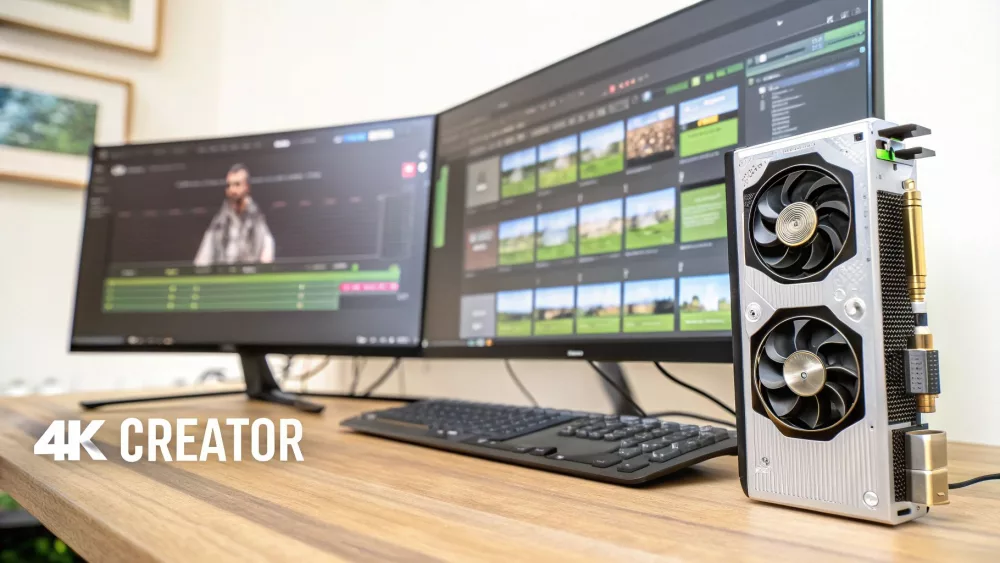
This is it—the top of the mountain. We're now in the territory of uncompromising performance, where gamers and creative professionals demand a single machine that can do absolutely everything. We’re talking about true 4K gaming: running the latest titles at a native 3840x2160 resolution with every graphical setting pushed to the limit.
The demands in this tier are enormous. You need a graphics card with brutal raw power, a massive VRAM buffer, and the most advanced features money can buy. These elite GPUs are more than just for gaming; they are hybrid workhorses built to tear through heavy creative tasks like 4K video editing, complex 3D rendering, and high-bitrate streaming without breaking a sweat.
The main contenders for the crown are NVIDIA’s GeForce RTX 4080 Super and the flagship RTX 4090, squaring off against AMD’s top-end Radeon RX 7900 XTX. Each card brings a different philosophy to the table in the quest for ultimate performance.
The Undisputed 4K Gaming Champions
If your only goal is to achieve the highest frame rates possible at 4K, there's no substitute for raw horsepower. Here, the NVIDIA GeForce RTX 4090 stands completely alone. It's the undisputed king of consumer GPUs, delivering a level of performance that no other card can touch right now. It's really the only card that can comfortably push many demanding games well over 100 FPS at native 4K, even with every setting, including ray tracing, maxed out.
Sitting just a step below is the NVIDIA GeForce RTX 4080 Super. It offers a more balanced—though still very premium—entry into high-end 4K gaming. It delivers a huge slice of the RTX 4090's power for a noticeably lower price, making it a much more practical choice for many enthusiasts.
On the other side, AMD's Radeon RX 7900 XTX competes fiercely, especially in traditional rasterization. It often matches or even beats the RTX 4080 Super in games that don't rely heavily on ray tracing. Plus, its generous 24GB of VRAM is a huge selling point for future-proofing against next-generation titles.
For enthusiasts and creators, the decision isn't just about gaming. NVIDIA's CUDA core architecture and mature driver ecosystem give its cards a significant advantage in many professional applications, from Adobe Premiere Pro to Blender, making them the default choice for hybrid gaming and work setups.
Performance Beyond the Frame Rate
For many people shopping in this tier, the best GPU for gaming also has to be the best for their creative work. This is where the feature set and underlying architecture become just as critical as raw gaming speed.
- NVIDIA's Creative Edge: The RTX 4080 Super and RTX 4090 really shine here. Their superior CUDA performance dramatically cuts down render times in popular 3D software and provides buttery-smooth timeline scrubbing in video editing. What's more, the dual NVENC encoders on these cards are an absolute game-changer for streamers, enabling high-quality game capture with minimal performance impact.
- AMD's Strong Value: The RX 7900 XTX is no slouch, either. It has its own powerful media engine and impressive raw compute capabilities. While it might fall behind NVIDIA in certain, highly optimised creative apps, it offers phenomenal performance for workloads that lean more on raw shader power and VRAM capacity.
Ray Tracing and Upscaling at the High End
At 4K, the performance cost of ray tracing is at its most punishing. This makes powerful hardware and intelligent upscaling non-negotiable.
Scenario A: Pushing Alan Wake 2 with Full Path Tracing Let's take one of the most graphically intense games ever made as an example. To run it at 4K with its stunning path-traced lighting, you need the absolute best tech available.
- NVIDIA RTX 4090/4080 Super: These cards were built for exactly this. With DLSS 3.5, which includes Ray Reconstruction and Frame Generation, they can deliver a smooth, playable experience that is simply out of reach for other GPUs. The visual result is breathtaking.
- AMD RX 7900 XTX: While it struggles with such an extreme workload, it can still hit playable frame rates using FSR. However, it just can't match the visual clarity and performance that NVIDIA’s full DLSS toolkit provides in this specific scenario.
This distinction makes the choice a lot clearer. If your primary goal is to experience the absolute cutting edge of graphics technology, NVIDIA's RTX 40-series flagships are the undeniable leaders. The RTX 4090 is the ultimate, no-compromise choice, while the RTX 4080 Super delivers a superb 4K experience for a more attainable price. But for those who prioritise rasterization performance and VRAM for a mix of gaming and productivity, the RX 7900 XTX presents an exceptionally strong value proposition.
Practical Tips for Buying Your Next GPU
Picking the right graphics card is the fun part, but your job isn't quite done. Before you click that "buy" button, a few final checks will make sure your shiny new GPU actually works in your rig without any drama. These simple steps can save you from some serious frustration down the line.
The first thing to nail down is compatibility. This isn't just about having a spare PCIe slot on your motherboard; the two biggest culprits for a failed upgrade are your power supply unit (PSU) and the physical size of your PC case. A brand-new GPU can be a seriously power-hungry beast.
Confirming Power and Physical Fit
First up, let's talk power. Check your PSU to see if it can handle the new card. Every GPU's spec sheet lists a minimum recommended PSU wattage. You absolutely need to meet this, but I always suggest having a bit of headroom to keep things stable when your system is under heavy load. Also, look at the physical connectors. Does your PSU have the right cables? Many modern cards need one or more 8-pin PCIe connectors, and the latest high-end NVIDIA cards now use the 12VHPWR connector.
Next, it's time to break out the tape measure. Seriously. High-performance graphics cards have gotten enormous over the last few years. You need to check the card's official dimensions—length, height, and width—and measure the space inside your PC case. Make sure there’s enough room not just for the card to slot in, but also for air to flow around it properly. You don't want your new investment to cook itself.
I've seen it happen countless times: someone buys a monster of a card only to find it won’t fit in their case or their PSU can't power it on. Double-checking these two simple things will save you a massive headache.
Finding the Best Deals and Making the Purchase
Once you know the card will fit and run, it's time to hunt for the best price. The cost for the exact same GPU can swing wildly between different shops and even between different partner brands like ASUS, MSI, or Gigabyte.
This is where a local tool like DistriNode comes in handy. It pulls together stock and pricing from multiple trusted distributors right here in South Africa, so you can see all your options in one place.
The local gaming scene is really taking off. The South African GPU market is growing fast, which is great news for all of us. More demand and a healthy e-sports culture mean better availability and more competition. You can actually dig into the numbers and trends in this full GPU market report if you're curious.
Finally, before you pull the trigger, quickly check the warranty and the seller’s return policy. Most manufacturers give you a two or three-year warranty, which is your safety net against any defects. A solid return policy is just as important, in case the card isn't quite what you hoped for or you hit an unexpected snag. Run through this checklist, and your GPU upgrade should be a smooth and rewarding experience.
Your Last-Minute GPU Questions, Answered
Alright, so you’ve narrowed down your choices, but a few questions are probably still bouncing around in your head. Let's tackle those common last-minute doubts to help you lock in your decision with total confidence.
Is Piling on VRAM the Secret to Performance?
Not quite. It’s a classic case of “it’s complicated.” While having enough VRAM is non-negotiable for high-resolution gaming, it’s only one piece of the puzzle. Think of it like this: VRAM is the size of the workbench, but the GPU core speed and memory bandwidth determine how fast the work actually gets done.
For 1080p gaming, 8GB is the current sweet spot, though bumping up to 12GB will give you more breathing room for future games. Once you jump to 1440p or 4K, you should really be looking at cards with 12GB to 16GB or more. Just remember, a slow GPU with a mountain of VRAM is still a slow GPU.
The Big Question: NVIDIA or AMD?
This is the perennial debate, and honestly, there's no single right answer. Both Team Green and Team Red make fantastic cards, but they have different philosophies and strengths. It really boils down to what you value most.
NVIDIA: They still hold the crown for ray tracing performance. If you want to see games like Cyberpunk 2077 with all the stunning lighting effects cranked up, NVIDIA is hard to beat. Their DLSS upscaling tech is also widely regarded as the best in the business for boosting frame rates while keeping the picture sharp.
AMD: They often deliver a massive punch in raw gaming performance (rasterisation) for your money. If you care more about pure frame rates in traditional games than ray tracing, AMD frequently offers better value. Plus, their FSR upscaling is open-source, so it works on almost any GPU, not just their own.
Ultimately, it comes down to this: for the absolute best ray tracing and top-tier upscaling, NVIDIA usually has the edge. If your goal is to get the most raw frames per rand, AMD makes a very compelling argument.
How Can I Be Sure This Thing Will Actually Fit?
Nothing’s worse than unboxing a shiny new GPU only to find it doesn’t work with your rig. You just need to check three things to avoid that headache.
First, check your power supply unit (PSU). Does it have enough wattage to handle the new card, and does it have the right PCIe power cables (e.g., 8-pin or the new 12VHPWR connectors)?
Second, get out a tape measure. Seriously. Check the GPU’s dimensions (length, height, and width) against the space inside your PC case. Some of these modern cards are absolute behemoths.
Finally, make sure your motherboard has a spare PCIe x16 slot. This is standard on virtually all modern motherboards, but it never hurts to double-check.
Ready to pull the trigger? Stop juggling a dozen browser tabs. At DistriNode, you can see real-time pricing and stock from South Africa’s top distributors all in one spot. Visit https://distrinode.co.za to compare your final choices and snag the best deal for your new build.
Leave a comment