Account Contact
Your Cart
Pay the courier with no extra fees.
Need help? DistriNode AI can handle any task on our site.

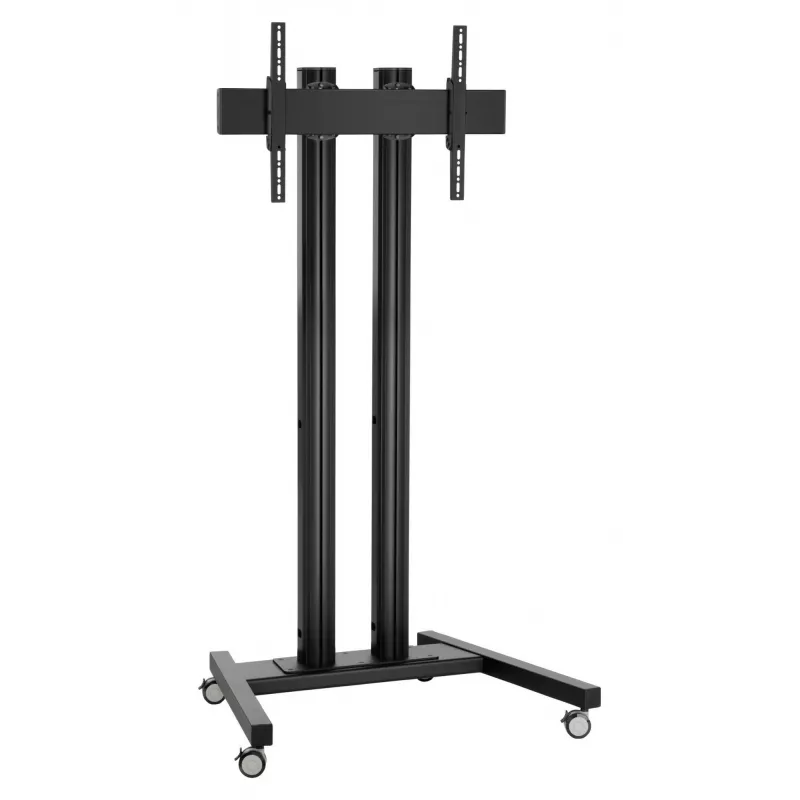
Mobile display mount Vogel's TD 2084B — floor stand for single screen

Mobile display mount Vogel's TD 2084B — floor stand for single screen
R17,901
Vogel's TD 2084B is a mobile floor stand engineered to support a single display screen. The stand provides a stable, transportable solution for presenting digital signage, conducting meetings, teaching in classrooms or staging temporary events. It is designed for easy relocation of a display without... Read More
Stock 3 Code 1718024 Brand VOGELS Model 7953090 Warranty 2 Years

Shipping & Returns

Estimated delivery Thursday, October 8
You will be kept updated through our detailed tracking system
Payment options
EFTPayFastBank CardSnapScanZapperGoogle PayApple PayMobicredMoreTymePay on Arrival

Vogel's TD 2084B is a mobile floor stand engineered to support a single display screen. The stand provides a stable, transportable solution for presenting digital signage, conducting meetings, teaching in classrooms or staging temporary events. It is designed for easy relocation of a display without permanent wall mounting, enabling flexible room layouts and fast installation in varied environments.

Advantages

The design combines stability and mobility with an integrated cable management path to keep connections tidy and protected. The stand accommodates common display mounting patterns and includes quick‑attach points that simplify installation and removal. Its robust base reduces wobble while remaining compact enough for transport through standard doorways and corridors.

Suitable for

  • Corporate meeting rooms and huddle spaces
  • Trade shows, exhibitions and pop‑up events
  • Classrooms and lecture halls requiring flexible display placement
  • Retail and hospitality digital signage
  • Temporary installations where wall mounting is not possible

Key specifications

  • Mount type: freestanding floor stand for a single display
  • Compatibility: supports common VESA mounting patterns for single screens
  • Cable management: integrated channel to route display cables discreetly
  • Mobility: designed for transport between rooms without permanent fixtures
  • Base: stable footprint to minimize movement during use

How to use

Place the Vogel's TD 2084B on a level surface and expand the base as required for stability. Attach the display to the mounting bracket following the display manufacturer’s mounting instructions and compatible VESA pattern. Route power and signal cables through the integrated cable channel to keep connections organized. For relocation, disconnect cables, unmount the display if necessary and move the stand to the new position, then reinstall and reconnect.

Recommendations

Verify the display weight and VESA pattern before installation to ensure compatibility. Use two people for mounting larger screens to reduce the risk of damage or injury. Avoid placing the stand on uneven surfaces and secure cables to prevent trip hazards.

Key Highlights
  • Corporate meeting rooms and huddle spaces
  • Trade shows, exhibitions and pop‑up events
  • Classrooms and lecture halls requiring flexible display placement
  • Retail and hospitality digital signage
  • Temporary installations where wall mounting is not possible
  • Mount type: freestanding floor stand for a single display
  • Compatibility: supports common VESA mounting patterns for single screens
  • Cable management: integrated channel to route display cables discreetly
  • Mobility: designed for transport between rooms without permanent fixtures
  • Base: stable footprint to minimize movement during use
Price history over the last 6 months
Mobile display mount Vogel's TD 2084B — floor stand for single screen
Current
R17,901
Lowest
R16,600
Highest
R17,901
Change 24H
+R689   +4%
Week
+R92   +1%
Month
+R92   +1%

Popular products in this category

WhatsApp
Hi, I’m DistriNode’s AI assistant. I can help you find products, compare options, create quote PDFs, or open support requests.