Account Contact
Your Cart
Pay the courier with no extra fees.
Need help? DistriNode AI can handle any task on our site.

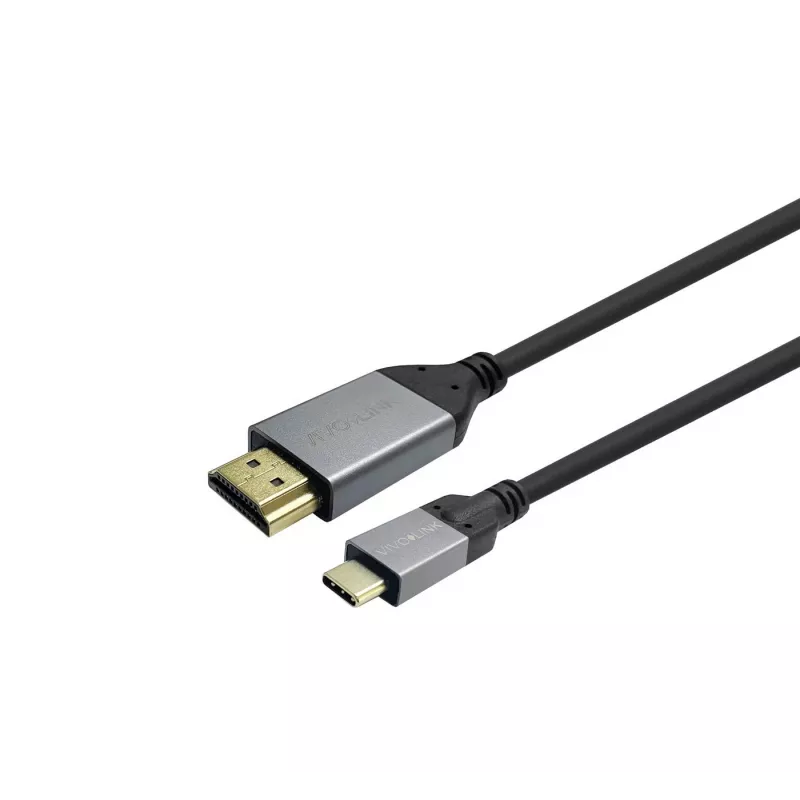
Vivolink PROUSBCHDMIMM7.5 cable gender changer USB C HDMI Black 7.5m

Vivolink PROUSBCHDMIMM7.5 cable gender changer USB C HDMI Black 7.5m
R1,237
Vivolink PROUSBCHDMIMM7.5 is a 7.5 m USB-C to HDMI gender changer cable designed to connect laptops and other devices with USB-C connectors to HDMI displays. The black cable supports video and audio transmission and is compatible with devices that provide a USB-C video output.AdvantagesThe cable sup... Read More
Stock 4 Code 1185900 Brand VIVOLINK Model PROUSBCHDMIMM7.5 Warranty 2 Years

Shipping & Returns

Estimated delivery Tuesday, October 6
You will be kept updated through our detailed tracking system
Payment options
EFTPayFastBank CardSnapScanZapperGoogle PayApple PayMobicredMoreTymePay on Arrival

Vivolink PROUSBCHDMIMM7.5 is a 7.5 m USB-C to HDMI gender changer cable designed to connect laptops and other devices with USB-C connectors to HDMI displays. The black cable supports video and audio transmission and is compatible with devices that provide a USB-C video output.

Advantages

The cable supports up to 4K@60Hz resolution and an 18 Gbit/s transfer speed, providing high-quality video playback. Its 7.5 m length offers extended reach between devices and screens, and the black design provides a discreet, professional appearance. The cable carries up to 500 mA current for device signaling where applicable.

Suitable for

  • Connecting USB-C laptops or tablets to HDMI monitors and TVs
  • Presentations and meeting room setups requiring extended cable length
  • Home entertainment setups and media playback on external displays
  • Temporary workstation setups where a longer cable run is needed

Key specifications

  • Connectors: USB C to HDMI
  • USB version: USB 3.2 Gen 1 (3.1 Gen 1)
  • Maximum resolution: 4K@60Hz
  • Transfer speed: 18 Gbit/s
  • Cable length: 7.5 m
  • Maximum current: 500 mA
  • Colour: Black
  • Weight: 0.168 kg

How to use

Connect the USB-C end to a compatible device that supports video output over USB-C and plug the HDMI end into the display's HDMI input. Select the correct input source on the display and adjust display settings on the host device if necessary. For best results, ensure both device firmware/drivers and display settings support 4K@60Hz if that resolution is required.

Recommendations

For reliable 4K@60Hz operation, use with devices that explicitly support USB-C video output (DisplayPort Alt Mode) and ensure HDMI input on the display supports the required bandwidth. Avoid sharp bends and excessive tension on the cable; store coiled without tight kinks.
Key Highlights
  • Connecting USB-C laptops or tablets to HDMI monitors and TVs
  • Presentations and meeting room setups requiring extended cable length
  • Home entertainment setups and media playback on external displays
  • Temporary workstation setups where a longer cable run is needed
  • Connectors: USB C to HDMI
  • USB version: USB 3.2 Gen 1 (3.1 Gen 1)
  • Maximum resolution: 4K@60Hz
  • Transfer speed: 18 Gbit/s
  • Cable length: 7.5 m
  • Maximum current: 500 mA
  • Colour: Black
  • Weight: 0.168 kg
Specifications
Cable length
7.5 m
Compliance certificates
RoHS
Connector 1
USB C
Connector 1 form factor
Straight
Connector 1 gender
Male
Connector 2
HDMI
Connector 2 form factor
Straight
Connector 2 gender
Male
Data transfer rate
18 Gbit/s
Maximum refresh rate
60 Hz
Maximum resolution (HDMI)
3840 x 2160 pixels
Package weight
178 g
Product colour
Black
Quantity per pack
1 pc(s)
Sustainability compliance
Yes
USB version
USB 3.2 Gen 1 (3.1 Gen 1)
Weight
345 g

Leaflet

Open Leaflet
Price history over the last 6 months
Vivolink PROUSBCHDMIMM7.5 cable gender changer USB C HDMI Black 7.5m
Current
R1,237
Lowest
R1,213
Highest
R1,441
Change 24H
+R13   +1%
Week
+R24   +2%
Month
+R22   +2%

Popular products in this category

WhatsApp
Hi, I’m DistriNode’s AI assistant. I can help you find products, compare options, create quote PDFs, or open support requests.