Account Contact
Your Cart
Pay the courier with no extra fees.
Need help? DistriNode AI can handle any task on our site.

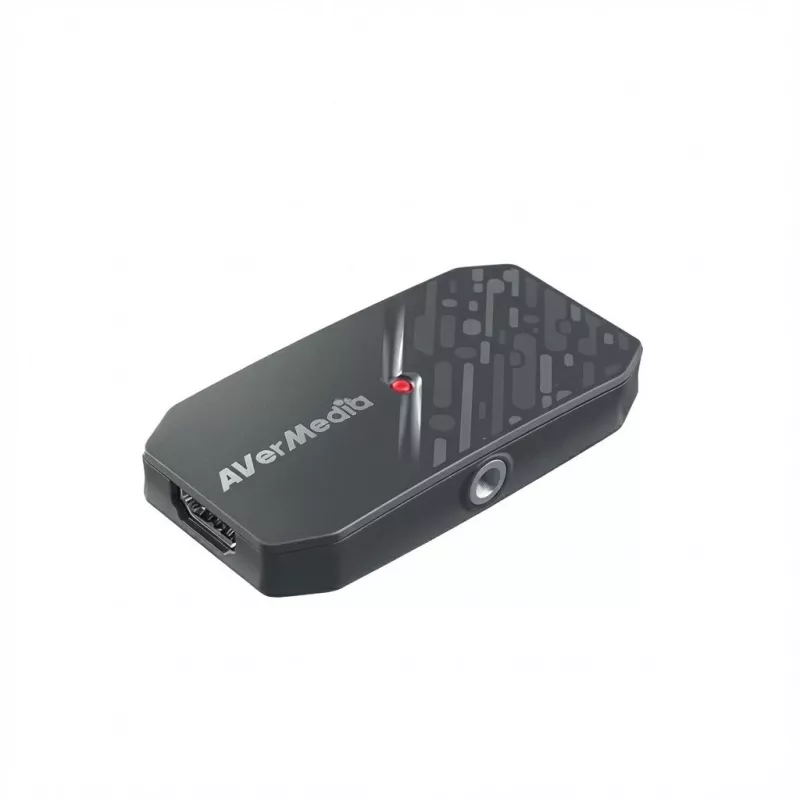
Video capture box AVerMedia Live Streamer CAP 4K BU113G2 — HDMI input, USB output

Video capture box AVerMedia Live Streamer CAP 4K BU113G2 — HDMI input, USB output
R2,861
More power for your camera Unleash the full potential of your camera – it's more than just a tool for taking photos, it's the key to professional video recording. With the CamStream 4K BU113G2, your DSLR, mirrorless camera, action cam or camcorder becomes a powerful device for streaming and recordin... Read More
Stock 7 Code 1395632 Brand AVERMEDIA Model 61BU113G20A2 Warranty 2 Years

Shipping & Returns

Estimated delivery Tuesday, October 6
You will be kept updated through our detailed tracking system
Payment options
EFTPayFastBank CardSnapScanZapperGoogle PayApple PayMobicredMoreTymePay on Arrival
More power for your camera Unleash the full potential of your camera – it's more than just a tool for taking photos, it's the key to professional video recording. With the CamStream 4K BU113G2, your DSLR, mirrorless camera, action cam or camcorder becomes a powerful device for streaming and recording. Experience ultra-smooth 4K60 images, vibrant colours and virtually latency-free transmission for a true professional production feel in real time. Professional camera, professional content. Without limits. Capture every detail in stunning 4K60 or ultra-smooth 1080p240 for professional-quality videos. No matter what input source you use, the output retains its original clarity while offering flexible quality options. Whether streaming, recording or video conferencing, enjoy crisp images, seamless motion and vibrant, lifelike colours. Lifelike colours with RGB24 Capture every detail with impressive precision. The uncompressed RGB24 format preserves full colour depth and subtle nuances – for vivid, lifelike images that catch the eye. Ideal for creators who need professional colour accuracy to fully engage their audience. Turn your camera into a professional webcam Turn your DSLR, mirrorless camera or camcorder into a powerful webcam. With CamStream 4K, you can seamlessly connect your camera to your PC or Mac via USB for crystal-clear streaming, professional video calls and more – in the quality your audience deserves. Effortless setup, versatile mounting Get started right away thanks to the plug-and-play USB connection. Whether mounted on a tripod, your camera's hot shoe or a professional rig, the CamStream 4K adapts seamlessly to your setup for maximum flexibility. Professional streaming on the go Turn your camera into a powerful mobile streaming setup. With the CamStream 4K, simply connect your camera to an Android smartphone, launch a streaming app with USB camera support, and go live in stunning video quality. Ideal for broadcasting conferences, events and much more – anytime, anywhere. Note: Only compatible with Android devices. The BU113G2 fits seamlessly into your camera setup and features a double-sided back plate for a sleek, professional look. Mount the device effortlessly with the 1/4" tripod thread for a tidy, hands-free setup that enhances any production environment. From streaming to content creation – anything is possible Whether you're a streamer, content creator or remote professional, the CamStream 4K takes your video quality to a whole new level. Make a lasting impression with cinema-quality images and flawless clarity – perfect for everything from social media streams to important business calls. Technical data CamStream 4K BU113G2 (BK = black model, WH = white model) Interface: USB 3.2 Gen 1 Type-C (5 Gbit/s) Video input: HDMI 2.0 Video output: USB 3.2 (Gen 1) Type-C Maximum supported resolutions (video input): 3840×2160p60 HDR / 2560×1440p144 HDR / 1920×1080p240 HDR Maximum recording resolutions: MJPEG: 3840×2160p60, 3440×1440p60, 2560×1440p144, 2560×1080p144, 1920×1080p144 NV12: 3840×2160p30, 2560×1440p60, 2560×1080p60, 1920×1080p120, 1280×1024p60 YUY2: 2560x1080p60, 1920x1200p60, 1920x1080p60, 1280x1024p60 P010(HDR10) (Windows only): 1920x1080p60, 1280x1024p60 RGB24 (Windows only): 1920x1080p60, 1280x1024p60 Supported AVerMedia software: AVerMedia Assist Central Pro, AVerMedia Streaming Center (Windows only), Firmware Update Tool Dimensions (W × D × H): 80.8 × 40.8 × 14.5 mm (3.18 × 1.61 × 0.57 inches) Weight: 26 g (0.92 oz.) System requirements: Windows 10 x64 or newer Desktop: Intel Core i5-6XXX / AMD Ryzen 3XXX or higher + NVIDIA GTX 1060 / AMD RX 5700 or higher Laptop: Intel i7-7700HQ + NVIDIA GTX 1050Ti or higher Recommended: 8 GB RAM (dual channel) macOS 14 / 15 or newer Apple M1 or 3.6 GHz Quad-Core Intel Core i7 Apple M1 or Radeon Pro 555 with 2 GB VRAM 16 GB 2400 MHz DDR4 RAM M1 Ultra / M2 Ultra or higher is required Note: HDR recording and RGB24 format are not supported on macOS iPadOS 17 or later Android 14 or later Notes: The device must support OTG (On-The-Go), the USB Type-C cable must be OTG-compatible. Check your phone's manual or the manufacturer's website to find out if OTG is supported. Contents: CamStream 4K (BU113G2), USB Type-C to Type-A cable (1 m / 3.28 ft), quick start guide, 1/4-inch cold shoe mount
  • Colour: White
  • Compatibility HDMI: HDMI 2.0
  • Audio signals: Yes
  • Height packaging: 0.048m
  • Supported display resolution: Up to 3840 x 2160 @ 60 Hz
  • Side A: USB-C female
  • Packaging volume: 0.0010m³
  • Length packaging: 0.176m
  • Width packaging: 0.117m
  • Country of origin: Taiwan
  • Im Angebot: No
  • Stark reduziert: No
  • Brand: AVerMedia
  • Type: USB 4K Capture Card
  • EAN Barcode: 4711289505440
  • Variant: Mobile Streaming
  • Compatibility USB: USB 3.2 Gen.1
  • Manufacturer information: AVT Solutions GmbH
    An der Strusbek 9
    22926 Ahrensburg
    Deutschland
    [email protected]
  • Manufacturer No.: BU113G2 (White)
  • Signal: Audio/Video
  • Side B: HDMI A female
  • Weight: 0.215kg
  • Customs tariff number: 8471800000

How to use

Connect an HDMI source (such as a camera, game console or presentation computer) to the HDMI input on the capture box, and link the device to your PC or streaming device using the USB connection. Launch your chosen capture or streaming application and select the AVerMedia capture device as the video source. Configure resolution and capture settings in the software according to your desired output and the capabilities of the connected HDMI source, then start recording or streaming. Ensure the host PC recognizes the device and that any required drivers or software are installed if prompted by the operating system.

Recommendations

Use high-quality HDMI cables and a stable USB connection to maintain reliable video transmission. Match the capture resolution in your software to the input source to avoid unnecessary downscaling and to optimize performance. For live streaming, verify host system resources and network bandwidth to ensure smooth, consistent output.

Key Highlights
  • Live streaming of gameplay, tutorials, or events
  • Recording presentations, webinars and lectures
  • Capturing camera feeds for remote production and conferencing
  • Integration into multi-device recording setups for content creators
  • Input: HDMI video input (supports high-resolution HDMI sources)
  • Output: USB video output for connection to PC or compatible streaming devices
  • Capture capability: 4K capture support as indicated by the model name
  • Form factor: compact external capture box suitable for desktop or mobile use
  • Compatibility: designed to work with common recording and streaming software via standard USB video interfaces
Price history over the last 6 months
Video capture box AVerMedia Live Streamer CAP 4K BU113G2 — HDMI input, USB output
Current
R2,861
Lowest
R2,317
Highest
R2,861
Change 24H
+R397   +16%
Week
+R420   +17%
Month
+R406   +17%
WhatsApp
Hi, I’m DistriNode’s AI assistant. I can help you find products, compare options, create quote PDFs, or open support requests.