Account Contact
Your Cart
Pay the courier with no extra fees.
Need help? DistriNode AI can handle any task on our site.

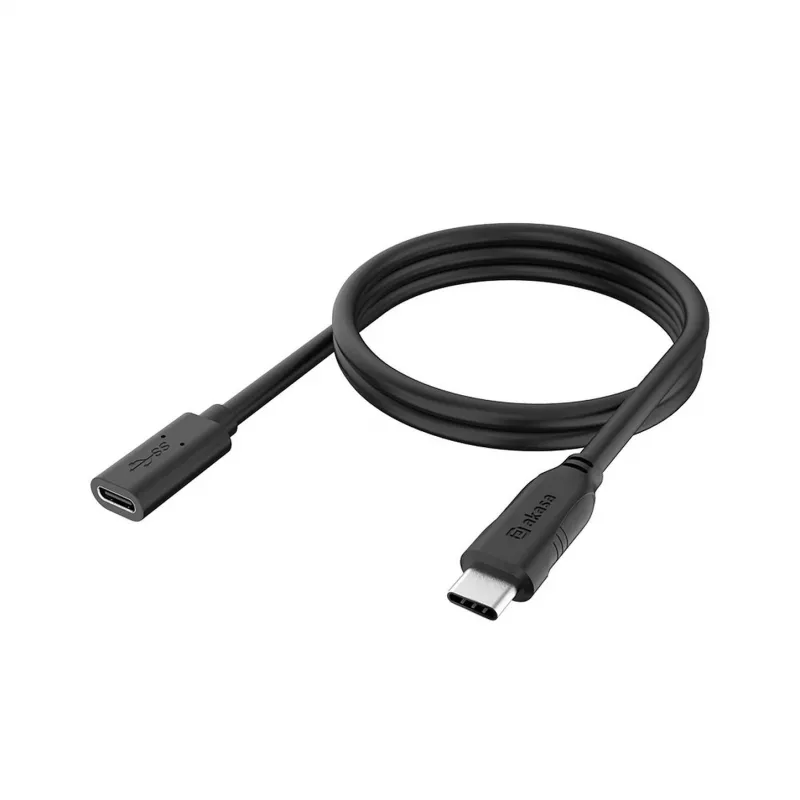
USB extension cable Akasa AK-CBUB70-12BK Type-C 10 Gbps, 1.2 m

USB extension cable Akasa AK-CBUB70-12BK Type-C 10 Gbps, 1.2 m
R355
The Akasa AK-CBUB70-12BK Type-C USB extension cable is a 1.2 m solution for extending an existing USB Type-C connection while preserving high-speed data transfer. The cable supports transfer rates up to 10 Gbps, enabling connection of external drives, peripherals and other USB-C devices at near USB ... Read More
Stock 7 Code 312558 Brand AKASA Model AK-CBUB70-12BK Warranty 2 Years

Shipping & Returns

Estimated delivery Tuesday, October 6
You will be kept updated through our detailed tracking system
Payment options
EFTPayFastBank CardSnapScanZapperGoogle PayApple PayMobicredMoreTymePay on Arrival

The Akasa AK-CBUB70-12BK Type-C USB extension cable is a 1.2 m solution for extending an existing USB Type-C connection while preserving high-speed data transfer. The cable supports transfer rates up to 10 Gbps, enabling connection of external drives, peripherals and other USB-C devices at near USB 3.1 Gen 2 speeds. Its flexible jacket and standard Type-C connectors allow convenient placement and reliable signal extension without modifying host ports.

Advantages

The cable offers full data bandwidth up to 10 Gbps over a 1.2 m length, maintaining signal integrity for high-performance storage and peripherals. A reversible USB Type-C connector simplifies plugging and reduces wear from repeated connections. The flexible construction allows easy routing behind desks and around equipment while preserving stable connectivity. The cable is compatible with USB-C hosts and devices that support standard USB 3.x data rates.

Suitable for

  • Extending connection to external SSDs, HDDs and NVMe enclosures
  • Connecting USB-C docking stations and hubs at a short distance
  • Positioning peripherals such as webcams, microphones and card readers
  • Temporary workstation setups and flexible device placement

Key specifications

  • Connector type: USB Type-C to USB Type-C
  • Maximum data transfer speed: up to 10 Gbps
  • Cable length: 1.2 metres
  • Cable jacket: flexible insulated sheath for routing ease
  • Direction: passive extension cable for data (no active signal boosting)

How to use

Connect one end of the cable to the USB-C port of the host device and the other end to the USB-C device or peripheral you want to extend. Ensure both connected devices support the intended data transfer speed to achieve up to 10 Gbps. The reversible Type-C plugs make alignment straightforward; plug in firmly until the connection is seated. Avoid sharp bends near the connectors and allow some slack to reduce strain during movement.

Recommendations

For optimal performance, use the extension with devices and hosts that support USB 3.x data modes. Keep cable runs under the specified length and avoid routing the cable alongside high-power AC lines to reduce interference. If you experience reduced speeds, verify device capabilities and try alternative ports or cables to isolate the bottleneck.

Key Highlights
  • Extending connection to external SSDs, HDDs and NVMe enclosures
  • Connecting USB-C docking stations and hubs at a short distance
  • Positioning peripherals such as webcams, microphones and card readers
  • Temporary workstation setups and flexible device placement
  • Connector type: USB Type-C to USB Type-C
  • Maximum data transfer speed: up to 10 Gbps
  • Cable length: 1.2 metres
  • Cable jacket: flexible insulated sheath for routing ease
  • Direction: passive extension cable for data (no active signal boosting)
Price history over the last 6 months
USB extension cable Akasa AK-CBUB70-12BK Type-C 10 Gbps, 1.2 m
Current
R355
Lowest
R315
Highest
R355
Change 24H
+R10   +3%
Week
+R13   +4%
Month
+R11   +3%

Popular products in this category

WhatsApp
Hi, I’m DistriNode’s AI assistant. I can help you find products, compare options, create quote PDFs, or open support requests.