Account Contact
Your Cart
Pay the courier with no extra fees.
Need help? DistriNode AI can handle any task on our site.

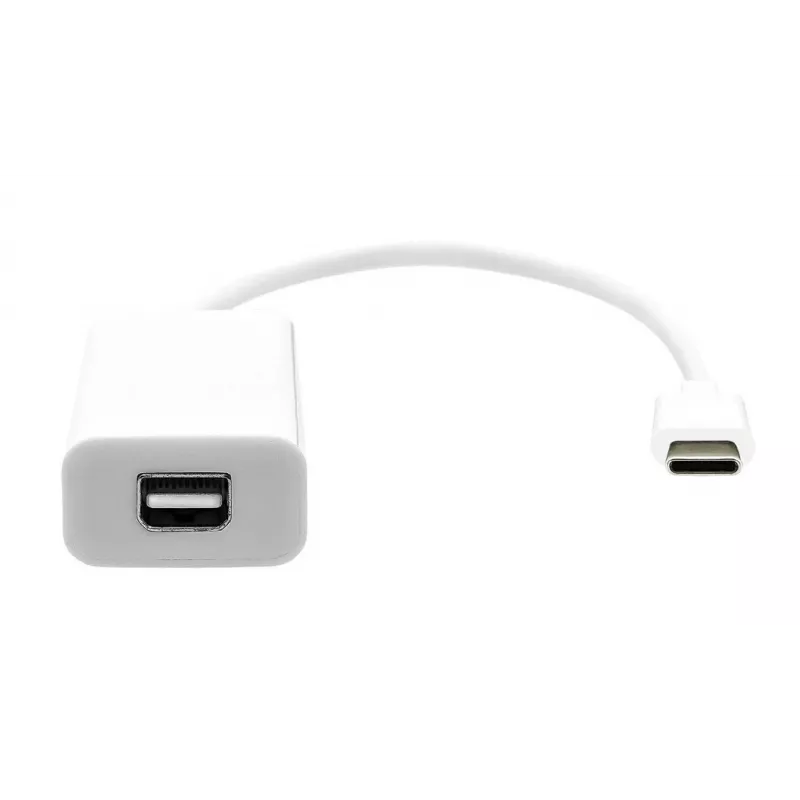
USB-C to Mini DisplayPort cable ProXtend USBC-MINIDP-0002W, 20 cm, white

USB-C to Mini DisplayPort cable ProXtend USBC-MINIDP-0002W, 20 cm, white
R278
ProXtend USBC-MINIDP-0002W is a 20 cm white cable that converts a USB-C video output to a Mini DisplayPort input. The compact cable provides a direct, short connection between devices with USB-C video-capable ports — such as laptops, tablets or smartphones — and displays, projectors or docking stati... Read More
Stock 463 Code 1201411 Brand PROXTEND Model USBC-MINIDP-0002W Warranty 2 Years

Shipping & Returns

Estimated delivery Tuesday, October 6
You will be kept updated through our detailed tracking system
Payment options
EFTPayFastBank CardSnapScanZapperGoogle PayApple PayMobicredMoreTymePay on Arrival

ProXtend USBC-MINIDP-0002W is a 20 cm white cable that converts a USB-C video output to a Mini DisplayPort input. The compact cable provides a direct, short connection between devices with USB-C video-capable ports — such as laptops, tablets or smartphones — and displays, projectors or docking stations that accept Mini DP.

Advantages

The short 20 cm length reduces cable clutter and is practical for desk setups or docking situations. The cable supports a straightforward digital video connection without the need for extra adapters, offering a reliable link between USB-C source devices and Mini DisplayPort-equipped displays. Its compact form factor makes it convenient for travel or use in limited-space environments.

Suitable for

  • Connecting laptops with USB-C video output to monitors with Mini DisplayPort
  • Linking tablets or phones (with video output) to projectors that use Mini DP
  • Short connections between USB-C docking stations and Mini DisplayPort displays

Key specifications

  • Model: ProXtend USBC-MINIDP-0002W
  • Connector A: USB-C (video output required on source)
  • Connector B: Mini DisplayPort
  • Length: 20 cm
  • Color: White

How to use

Plug the USB-C end into a device that provides video output over USB-C. Connect the Mini DisplayPort end to the display, projector or docking station. Select the appropriate input on the display device and configure display settings on the source device if necessary. No separate drivers are typically required; ensure the source device supports video over USB-C.

Recommendations

For reliable operation, use the cable for short-distance connections as intended. Verify that your source device supports DisplayPort Alternate Mode (DisplayPort over USB-C) before use. Avoid excessive bending near the connectors and keep the cable free from heavy strain to prolong service life.
Key Highlights
  • Connecting laptops with USB-C video output to monitors with Mini DisplayPort
  • Linking tablets or phones (with video output) to projectors that use Mini DP
  • Short connections between USB-C docking stations and Mini DisplayPort displays
  • Model: ProXtend USBC-MINIDP-0002W
  • Connector A: USB-C (video output required on source)
  • Connector B: Mini DisplayPort
  • Length: 20 cm
  • Color: White
Price history over the last 6 months
USB-C to Mini DisplayPort cable ProXtend USBC-MINIDP-0002W, 20 cm, white
Current
R278
Lowest
R263
Highest
R278
Change 24H
+R12   +5%
Week
+R15   +6%
Month
+R14   +5%

Popular products in this category

WhatsApp
Hi, I’m DistriNode’s AI assistant. I can help you find products, compare options, create quote PDFs, or open support requests.