Account Contact
Your Cart
Pay on delivery – no extra fees
Need help? Ask our AI

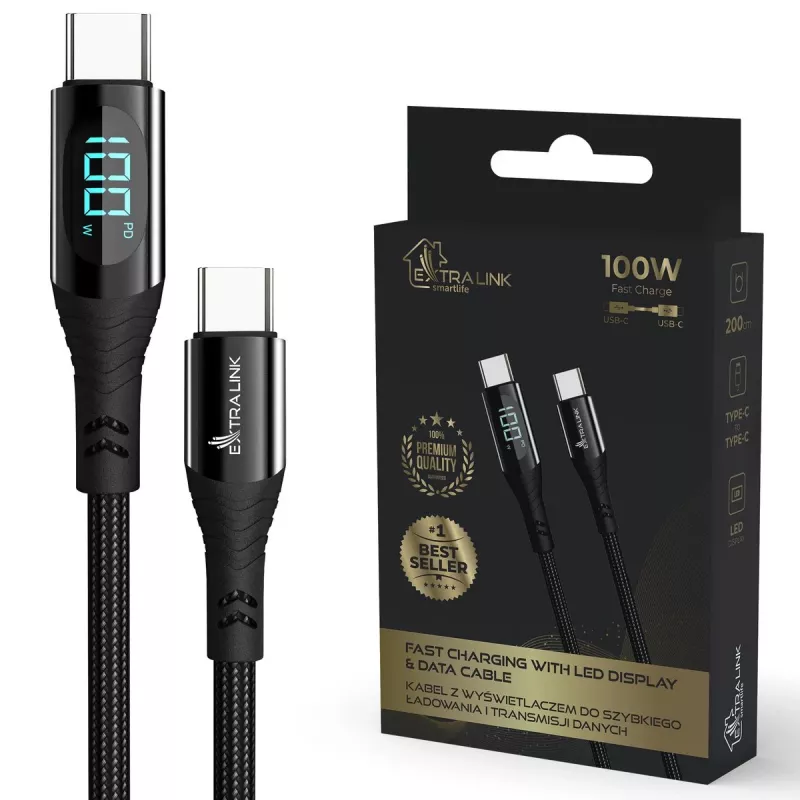
USB-C cable Extralink CABESL04 100W, 200 cm, LED display, black

USB-C cable Extralink CABESL04 100W, 200 cm, LED display, black
R289
Extralink CABESL04 100W USB-C cable is a 200 cm cable with an integrated LED display that indicates charging status and power information. It supports USB-C to USB-C connections for charging and data transfer, with power delivery up to 100W, making it suitable for high-power devices. The cable’s len... Read More
Stock Out Of StockNo Stock Code 976786 Brand EXTRALINK Model CABESL04 Warranty 2 Years
CategoryUSB Cables & Adapters

Shipping & Returns

Extralink CABESL04 100W USB-C cable is a 200 cm cable with an integrated LED display that indicates charging status and power information. It supports USB-C to USB-C connections for charging and data transfer, with power delivery up to 100W, making it suitable for high-power devices. The cable’s length provides extended reach for desktop setups, charging stations or when a wall outlet is distant from the device.

Advantages

The cable supports up to 100W power delivery for fast charging of compatible laptops, tablets and smartphones while enabling data transfer between USB-C devices. The 200 cm length offers flexibility in positioning devices and chargers, reducing the need to be close to a power source. The integrated LED display provides real-time information about charging status or power levels, helping to monitor the charging process. The cable has USB-C connectors on both ends and a durable jacket intended for regular daily use.

Suitable for

  • Charging laptops, tablets and smartphones that accept USB-C PD
  • Connecting USB-C peripherals for data transfer between devices
  • Use with desktop charging stations, power banks and wall chargers
  • Situations requiring longer cable reach, such as office desks and living rooms

Key specifications

  • Cable length: 200 cm
  • Maximum power delivery: up to 100W
  • Connector type: USB-C to USB-C
  • Integrated LED display showing charging status and power information
  • Primary functions: power delivery and data transfer
  • Colour: black

How to use

Connect one USB-C connector to the power source such as a compatible charger, power bank or USB-C port on a computer, and connect the other end to the device to be charged or synchronized. The integrated LED display will show the charging status or power information once the connection is established. For fast charging, ensure both the power source and the connected device support the required power delivery profile. Avoid bending the cable sharply near the connectors and route it to prevent strain during use.

Recommendations

Use with chargers and devices that support USB Power Delivery to achieve full 100W capability. Inspect connectors periodically for debris and avoid exposing the cable to excessive heat or liquids. For prolonged cable life, coil loosely when storing and avoid tight knots or sharp bends.

Key Highlights
  • Charging laptops, tablets and smartphones that accept USB-C PD
  • Connecting USB-C peripherals for data transfer between devices
  • Use with desktop charging stations, power banks and wall chargers
  • Situations requiring longer cable reach, such as office desks and living rooms
  • Cable length: 200 cm
  • Maximum power delivery: up to 100W
  • Connector type: USB-C to USB-C
  • Integrated LED display showing charging status and power information
  • Primary functions: power delivery and data transfer
  • Colour: black
Price history is not available yet
We are still collecting enough daily price data for this product.

Write a review

Rating *
Your name will be shown publicly – you can use a nickname. We invite buyers to write reviews; we check reviews before publishing and publish critical ones too.

More EXTRALINK products in this category

Popular products in this category

WhatsApp
Messenger
Hi, I’m DistriNode’s AI assistant. I can help you find products, compare options, create quote PDFs, or open support requests.
All categories