Account Contact
Your Cart
Pay the courier with no extra fees.
Need help? DistriNode AI can handle any task on our site.

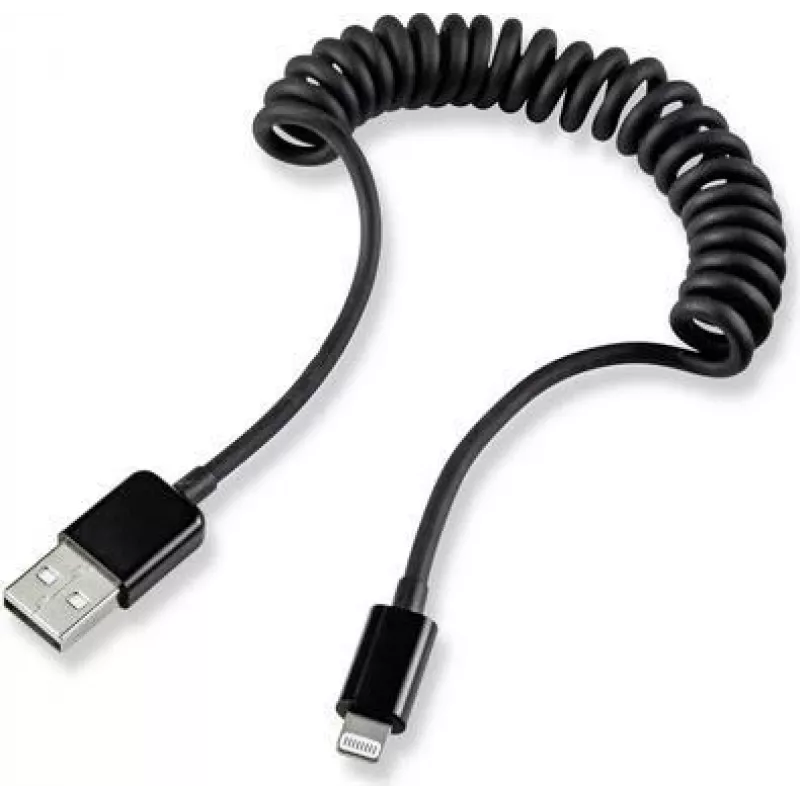
USB 2.0 to Apple Lightning Cable Renkforce RF4087422, 1x USB-A to 1x Lightning, 0.95 m, Black

USB 2.0 to Apple Lightning Cable Renkforce RF4087422, 1x USB-A to 1x Lightning, 0.95 m, Black
R703
Renkforce RF4087422 is a 0.95 m USB 2.0 cable with a USB-A connector on one end and an Apple Lightning connector on the other. Designed in black, the cable supports data transfer and charging for Lightning-compatible Apple devices. Its 0.95 m length is intended for everyday use at home, in the offic... Read More
Stock 471 Code 2205434 Brand RENKFORCE Model RF4087422 Warranty 2 Years

Shipping & Returns

Estimated delivery Tuesday, October 6
You will be kept updated through our detailed tracking system
Payment options
EFTPayFastBank CardSnapScanZapperGoogle PayApple PayMobicredMoreTymePay on Arrival

Renkforce RF4087422 is a 0.95 m USB 2.0 cable with a USB-A connector on one end and an Apple Lightning connector on the other. Designed in black, the cable supports data transfer and charging for Lightning-compatible Apple devices. Its 0.95 m length is intended for everyday use at home, in the office or while commuting and works with standard USB 2.0 ports for sync and charging functions.

Advantages

The cable combines a common USB-A interface with an Apple Lightning plug to provide charging and data synchronization. With a moderate length of 0.95 m it offers a balance between reach and portability without excessive cable clutter. The black finish conceals wear and fits into typical device and workspace environments. The USB 2.0 specification ensures compatibility with a wide range of chargers, power banks and computer ports for standard charging and data transfer rates.

Suitable for

  • Charging Lightning-compatible iPhone and iPad models from USB-A power sources
  • Data synchronization between Lightning devices and computers with USB-A ports
  • Use with USB-A wall chargers, car chargers and portable battery packs
  • Everyday carry for travel, office or home use

Key specifications

  • Connector A: USB-A (male)
  • Connector B: Apple Lightning (male)
  • Cable length: 0.95 m
  • Color: Black
  • Interface standard: USB 2.0
  • Functions: Charging and data transfer/synchronization

How to use

Connect the USB-A end to a compatible USB 2.0 port on a computer, wall charger, car charger or power bank. Insert the Lightning connector into the Lightning port of a compatible Apple device. Once connected, the cable enables standard charging and data synchronization; the device will indicate charging status and allow file transfer when connected to a computer. Disconnect by gently pulling the connector straight out from the device to avoid stress on the plug and port.

Recommendations

For reliable operation, use the cable with certified power adapters and avoid subjecting it to sharp bends or heavy strain near the connector ends. Inspect connectors periodically for debris and keep contacts dry. For best performance during data transfer, use direct USB-A ports on a computer rather than unpowered hubs when possible.

Key Highlights
  • Charging Lightning-compatible iPhone and iPad models from USB-A power sources
  • Data synchronization between Lightning devices and computers with USB-A ports
  • Use with USB-A wall chargers, car chargers and portable battery packs
  • Everyday carry for travel, office or home use
  • Connector A: USB-A (male)
  • Connector B: Apple Lightning (male)
  • Cable length: 0.95 m
  • Color: Black
  • Interface standard: USB 2.0
  • Functions: Charging and data transfer/synchronization
Price history over the last 6 months
USB 2.0 to Apple Lightning Cable Renkforce RF4087422, 1x USB-A to 1x Lightning, 0.95 m, Black
Current
R703
Lowest
R692
Highest
R703
Change 24H
+R10   +1%
Week
—   
Month
—   

Popular products in this category

WhatsApp
Hi, I’m DistriNode’s AI assistant. I can help you find products, compare options, create quote PDFs, or open support requests.